Blender data
What objects, scenes and settings look like to an add-on, and how nodes reach them.
Everything in a Blender file is data your add-on can read and change: the objects, their modifiers, the materials, the scene's frame range, the render settings. Data is nested. An object has modifiers, a modifier has a width. You reach a value by following that nesting step by step, and the Blender Data node does exactly that.
Data, properties and lists
Three kinds of things make up Blender's data:
| Examples | On a node | |
|---|---|---|
| Data | an object, a mesh, a material, a modifier, the scene | a Blender Data socket (teal), you can go further into it |
| Properties | an object's name, a modifier's width, the scene's end frame | a value socket: Boolean, Integer, Float, String, Vector, ... |
| Lists | all objects of the file, an object's modifiers, a mesh's vertices | a Blender Data socket drawn square, use it with the collection nodes or a loop |
The objects, meshes and materials you see in the Outliner are data-blocks: data that lives on its own in the file, under a name. Everything else (a modifier, a vertex, the render settings) lives inside a data-block.
Where data starts
Every path starts at one of three places:
| Start | Is | Use it for |
|---|---|---|
| Context | What's current where your code runs: active_object, selected_objects, scene, view_layer, preferences, ... | Almost everything. The add-on works on whatever the user has selected, in any file |
| Blend File | Everything in the file (bpy.data): objects, materials, meshes, scenes, ... | Data that isn't selected or active: all materials, an object by name |
| Input | The data connected to the node's Data input | Continuing from another node: the modifiers of an object you have already |
The context depends on where your code runs. In a panel in the 3D Viewport, context.active_object is the object the user clicked last; in a timer or a handler there's no editor, so things like context.area are None. Prefer the context over names: objects["Cube"] only works in files that have a Cube.
Reaching data
Add Add › Blender Data › Blender Data, or one of the entries below it that add it already set up: Active Object, Selected Objects, Scene, View Layer, Window Manager, Preferences, Blend File, All Objects. Click the path button on the node to open the path browser and pick where to go.
The node's output has the type of what the path ends at. A path ending at width gives a Float, one ending at active_object gives an Object. Connected nodes know that type: a second Blender Data node that starts at its Data input offers only the properties of an Object, and a field or Set Property gets the right value socket.
Some data can be of several types. active_object.data is a Mesh for a mesh object and a Camera for a camera. When a type has subtypes, the output shows a small arrow next to it (Data ⌄ Mesh): pick the type you expect to get its properties, like vertices. The same arrow on the Data input of an unconnected node sets the type the path starts from.
See Blender Data for every option of the node.
Reading, changing and calling
| To | Use |
|---|---|
| Read a value | Blender Data, or Get Property in Blender mode |
| Change a value | Set Property in Blender mode, with the path of the property (Get and set properties) |
| Show a value in a panel | a field node (Checkbox, Number Field, ...) in Blender mode (Fields and buttons) |
| Do something: add a modifier, create an object, select it | Blender Function, or Run Operator for an operator |
| Check the mode, an object's type, find an editor | Mode and editor checks |
| Loop over a list | For Each (List) (Lists) or Draw For Each in a panel |
Limitations
- Paths only follow Blender's properties. Things you'd compute in Python (
obj.matrix_world.inverted(),len(...)of something that isn't a list) need a Python node or a math node. - A path that doesn't exist where the add-on runs (no active object, a modifier the object doesn't have) fails there with an error on the node. Check first with Is Object Type, a comparison with None or Collection Length.
- Values the browser shows are from the moment it opened. They aren't kept anywhere; the add-on reads the data again every time it runs.
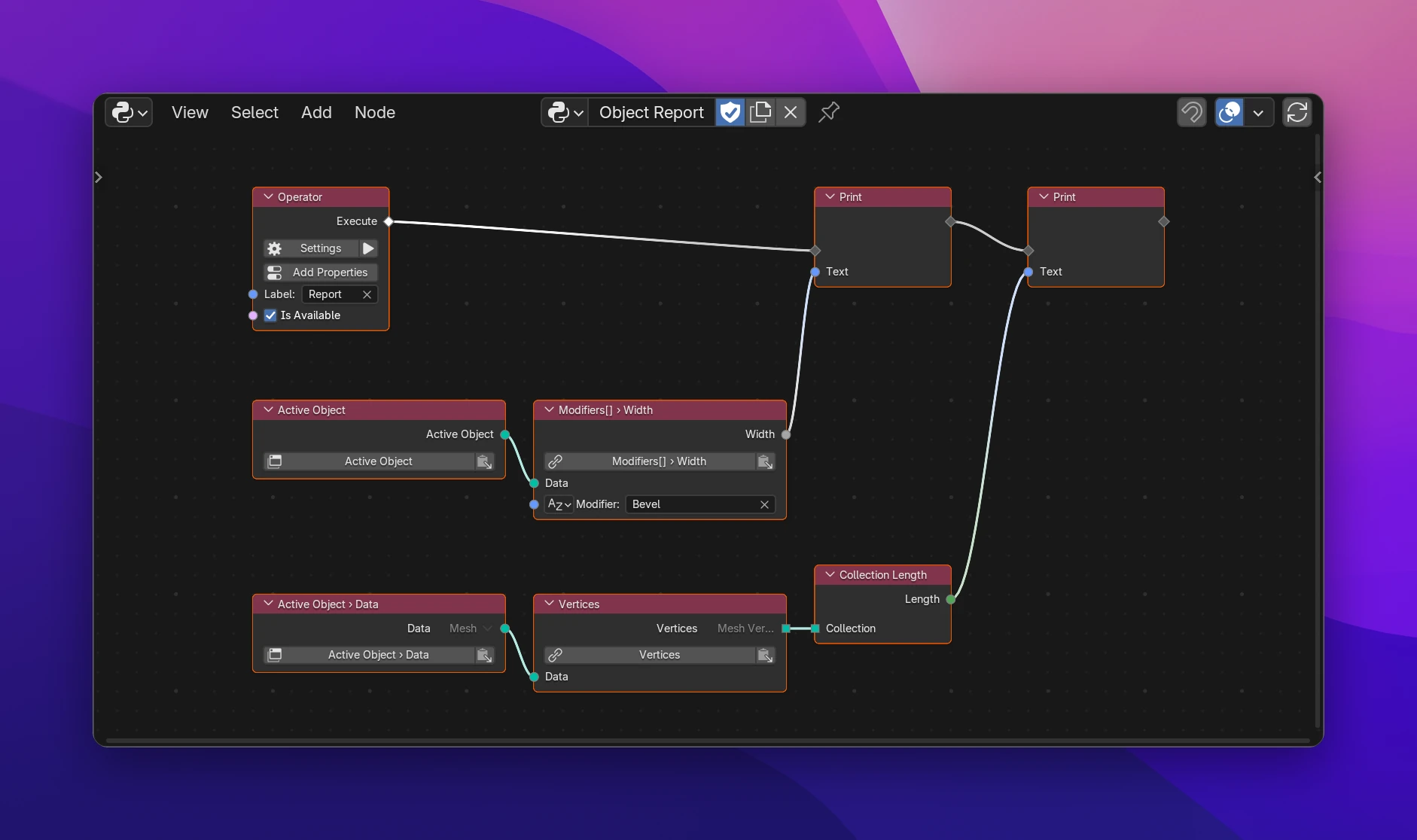
The node becomes the path itself, written with the context of the function it's in (bpy.context where there's none, bpy.data for the Blend File):
def execute(self, context):
    print(str(context.active_object.modifiers['Bevel'].width))
    print(str(len(context.active_object.data.vertices)))
A path that starts at the Data input continues the expression connected to it. Nothing is stored: every use of the output writes the path again.