Collections
Add, remove and read the items of collection properties.
A Collection property is a list your add-on stores: a list of notes, of presets, of objects to process. Each item is a group of properties, like one row of a table. The collection nodes add and remove items and read the list. Get the list itself from a Get Property node.
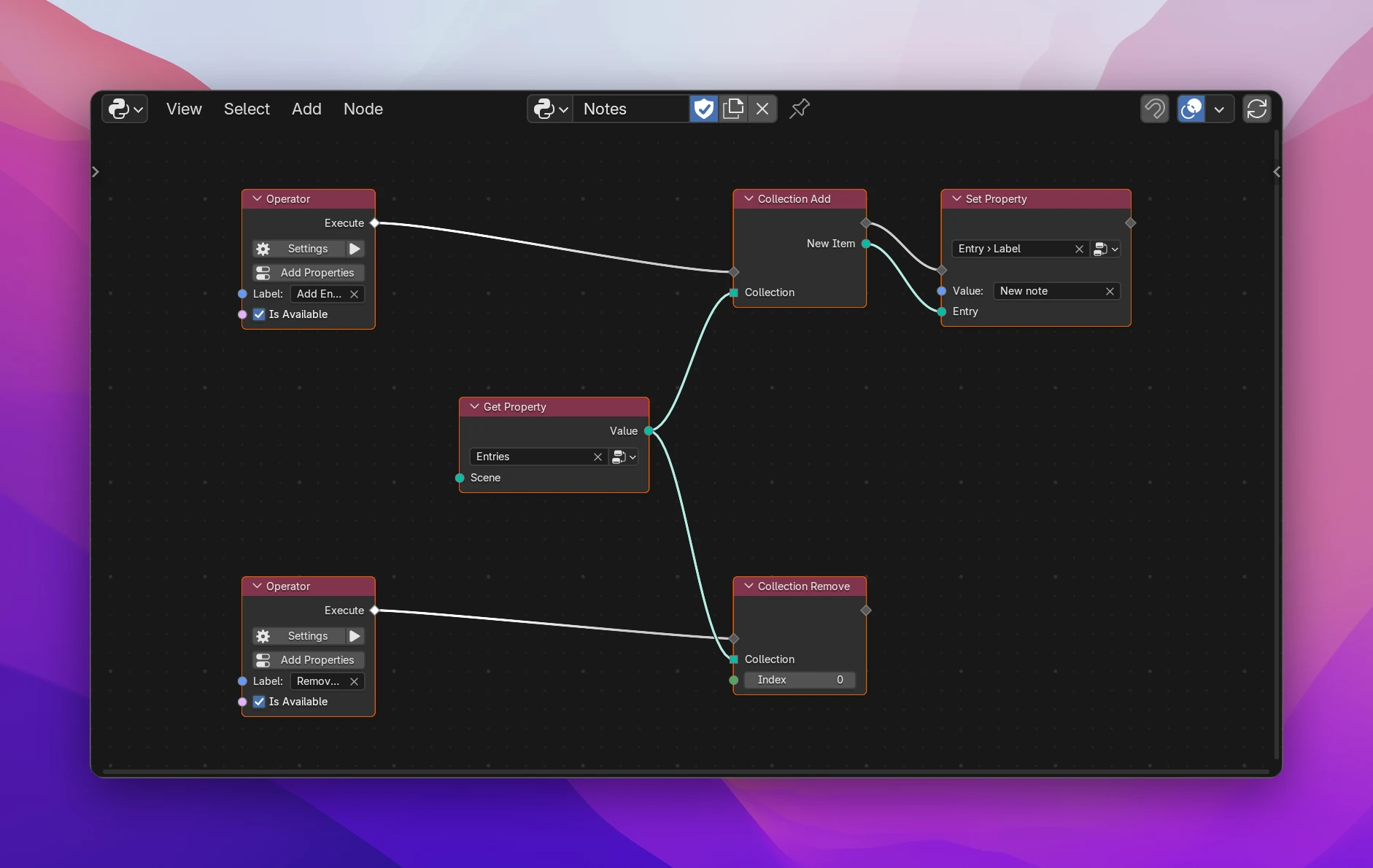
Setting up a list
In Addon Data › Properties, add a property of type Group, e.g. Entry, and give it members: Label (String), Weight (Float).
Add a property of type Collection, e.g. Entries, and pick the group Entry as its Group.
In an operator, connect a Get Property for Entries to Collection Add. Set the new item's members with Set Property (Entry › Label), its Data input connected to New Item.
Draw the list in a panel with a UI List (Lists), with buttons running the add and remove operators below it.
Nodes
| Node | Inputs | Outputs | Does |
|---|---|---|---|
| Collection Add | flow, Collection | flow, New Item | Adds an item at the end. New Item is the item, typed like the collection's items, ready for Set Property |
| Collection Remove | flow, Collection, Index | flow | Removes the item at Index (0 is the first) |
| Collection Clear | flow, Collection | flow | Removes all items |
| Collection Length | Collection | Length | The number of items |
| Collection Get Item | Collection, Index | Item | The item at Index, typed like the collection's items |
All of them need the Collection input connected; unconnected they show Connect a collection. The input takes any list socket (drawn square).
Collection Length and Collection Get Item also work on Blender's lists: the vertices of a mesh, the objects of the file, an object's modifiers. Add, Remove and Clear are for your own collection properties; Blender's lists have their own functions for that (modifiers.new(), objects.remove()), called with Blender Function.
To do something with every item, loop over the collection with For Each (List) (Lists), or Draw For Each in a panel.
Limitations
- An index past the end fails when the add-on runs (
IndexError). Check it against Collection Length first. Negative indices count from the end in Collection Get Item (-1is the last item). - Python references to items aren't stable: adding an item can move the others in memory. Use New Item right after Collection Add; don't keep items in variables across adds.
- Removing an item doesn't change a UI List's active index. Lower it with Set Property when it points past the end.
def execute(self, context):
    item = context.scene.notes.entries.add()
    item.label = 'New note'
return {"FINISHED"}| Node | Code |
|---|---|
| Collection Add | item = entries.add() |
| Collection Remove | entries.remove(0) |
| Collection Clear | entries.clear() |
| Collection Length | len(entries) |
| Collection Get Item | entries[0] |