Lists
Create lists, read and change their items, and run nodes for each item.
A list holds several values in order: names, numbers, objects. The list nodes are in Add › Data › List. Blender's collections, like the selected objects or a mesh's vertices, connect to the same List inputs, so these nodes work on them too.
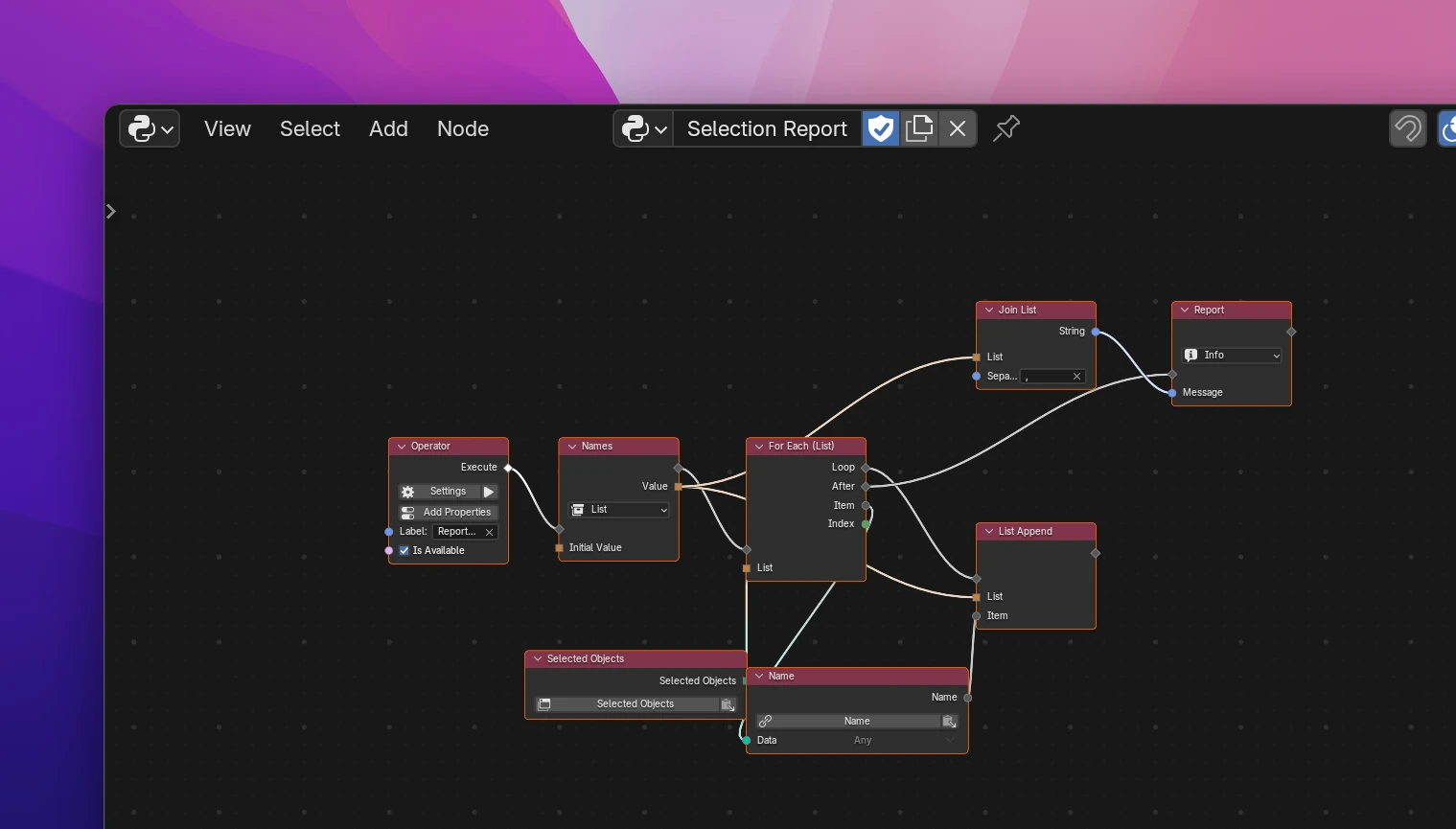
Collecting values in a list
The screenshot shows the usual pattern. The Report Selection operator reports Cube, Sphere with two objects selected:
Add a Local Variable in the operator's flow, set its type to List and label it "Names". Its Initial Value stays unconnected: an empty list.
Add a For Each (List) after it and connect the selected objects (a Blender Data node with selected_objects) to its List.
On Loop, add a List Append. Connect the variable's Value to List, and the name of the loop's Item to Item.
On After, use the list: here a Join List turns it into Cube, Sphere for a Report.
A Python Expression [o.name for o in context.selected_objects] gives the same list in one node, if you're comfortable with Python.
The variable is what keeps the list. Connecting a Create List to List Append wouldn't work: Create List is a value node and makes a new list every time it's used, so each append would go to a different list.
Reading lists
These are value nodes. They compute their result where it's used and don't change the list.
| Node | |
|---|---|
| Create List | A List of its Item inputs, in order. Connecting the last Item adds another input. Unconnected, it's an empty list |
| List Get Item | The Item at Index. The first item is at 0, -1 is the last one. An index past the end gives None |
| List Length | The number of items |
| List Index | The position of Item in the list as Index (-1 if it's not in it), and Found: whether it is |
| List Contains | Whether Item is in the list |
| List Slice | The items from Start up to End, without the one at End. End 0 means "to the end of the list". Negative positions count from the end: Start -3 gives the last three items |
Changing lists
These nodes run in a flow (they have flow sockets) and change the list connected to List itself. Nothing is copied: every node using that list sees the change.
| Node | |
|---|---|
| List Append | Adds Item at the end |
| List Insert | Adds Item at Index; the items from there move one back. 0 puts it first |
| List Extend | Adds all items of Items at the end |
| List Set Item | Replaces the item at Index with Item. Does nothing if the list is shorter |
| List Remove | Removes the first item that equals Item. Does nothing if there is none |
| List Pop | Removes the item at Index (-1, the last one, by default) and gives it as Item to the nodes after it. On an empty list, Item is None |
| List Clear | Removes all items |
| List Reverse | Reverses the order |
| List Sort | Sorts the items: numbers by size, texts alphabetically (upper case before lower case). Reverse sorts from big to small |
Change lists you own: a list in a variable, or one a function returned. A list Blender gives you, like selected_objects, is a copy: changing it doesn't change Blender's selection. To add items to a Blender collection or a Collection property, use Collection Add and the Blender data nodes instead.
For Each (List)
For Each (List) runs the nodes on its Loop output once for every item of List, then continues at After.
| Socket | |
|---|---|
| List (input) | The list or Blender collection to go through |
| Loop | Runs once per item |
| Item | The current item |
| Index | Its position, counting from 0 |
| After | Runs once, when all items are done |
Item and Index only exist inside the loop. To stop early or skip an item, use Break / Continue. To run nodes a number of times instead, use Repeat. To draw a row per item in a panel, use Draw For Each.
Limitations
- List Get Item gives
Nonefor an index past the end, but an index below-length(like -5 on a list of 3 items, or -1 on an empty list) raises an error when the add-on runs. List Set Item behaves the same, and List Pop raises the error for any index outside the list. Check List Length first if the index can be out of range. - List Insert with an index past the end adds the item at the end.
- List Sort raises an error for lists that mix values without an order, like numbers and texts, or for lists of objects. Sort the names instead.
- Don't add or remove items of a list while a For Each (List) goes through that same list: items get skipped. Collect the changes in a second list and apply them on After.
The operator in the screenshot:
def execute(self, context):
    names = []
    for item in context.selected_objects:
        names.append(item.name)
    utils.report(self, 'INFO', ', '.join(str(i) for i in names))
return {"FINISHED"}| Node | Python |
|---|---|
| Create List | [a, b, c] |
| List Get Item | items[index] if len(items) > index else None |
| List Length | len(items) |
| List Index | items.index(item) if item in items else -1, Found: item in items |
| List Contains | item in items |
| List Slice | items[start:end], items[start:None] with End 0 |
| List Append / Insert / Extend | items.append(item), items.insert(index, item), items.extend(other) |
| List Set Item | if len(items) > index: items[index] = item |
| List Remove | if item in items: items.remove(item) |
| List Pop | popped = items.pop(index) if items else None |
| List Clear / Reverse / Sort | items.clear(), items.reverse(), items.sort(reverse=False) |
| For Each (List) | for item in items:, with Index connected for index, item in enumerate(items): |