Python code on a node
Type a line of Python on a node, and find the Python for what you want to do in Blender.
Most of Blender is reachable with nodes: Blender Data for data, Run Operator for operators, the property nodes for settings. For the rest, a line of Python typed on a node is often enough.
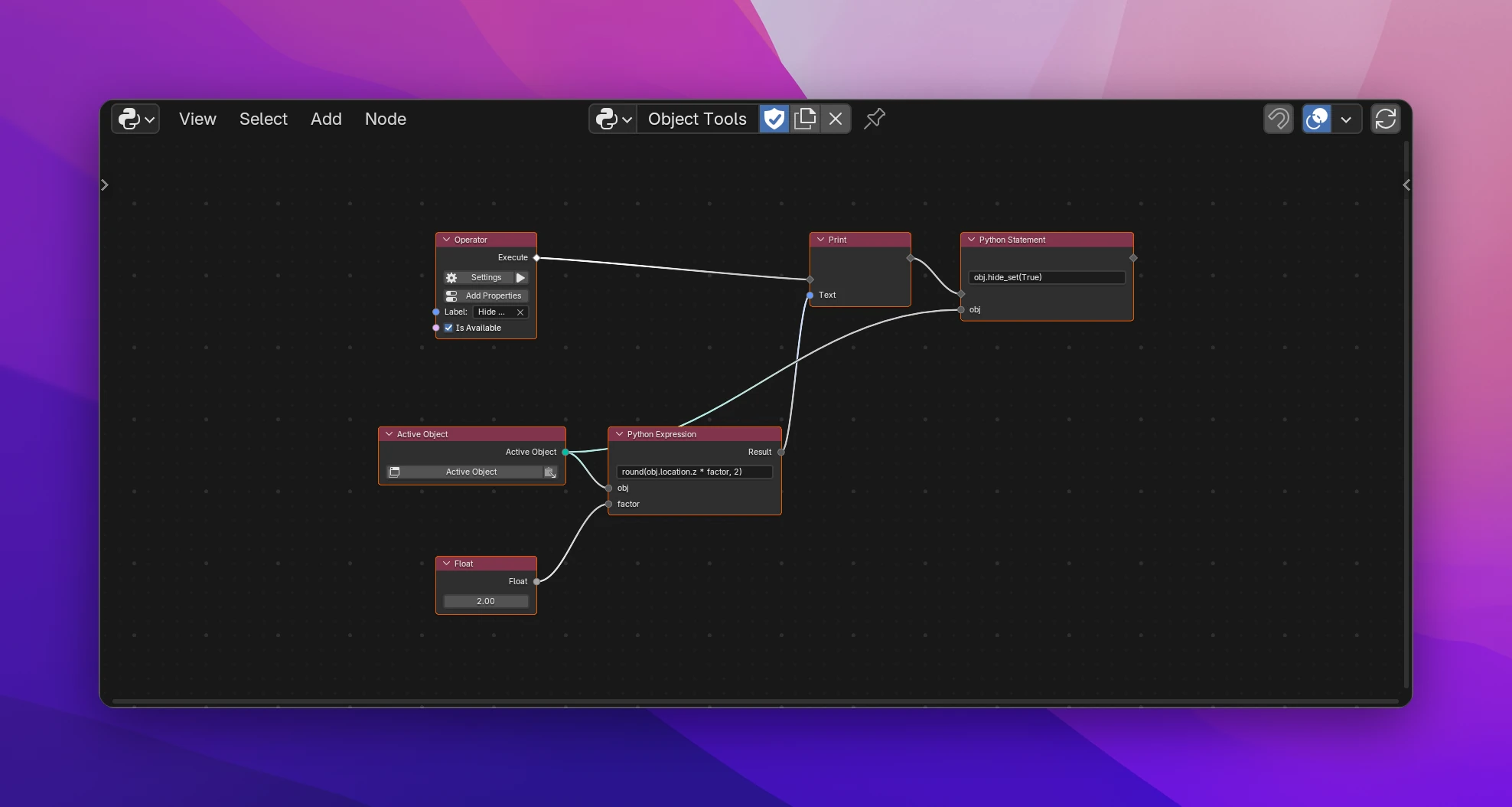
Python Expression
Python Expression is a value from one line of Python: round(value * 100), obj.name.upper(), len(context.selected_objects). Its output is Result.
Names the line uses that Python doesn't know become inputs of the node: round(obj.location.z * factor, 2) gets the inputs obj and factor, in the order they appear. Connect values to them like to any other input. An input left unconnected is None, and the node says so.
contextis Blender's context where the code runs. Inside operators and panels,self,layoutandeventwork too, where the flow has them. Using one where it isn't available is an error on the node.bpy,bmesh,math,mathutils,random,os,re,time,datetime,jsonandpathlibare imported when the line uses them. Python's built-in functions (len,round,sorted, ...) work as usual.- Names the line defines itself aren't inputs:
[o.name for o in objects]only has the input objects. - The Result is a Data value. Connect it to the input it's meant for; it's converted to that input's type.
A line that isn't valid Python turns the field red and shows the error on the node, like Not valid Python: invalid syntax (column 12).
Python Statement
Python Statement runs a line in a flow: obj.hide_set(True), scene.frame_current = 1, or several statements separated with ;. It has the flow input and output, and inputs for unknown names like Python Expression.
Variables the line assigns stay inside it. To pass a value on, use a Python Expression for it, or an Inline Script with an output.
Get Attribute and Set Attribute
Get Attribute and Set Attribute read and set an attribute whose name is only known when the add-on runs, for example picked in an enum: Python's getattr and setattr. For names you know in advance, a Blender Data path is simpler.
Get Attribute
| Data (input) | The value to read from: an object, a scene, any Python value |
| Name (input) | The attribute's name, like "location" |
| Default (input) | What Value is when Data has no attribute of that name. Unconnected, None |
| Value | The attribute's value, or Default |
| Exists | Whether Data has the attribute |
Set Attribute sets Name of Data to Value, in a flow. A Name typed on the node that is a valid Python name is written as a plain assignment (obj.hide_viewport = True); a connected name uses setattr.
Finding the Python
- Turn on Preferences › Interface › Python Tooltips: hovering a button or setting shows its Python, e.g.
bpy.ops.mesh.primitive_cube_add()orObject.location. - Right-click a setting › Copy Data Path for Scripting Nodes and paste it into a Blender Data node.
- The Info editor lists the operators Blender ran, with their Python.
- The Blender Python API docs describe every type, property and operator.
Helpers in other categories
| Node | |
|---|---|
| Area by Type | The first editor of a type (a 3D Viewport, ...) and its main region. Connect them to Temp Override to run an operator that needs that editor from somewhere else. See Blender Data |
| Redraw | Redraws editors, so they show values changed by a timer, a handler or data Blender doesn't watch. See Interface |
| Add-on Info | Your add-on's name, version, Python module and the folder it's installed in. See Data |
| Current Time | The date and time as text (with a format like %Y-%m-%d) and as seconds. See Data |
Limitations
- One line per node. For several lines, loops or
ifblocks, use an Inline Script. - Names are found by reading the code, not by running it. A name created with
execorglobals()isn't seen, and a typo becomes an input instead of an error. - Python on a node doesn't ask for permissions. A line that reads or writes files needs the files permission turned on by hand in the add-on settings; the Extensions Platform check points it out.
The connected values are put into the line in place of the names, so the add-on reads like code written by hand. The example above becomes:
def execute(self, context):
    print(utils.as_text(round(context.active_object.location.z * 2.0, 2)))
    context.active_object.hide_set(True)
    return {"FINISHED"}
The line is parsed and written again (Python's ast.unparse), so its formatting can change: quotes and parentheses can differ from what you typed.
Get Attribute writes getattr(data, name, default) and hasattr(data, name); Set Attribute writes data.name = value or setattr(data, name, value).