Script nodes
Run a script where the node is, or call a function of one of the add-on's scripts.
Two nodes run Python from a text block or a .py file. Inline Script puts the code where the node is in the flow. Script Function calls a function of a script that is part of the add-on. Scripts explains both in depth; this page is the reference.
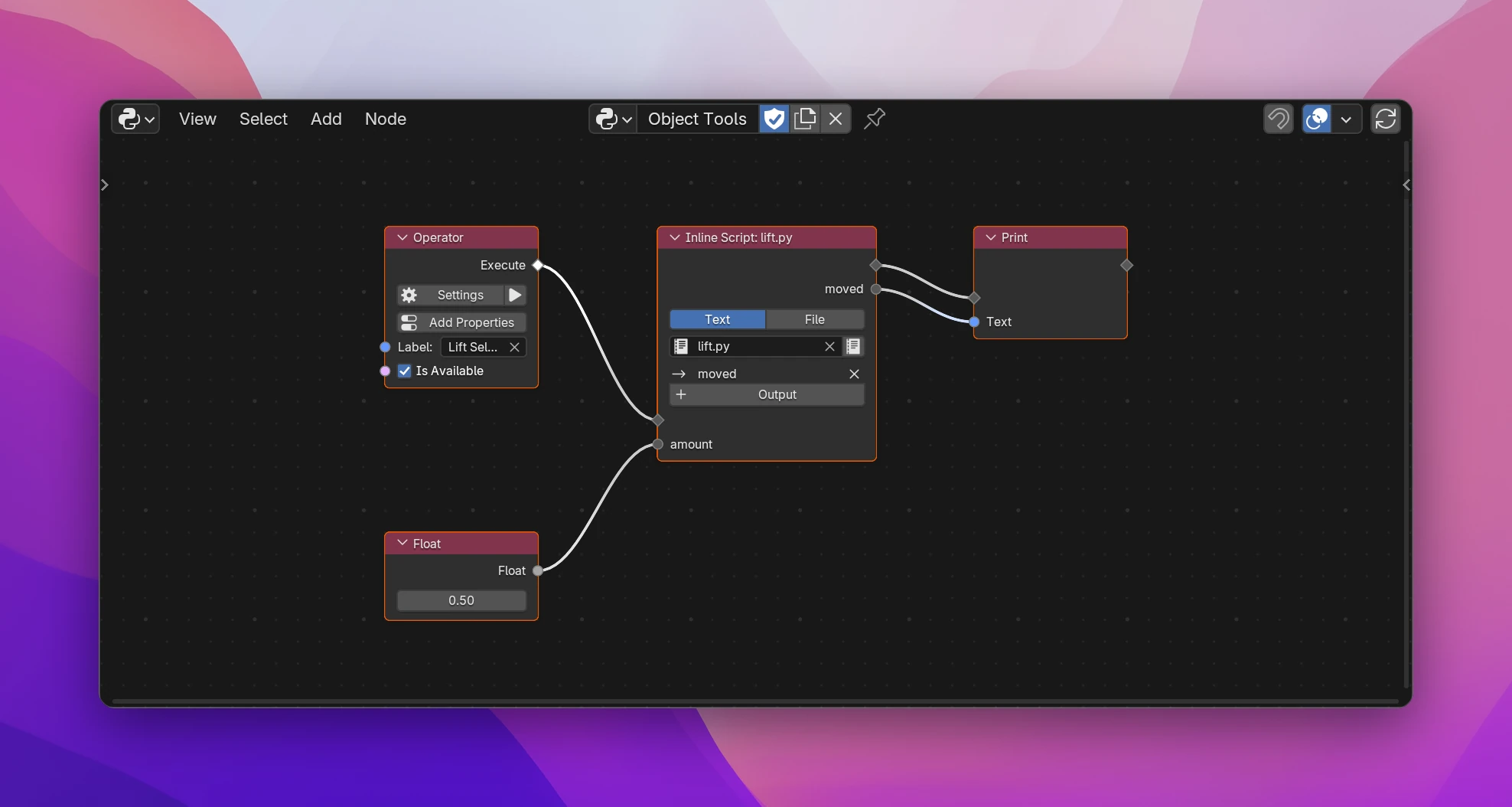
Inline Script
Runs the code where the flow reaches the node, like several lines of Python Statement. Above, the operator Lift Selected runs lift.py:
for obj in context.selected_objects:
    obj.location.z += amount
moved = len(context.selected_objects)| Text / File | Where the code comes from: a text block of the blend file, or a .py file on disk |
| Text field | The text block. + next to it creates one; the text icon opens it in a Text Editor. An empty text shows Add Template, which writes an example into it |
| File field | The path of the .py file, for File |
| Inputs | One per name the code uses without defining it (amount above). Unconnected inputs are None |
| Outputs | + Output lists the variables the code assigns, outside functions, classes and comprehensions. Pick one and it becomes an output with the variable's value after the code. X next to an output removes it |
contextis Blender's context where the code runs.selfandeventwork in operators; using them elsewhere is an error on the node.- When the code uses
layout, the node becomes an interface node: connect it to a panel's or menu's Draw flow and draw withlayout. bmesh,math,mathutils,random,os,re,time,datetime,jsonandpathlibare imported when the code uses them.- An output whose variable the code doesn't assign anymore stays, with its links, and is
None. The node shows a hint. - While the code has a syntax error, the node keeps its sockets and links, and shows the error.
The node's header shows the source: Inline Script: lift.py.
Script Function
Calls a function of one of the add-on's scripts (the scripts in the sidebar's Files list).
| Script field | The script to call. Without one, New Script creates a script from a template, adds it to the add-on and picks it |
| Function | The function to call. Without a pick, the node calls run(), or the script's first function |
| Without Flow | For functions that return something: no flow sockets, the function is called where its results are used, once per used result. Use it to compute a value in a panel |
| Inputs | The function's parameters, typed from their annotations and defaults (spacing: float = 2.5 is a Float input with 2.5) |
| Outputs | The return values: one output, or one per item of a -> tuple[...] |
Parameters named context, layout, self and event aren't inputs; the node passes what the flow has. A function taking layout draws UI, so the node becomes an interface node. The header shows the function's name, like run().
The node shows an error when no script is picked, when its script was removed from the add-on, or when the script doesn't define the function anymore.
Which one to use
| Inline Script | Script Function | |
|---|---|---|
| Code runs | Where the node is, inlined into the generated function | In the script's own module, called from the node |
| Reuse | Every node is its own copy | Many nodes can call the same function |
| Helper functions, classes, handlers | No | Yes, the whole script is part of the add-on |
| Values in | Unknown names | Parameters |
| Values out | Picked variables | Return values |
Inline Script writes the inputs as assignments, then the code as it is:
def execute(self, context):
    amount = 0.5
    for obj in context.selected_objects:
        obj.location.z += amount
    moved = len(context.selected_objects)
    print(utils.as_text(moved))
    return {"FINISHED"}
Script Function imports the script's module and calls the function with keyword arguments: count = arrange.run(context=context, spacing=3.0, axis=0). See Scripts for the full example.