Scripts
Add Python to your add-on and run it from nodes.
Nodes build the structure of an add-on: operators, panels, properties. When a step is easier to write in Python, put it in a script: a text block in the .blend file or a .py file on disk. Scripts are used two ways:
| For | |
|---|---|
| Files list | Scripts that are part of the add-on: classes, handlers, helper functions. Script Function nodes call their functions |
| Inline Script node (Add › Python) | A few lines in an operator, a panel or any other flow, run where the node is |
Scripts of the add-on
+ › Script in the Files list (the Scripting Nodes tab of the node editor's sidebar) adds a script to the selected folder. Select it, then choose Text (a text block) or File (a .py file) below the list and pick one. + next to the text field creates a text from a template; for an empty text, Add Template writes the template into it. The text button next to a picked text opens it in a Text Editor. Removing a script from the list keeps its text.
Every script of the list is part of the add-on, unchanged, as <folder>/<name>.py: a script tools.py in the folder Scripts (where new scripts go) is scripts/tools.py, at the top level tools.py. If the name is taken, by a node tree for example, the list shows the name it got (as tools_2.py). Everything in it works as in any add-on file: imports, helper functions, classes, handlers. Relative imports between scripts (from . import helpers) only work while they're in the same folder, like in any Python package.
- Classes (operators, panels, …) are registered for you.
- If the script defines
register()andunregister(), they are called when the add-on is enabled and disabled instead. Register your classes there yourself, as in a regular add-on.
def on_save(*args):
    print("Saved", bpy.data.filepath)


def register():
    bpy.app.handlers.save_post.append(on_save)


def unregister():
    bpy.app.handlers.save_post.remove(on_save)
Below the list, under Add a node calling:, are the selected script's functions: click one to add a Script Function node calling it. Used by lists the nodes calling the script, with a button to jump to each.
Script Function
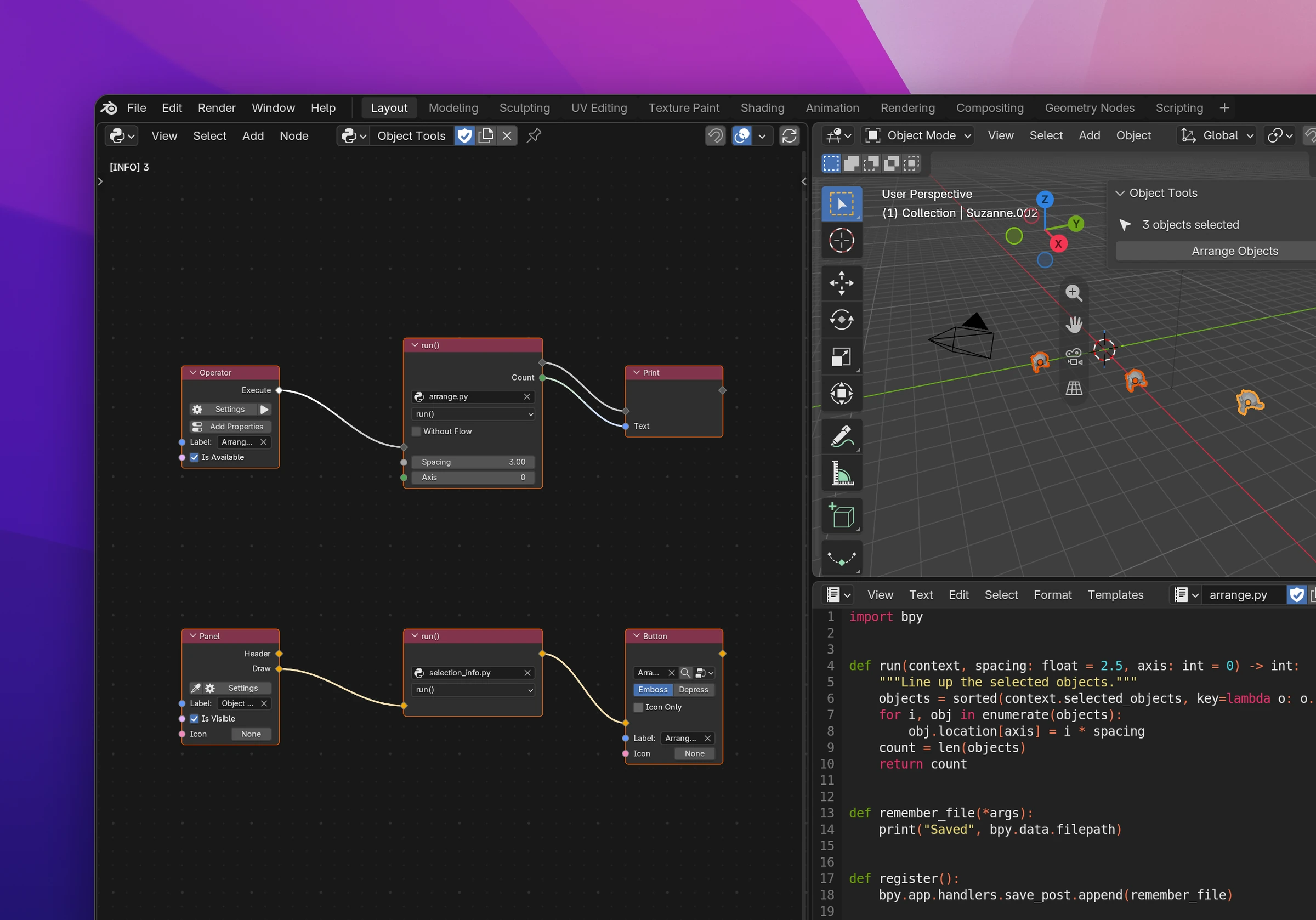
A Script Function node (Add › Python) picks a script of the add-on and one of its functions. Its parameters become the node's inputs, its return values the outputs:
def run(context, spacing: float = 2.5, axis: int = 0) -> int:
    objects = sorted(context.selected_objects, key=lambda o: o.name)
    for i, obj in enumerate(objects):
        obj.location[axis] = i * spacing
    count = len(objects)
    return count
gives a node with the inputs Spacing (Float, 2.5) and Axis (Integer) and the output Count. Without a pick, the node calls run(), or the script's first function.
| In the signature | On the node |
|---|---|
bool, int, float, str | Boolean, Integer, Float, String with the default value |
Vector, Color | Vector (size from the default), Color |
list, tuple[...], ... | List |
Blender types (Object, bpy.types.Mesh, ...) | Blender Data |
| no annotation, anything else | Data |
-> tuple[int, str] with return count, name | two outputs, Count and Name |
Parameters named context, layout, self and event aren't inputs: the node passes what the flow it's in has (an operator's context, a panel's layout, ...). A function taking layout draws UI and connects to interface flows.
Without Flow removes the flow sockets of a function that returns something: it's called where its outputs are used, like a Python Expression (once per used output). Use it to compute a value in a panel.
Inline Script
The code goes into the add-on where the flow connects to the node, like several lines of Python Statement:
for obj in context.selected_objects:
    obj.location.z += amount
moved = len(context.selected_objects)contextis Blender's context where the code runs. In a panel,layoutdraws into it (using it makes the node an interface node); in operatorsselfandeventwork too.- Names the code uses without defining them become inputs:
amountabove. Connect values to them; in the add-on they're set before the code (amount = 0.5). - + Output lists the variables the code assigns (outside functions, classes and comprehensions): pick
movedand the node gets a moved output, the variable's value after the code. math,random,os,json, … are imported when the code uses them.
+ next to the text field creates a text to start from.
Editing
Edits to a script update the nodes using it and reload the add-on, like any other change (Live updates). Saving a .py file on disk counts as an edit. Errors show where they belong: syntax errors and errors while the add-on loads on the script in the Files list, errors while the code runs on the script with the line (ZeroDivisionError: division by zero (arrange.py, line 7)) and on the node that called it.
from .scripts import arrange


class OBJECT_TOOLS_OT_arrange_objects(bpy.types.Operator):
    ...
    def execute(self, context):
        count = arrange.run(context=context, spacing=3.0, axis=0)
        print(str(count))
        return {"FINISHED"}