Flows and sockets
How flow sockets order what your add-on does, how data sockets pass values, and when each kind of node runs.
Nodes connect two ways. Flow links (between the diamond sockets) say what happens in which order, like lines of code one after the other. Data links (between the round sockets) pass values from one node to another.
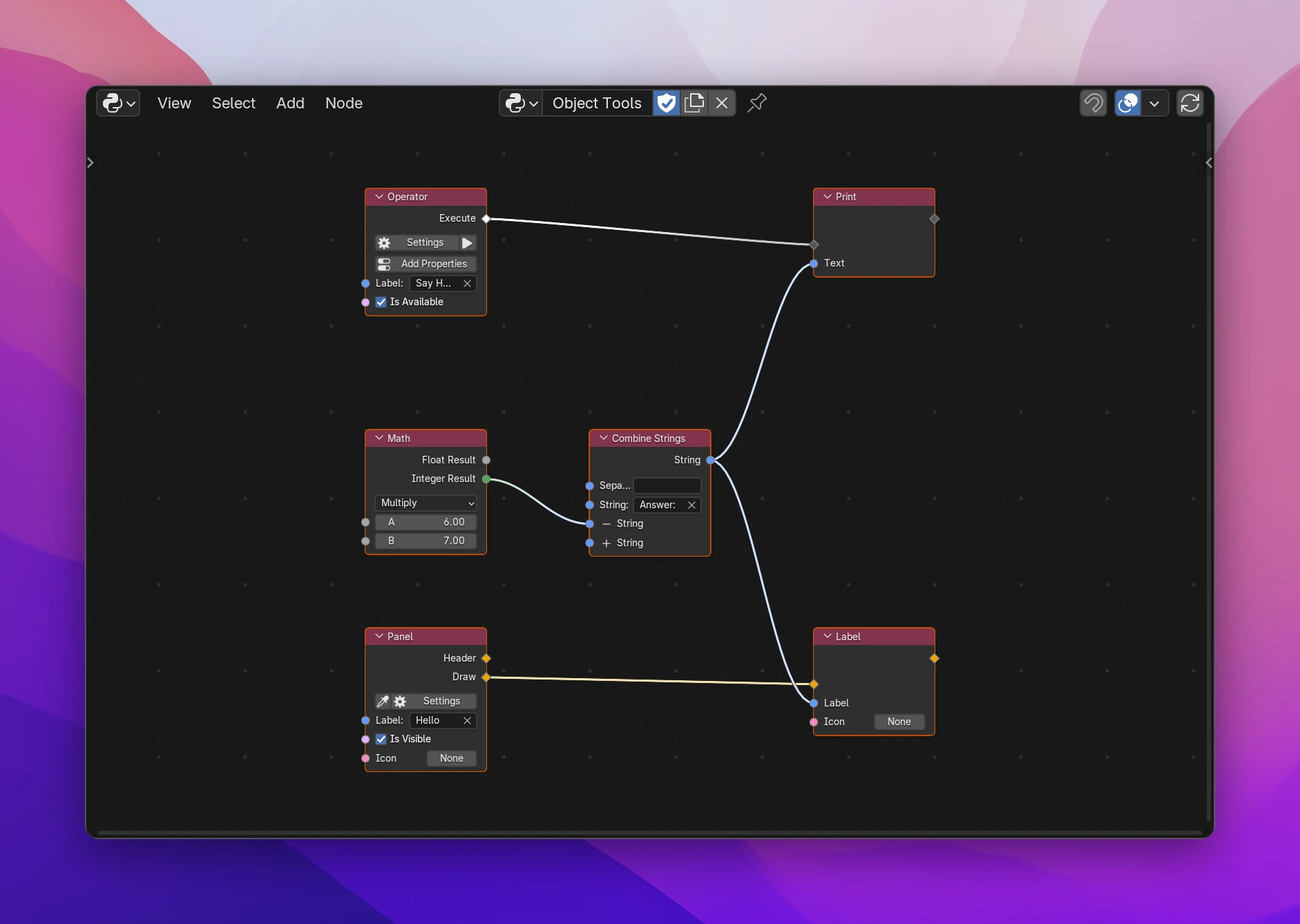
In the graph above, clicking the operator prints Answer: 42, and the panel shows the same text as a label. The Math and Combine Strings nodes have no flow sockets: they compute their value wherever it's used.
Flow sockets
There are three kinds of flows, each with its own color:
| Kind | Color | What it does | Examples |
|---|---|---|---|
| Logic | white | Starts code that Blender runs: the start of a flow | an Operator's Execute, events, timers, the Trigger node |
| Program | gray | Runs code, one node after the other | Print, Run Operator, Set Property, Repeat |
| Interface | yellow | Draws UI into a panel, menu or popup, top to bottom | a Panel's Draw, Label, Button, Row, Column |
- Logic and Program flows connect to each other: a Logic output goes into a Program input.
- Interface flows only connect to Interface sockets. A link between kinds that don't fit (or between a flow and a data socket) is muted: it's drawn dashed and does nothing.
- A flow output connects to one node: the flow goes on in one place. A flow input can take several flows. The node's code is then written into each of them.
- A flow socket named after its kind has no label: it's the node's main flow in or out. Other flows are named after what they're for: Then, Else, After, Execute.
Some nodes work in both code and interface flows and take the kind of the flow you connect: If/Else and Switch run a branch in an operator and draw one in a panel.
Data sockets
| Type | Color | Holds |
|---|---|---|
| String | blue | text |
| Float | light gray | a decimal number |
| Integer | green | a whole number |
| Boolean | pink | True or False |
| Vector | purple | 2 to 4 numbers (location, rotation, scale) |
| Color | yellow | an RGB or RGBA color |
| List | orange, square | a list of values |
| Blender Data | teal | an object, a scene, a material, ... A square socket is a collection of them (bpy.data.objects) |
| Icon | pink | a built-in or custom icon |
| Data | dark gray | any value |
An input that isn't connected has a field for its value. A Blender Data socket also shows the type it holds next to its name (Camera Object), see Blender data.
Converting between types
Connecting two sockets of different types converts the value:
| From → to | Result |
|---|---|
| anything → String | the value as text; Blender data gives its name |
| anything → Boolean | bool(value): empty text, 0, empty lists are False |
| Integer ↔ Float | the number (floats are rounded down to integers) |
| String → Float / Integer | the number in the text, 0 if it isn't one |
| Float / Integer → Vector / Color | the number in every component |
| Vector / Color / List → Float / Integer | the first component |
| single values → List | a list with the value in it |
| String / Integer → Icon | an icon by its name ("MESH_DATA") or id |
| anything ↔ Data | passed on as it is |
Some types can't be converted: numbers, text, vectors and colors can't become Blender Data, and Blender Data can't become a number, vector or color. The node then shows an error such as Float: Blender Data can't be used as Float.
When nodes run
- Root nodes don't need a flow to reach them: Operator, Panel, Menu, events, Trigger. Each becomes a class or a handler of the add-on, and its Logic or Interface outputs start flows.
- Flow nodes run when the flow reaches them. A flow node with nothing connected to its flow input isn't part of the add-on.
- Value nodes (no flow sockets: Math, Combine Strings, ...) run where their output is used. Their code goes into the place that uses it, every time it's used. A value node connected to two nodes computes its value twice, at the moment each one needs it.
A flow node's data outputs (the Count of a script function, the Index of a loop) only exist in the flow after the node. Connecting them to a node in another flow gives an error: isn't available here (it only exists inside that node's flow). To keep a value across flows, use a variable or a property.
Reroutes and frames
Add › Layout has Reroute and Frame. A reroute takes the type of the socket connected to it, so it passes flows and data alike. Frames group nodes visually and change nothing in the code.
Sockets you add
Nodes that take any number of values end in a socket with +. Connect a link to it, or click +, and it becomes a regular socket with a new + below. − next to a socket removes it. Combine Strings, Create List and Join Path work this way.
Other nodes change their sockets when you change a setting: an Operator gets an Invoke flow with Invoke Type set to Invoke, a Run Operator gets an input per property of the operator it runs. Links to sockets that stay are kept.
A Logic flow is the body of a method, Program nodes are its lines, value nodes are expressions inside them. The operator from the screenshot:
class OBJECT_TOOLS_OT_say_hello(bpy.types.Operator):
    bl_idname = "object_tools.say_hello"
    bl_label = "Say Hello"
    bl_options = {"REGISTER", "UNDO"}

    def execute(self, context):
        print("".join(["Answer: ", str(int(6.0 * 7.0))]))
        return {"FINISHED"}
The Math and Combine Strings nodes became the expression inside print(). The panel's draw() has its own copy of that expression.