Add-on and files
One add-on per .blend file, its settings in the sidebar, and how node trees, scripts and folders become the files of the add-on.
Each .blend file holds one add-on. Its node trees, scripts and settings are all saved in the file, and the Scripting Nodes tab in the node editor's sidebar (N) is where you name the add-on, organize its files and export it.
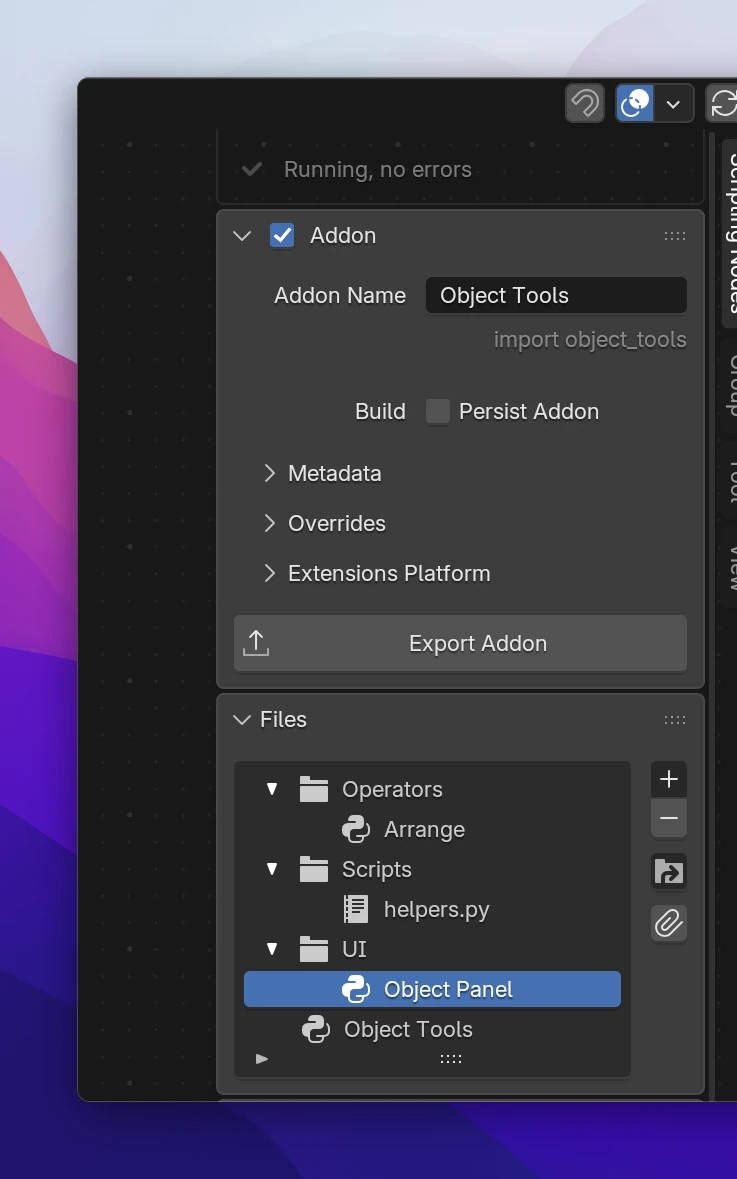
The add-on
Addon Name is the add-on's name in Blender's preferences. A new file gets a random name, so set your own first. The gray line under it is the add-on's Python module name (import object_tools), made from the name: letters only, lowercase, words joined with _. Classes and operator names use it too: an operator Arrange of Object Tools is object_tools.arrange, its class OBJECT_TOOLS_OT_arrange.
While you work, the add-on is installed and enabled in Blender, and it's rebuilt after every change (see Live updates). Opening another .blend file disables it, and the other file's add-on takes over.
The sidebar
The Scripting Nodes tab, from top to bottom:
| Panel | What's in it |
|---|---|
| Status line | Running, no errors, or how many nodes have errors with Go to Error, or why the add-on couldn't be loaded |
| Addon | The checkbox in its header turns the live add-on on and off. Addon Name, Persist Addon, and the subpanels below |
| Addon › Metadata | Tagline, author, version, tags, Blender versions, permissions: what Blender shows about the add-on. See Add-on settings |
| Addon › Overrides | Module Name, Class Prefix and Idname Namespace, when the ones made from the name don't fit |
| Addon › Extensions Platform | Checks the add-on against the rules of extensions.blender.org, see Extensions platform |
| Export Addon | Saves the add-on as a zip, see Export |
| Files | The add-on's node trees, scripts and folders |
| Addon Data | Properties, Variables and Assets |
| MCP Server | The server for AI assistants, see MCP server |
| Settings › Development | Logs, the log overlay and Show Node Code, see Live updates |
The other tabs of the sidebar: Node shows the selected node's settings (an Operator's properties, for example), Group the inputs and outputs of a function.
Live is the checkbox in the Addon header. Turned off, the add-on is disabled and isn't rebuilt while you edit (the header reads Addon (not running)). Exporting works either way.
Persist Addon keeps the add-on enabled when you open another .blend file, for example to try it on a different scene.
Files
The Files list shows the add-on's node trees and scripts, sorted into folders. Click a node tree to open it in the editor, double click a name to rename it.
| Button | Does |
|---|---|
| + | Adds a Node Tree, a Function, a Script or a Folder to the selected folder (or the folder of the selected file) |
| − | Removes the selected entry. A removed folder's contents move to the folder above. A removed script stays in the file as a text, only the add-on doesn't use it anymore |
| Move to Folder | Moves the selected file or folder into another folder, or to Top Level |
| Append | Blender's Append: take node trees from another .blend file |
A function shows unused while no Function node calls it. A tree or script with an error shows an error icon.
Organizing node trees
Each node tree is one Python file of the add-on, so split them the way you'd split code:
- One tree per tool: its operator, panel and properties together.
- One tree per part: Operators, Interface, Handlers.
- Functions for what several trees use.
Nodes in one tree can use what another tree defines: a Button can run an operator from any tree, a Function node can call a function from any tree. The imports between the files are written for you.
Folders group trees and scripts. A folder is a package of the add-on: a tree Object Panel in the folder UI › Panels is the file ui/panels/object_panel.py.
The add-on on disk
The live add-on is in Blender's user scripts folder, in scripts/addons/<module name>/. Scripting Nodes only writes to folders it created (they contain a .scripting_nodes marker file). If a folder of that name already exists, rename your add-on or remove the folder. Renaming the add-on removes the old folder.
An exported add-on has the same files, as an extension:
object_tools/
├── __init__.py              registers the classes, calls register() of the modules
├── blender_manifest.toml    name, version, permissions (Addon › Metadata)
├── object_tools.py          a node tree at the top level
├── properties.py            the add-on's properties (Addon Data › Properties)
├── utils.py                 helper functions the nodes use, only if any do
├── operators/
│   ├── __init__.py
│   └── arrange.py           the tree Arrange in the folder Operators
├── ui/
│   ├── __init__.py
│   └── object_panel.py
├── scripts/
│   ├── __init__.py
│   └── helpers.py           a script of the Files list, as you wrote it
└── assets/ files of Addon Data › Assets- File names come from the tree names in lowercase with
_(Object Panel→object_panel.py). Two trees with the same file name get a suffix. A script whose name is taken shows the name it got in the list (as helpers_2.py). - A tree that has nothing to export (empty, or only Trigger nodes) has no file.
- The live add-on's
__init__.pyalso has abl_info: it's loaded as a regular add-on, not as an extension.
# SPDX-License-Identifier: GPL-3.0-or-later

import bpy

from . import interface, operators, properties, utils

classes = (
    properties.OBJECT_TOOLKIT_PG_scene_properties,
    interface.OBJECT_TOOLKIT_PT_object_toolkit,
    operators.OBJECT_TOOLKIT_OT_rename_selected,
    operators.OBJECT_TOOLKIT_OT_distribute,
)


def register():
    for cls in classes:
        bpy.utils.register_class(cls)
    properties.register()
    interface.register()


def unregister():
    interface.unregister()
    properties.unregister()
    utils.unregister()
    for cls in reversed(classes):
        bpy.utils.unregister_class(cls)
Every class of a module that derives from a registrable bpy.types class (Operator, Panel, Menu, PropertyGroup, UIList, AddonPreferences, ...) is in classes, ordered so that classes are registered after the classes they use. Modules with their own register() / unregister() (keymaps, handlers, properties on Blender types) have them called after the classes are registered and before they're unregistered. Scripts that register their own classes are left out of classes.
| Setting | Default | Used for |
|---|---|---|
| Module Name | the add-on name: letters and spaces only, lowercase, _ between words (sna_addon if nothing is left) | the add-on's folder and import name. Names of Python's or Blender's modules (bpy, math, names starting with bl_ or _) get _addon added |
| Class Prefix | the module name in capitals | class names: OBJECT_TOOLS_PT_main |
| Idname Namespace | the module name | operator ids: object_tools.arrange |
The overrides take letters, digits and _ only; other characters are removed as you type.