Extensions platform
Check your add-on against the review guidelines and publish it on extensions.blender.org.
Add-ons on extensions.blender.org are reviewed against the moderation guidelines. The code Scripting Nodes writes follows them. What you build with the nodes can still break them: reading every object of the file, writing into the add-on's folder, Python that uses the clipboard without asking.
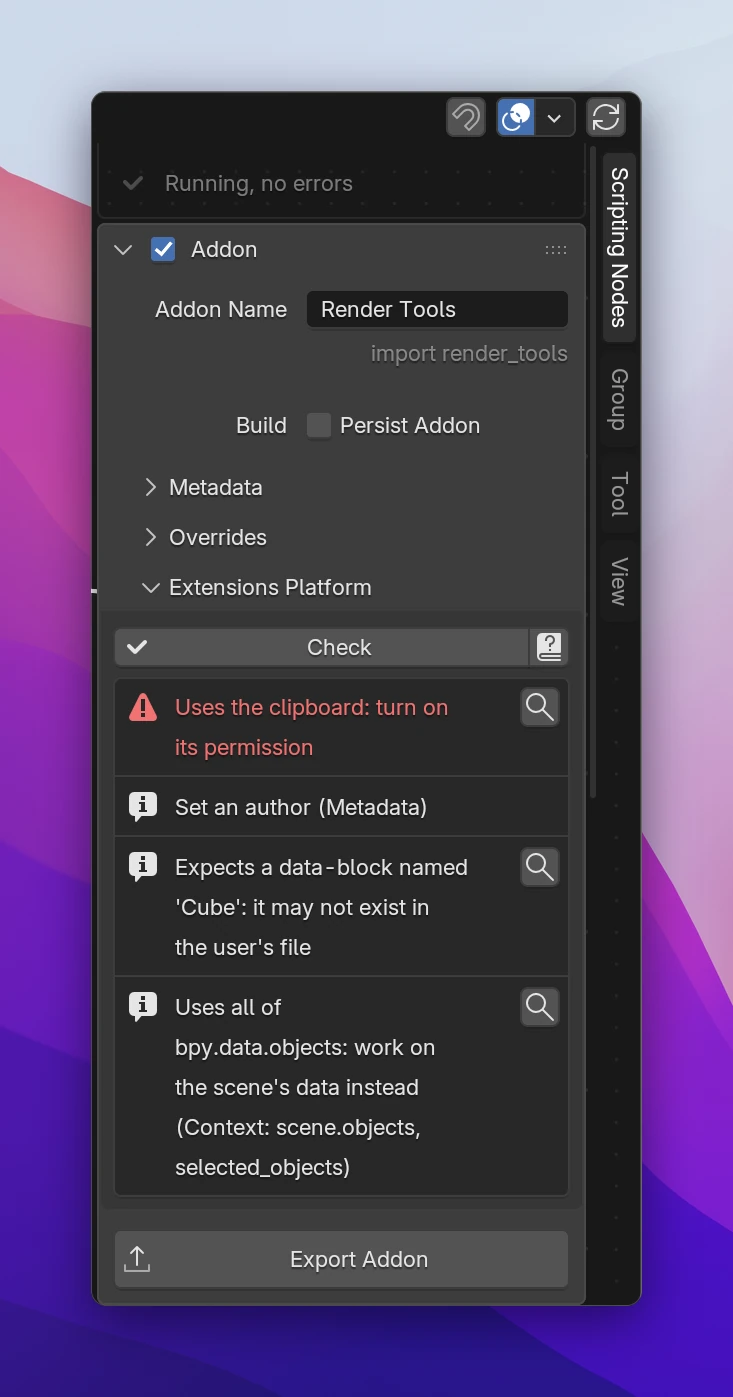
Checking your add-on
Addon › Extensions Platform in the node editor's sidebar lists what reviewers would reject or ask you to change. The add-on is checked as it would be exported when you export, or when you click Check. The ? button opens the guidelines.
- Red entries with a warning sign are errors: the platform rejects the add-on.
- The others are what reviewers usually point out. Fix them, or be ready to explain them.
- The magnifier next to an entry jumps to the node that causes it.
What it finds
| Entry | What to do |
|---|---|
| Uses all of bpy.data.… | A Blender Data node starting at the blend file (bpy.data.objects). Start at the Context instead (scene.objects, selected_objects): the add-on should work on what the user is working on |
| Expects a data-block named … | A key picked by name, like bpy.data.objects["Cube"]. The user's file may not have it: let the user pick the data, or use the active one |
| Writes into the add-on's folder (error) | A file path made from Add-on Info's Folder or the add-on's __file__. That folder is replaced when the add-on updates: write to bpy.utils.extension_path_user(__package__, create=True) |
| Changes the sys module (error) | Python changing sys.path, sys.modules or other parts of sys. Not allowed |
| Reads or writes files: turn on the Files permission (error) | Python or a script working with files (open, os.makedirs, shutil.copy, ...) without the permission. Turn on Files under Metadata › Permissions. File nodes turn it on for you |
| Connects to the internet: turn on the Network permission (error) | Python importing urllib, requests, http, socket or similar. Turn on Network |
| Connects to the internet without checking bpy.app.online_access first (error) | Users can turn off online access in Blender's preferences. Check bpy.app.online_access before connecting |
| Uses the clipboard: turn on its permission (error) | Python reading or setting window_manager.clipboard. Turn on Clipboard |
| Use __package__, not __name__, for the add-on (error) | Python reading the add-on's preferences with addons[__name__]. Extensions are packages: use __package__ |
| Refers to an extension repository by name; use __package__ (error) | Python with bl_ext or user_default in a string. The repository an extension is installed in differs per user |
| Check that window_manager.keyconfigs.addon isn't None | Python adding shortcuts without checking. In background mode there's no key configuration |
| Has an error, left out (error) | A node with an error. It isn't exported; fix it, or remove it |
| Trigger nodes only for testing, not exported | Trigger nodes are fine while you work. Remove them when they're in the way |
| The export has no code from nodes or scripts | Nothing to export yet |
| Set an author, Write a tagline saying what it does | Fill in Metadata: the platform shows them. The default tagline counts as missing |
| Metadata problems | An email that isn't an address, a website without https://, a copyright without a year. See Add-on settings |
The check reads the generated Python, so it finds what nodes write and what you write in Python nodes and scripts. It can't run your code: a file path built in a way it doesn't recognize isn't caught.
Publishing
Fix the errors in Extensions Platform, then export the zip.
Install the zip in a Blender without Scripting Nodes, or turn off the live add-on, and try every operator and panel. See Export.
Upload it on extensions.blender.org under Upload Extension. The platform reads the name, version, tags, permissions and license from the manifest.
For an update, raise the Version in Metadata, export again and upload the new zip as a new version of the extension.