Add-on settings
Name, version, author and the other information Blender shows about your add-on.
The Addon panel in the node editor's sidebar (Scripting Nodes tab) names the add-on and holds what Blender shows about it in the Preferences and what the Extensions platform needs. The settings belong to the .blend file, like the node trees.
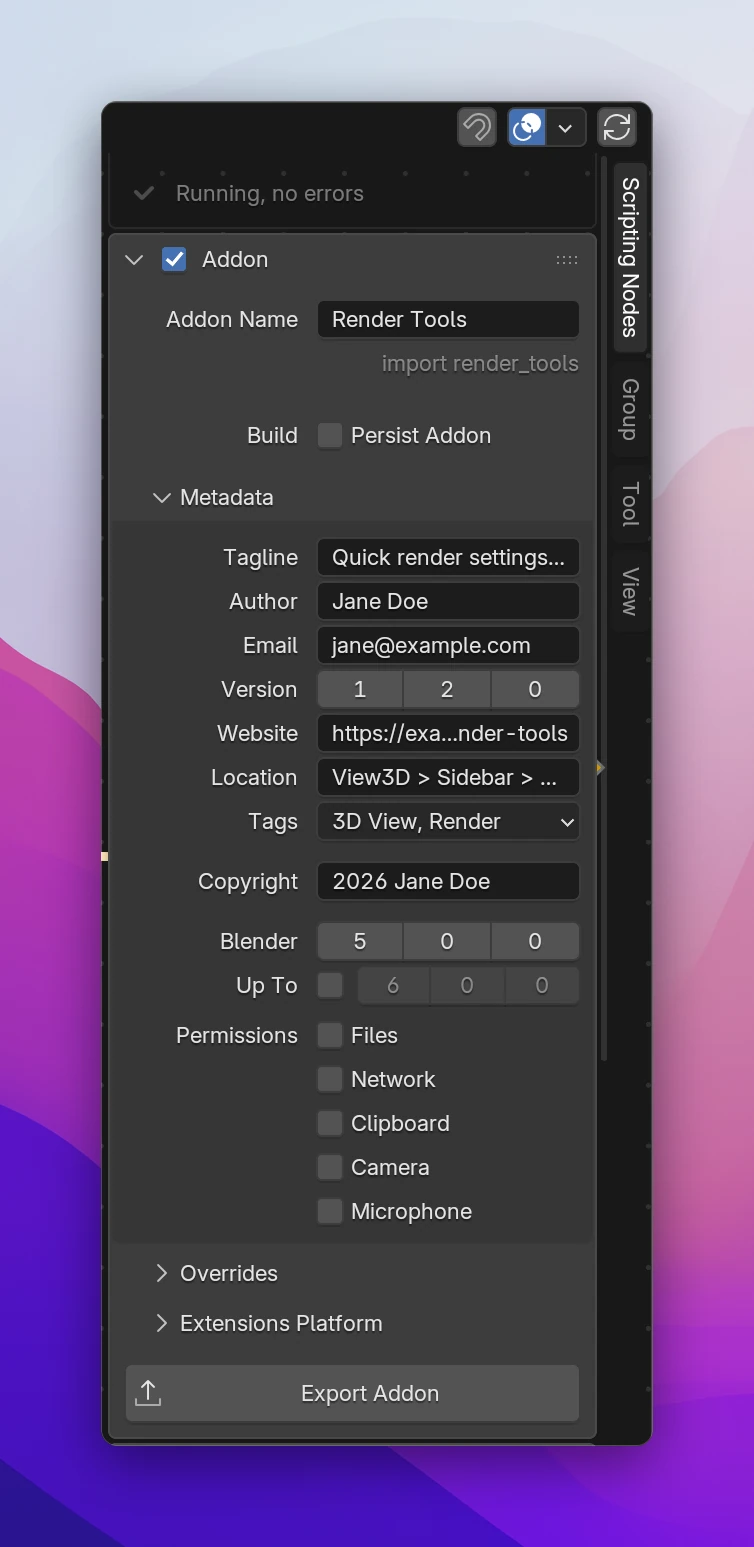
Addon
| Setting | |
|---|---|
| Checkbox in the header | Live: runs the add-on in Blender while you edit it, rebuilt on every change. Turn it off to stop it running (the header says Addon (not running)); exporting works either way |
| Addon Name | The name shown in the Preferences. The add-on's Python module is made from it, shown below the field (import render_tools) |
| Persist Addon | Keeps the live add-on enabled when you open another .blend file. Off: it's turned off with its file |
Set the name before you share the add-on. Renaming it later renames the module, the class names and the operator ids (render_tools.my_operator), so users' shortcuts and scripts that call your operators break.
Metadata
| Setting | |
|---|---|
| Tagline | One line about what the add-on does. At most 64 characters, ending in a letter or digit |
| Author, Email | Shown as the maintainer, Jane Doe <jane@example.com>. The email is optional |
| Version | Major, minor and patch. Raise it with every release: Blender and the Extensions platform use it to offer updates |
| Website | A documentation or project page, starting with https:// |
| Location | Where to find the add-on in Blender, e.g. View3D > Sidebar > Render Tools |
| Tags | Categories on the Extensions platform. The first one (alphabetically) is the add-on's category in the Preferences |
| Copyright | Who holds the copyright. Type a name and the current year is added (2026 Jane Doe); a year or range you type, like 2024-2026 Jane Doe, is kept |
| Blender | The oldest Blender version the add-on works in. It starts at the version you build it in, because the generated code may use what's new in it |
| Up To | Turn it on to set the first Blender version the add-on doesn't work in. It has to be above Blender |
| Permissions | What the add-on does outside of Blender that users are asked to allow: Files, Network, Clipboard, Camera, Microphone. Each one turned on gets a Reason field |
Permissions that nodes need are turned on for you and show Used by nodes: the file nodes need Files. Give them a reason anyway, like Saves presets next to the blend file; without one, a default reason is used. Python you write yourself (a Python node or a script) doesn't turn permissions on; do it here.
Add-ons are licensed under the GPL 3.0 or later, like Blender itself. Code using Blender's Python API has to be, and the Extensions platform only accepts it, so there's no setting for it.
Problems with the settings
Blender rejects add-ons whose tagline or reasons are too long or end in punctuation. Scripting Nodes shortens them when it writes the add-on. Settings it can't fix show a warning at the bottom of Metadata and are left out until they're fixed:
- Email isn't an address
- Website needs https:// and a domain
- Copyright needs a year and a name: '2026 Jane Doe'
- Tagline: 64 characters, end with a letter
- Blender: Up To must be above the minimum
- Give the add-on a name (Addon Name)
Overrides
The names in the generated code come from the Addon Name. Overrides sets them yourself, for example to keep them when you rename the add-on:
| Setting | Default | Used for |
|---|---|---|
| Module Name | The add-on name in lower case with _ (render_tools) | The add-on's folder and Python module, and the extension's id |
| Class Prefix | The module name in upper case | Class names: RENDER_TOOLS_PT_render_tools |
| Idname Namespace | The module name | Operator ids: render_tools.save_preset |
Spaces and dashes become _, other characters are dropped. A name that would hide a Python or Blender module (math, bpy) gets _addon added.
The settings are written to blender_manifest.toml, used when the add-on is installed from the exported zip:
schema_version = "1.0.0"

id = "render_tools"
version = "1.2.0"
name = "Render Tools"
tagline = "Quick render settings in the sidebar"
maintainer = "Jane Doe <jane@example.com>"
type = "add-on"
website = "https://example.com/render-tools"
tags = ["3D View", "Render"]

blender_version_min = "5.0.0"

license = [
  "SPDX:GPL-3.0-or-later",
]
copyright = [
  "2026 Jane Doe",
]

[permissions]
files = "Saves presets next to the blend file"

[build]
paths_exclude_pattern = [
  "__pycache__/",
  ".*",
  "*.zip",
]
While you work, the add-on runs as a legacy add-on from your scripts folder, so its __init__.py also has a bl_info with the name, author, tagline, versions, location and category. The export leaves bl_info out: extensions don't need it. Location only appears in bl_info, the manifest has no field for it.
The add-on's __init__.py starts with the license (and the copyright, when it's set):
# SPDX-FileCopyrightText: 2026 Jane Doe
# SPDX-License-Identifier: GPL-3.0-or-later