MCP server
Let AI agents read and build your node trees, and use Blender.
Scripting Nodes has an MCP server. An AI agent connected to it (Claude Code, Codex, Claude Desktop, ...) can build add-ons with nodes in the Blender you have open, see what it built, try it and fix what's wrong. You watch the nodes appear in the node editor and can step in at any time.
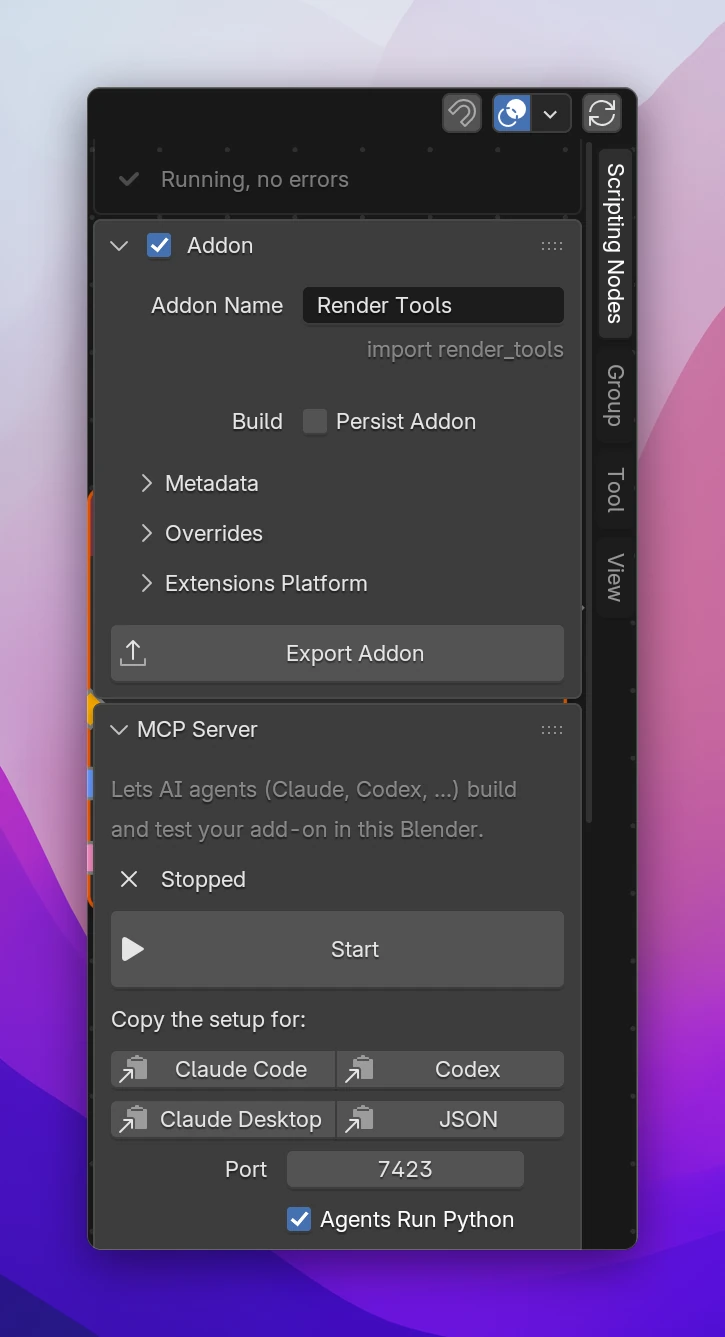
Starting it
Open the MCP Server panel in the node editor's sidebar (Scripting Nodes tab) and click Start. It listens on http://127.0.0.1:7423/, only on this computer, and the panel shows Running on :7423. Then connect your agent: the buttons under Copy the setup for copy what it needs, see Claude Code, Codex and Claude Desktop.
| Setting | Where | |
|---|---|---|
| Port | Panel and preferences (MCP Server Port) | The port it listens on, default 7423. Change it while the server is stopped |
| Agents Run Python | Panel and preferences (Allow Running Python) | Whether agents may run any Python in Blender (run_python) |
| Start with Blender | Preferences | Starts the server every time Blender starts |
| Token | Preferences | A password clients have to send with every request. Read when the server starts; the setup buttons include it |
The preferences are in Edit › Preferences › Add-ons › Scripting Nodes.
What an agent can do
Build add-ons
| Tool | |
|---|---|
get_addon | Overview: name, module, metadata, trees, properties, how many problems. Agents start here |
list_node_types, get_node_type | The nodes by category, what they do, their sockets and settings |
create_tree, get_tree, get_node | Trees and nodes, with their errors and the code they wrote |
edit_tree | Add, change, link and delete many nodes in one call |
edit_properties | The add-on's properties, groups and the properties of operators and preferences |
edit_function | The inputs and outputs of functions (node groups) |
make_group, ungroup | Move nodes into a new function and call it, or back (like Ctrl G and Ctrl Alt G) |
read_text, write_text, edit_scripts | Scripts: their code, and which scripts are part of the add-on |
edit_assets | Files and folders the add-on ships with |
search_data_paths | Blender data paths for Blender Data nodes |
set_addon | Name, author, tagline, version, permissions and other settings |
Check the work
| Tool | |
|---|---|
get_problems | Nodes with errors, a build that failed, what the Extensions platform would reject |
get_code | The generated Python, live or as exported |
run_operator | Run an operator of the add-on and see what it printed |
show_tree, screenshot | Open a tree in the node editor; a picture of Blender as you see it |
export_addon | The installable zip, checked against the guidelines |
Use Blender
| Tool | |
|---|---|
run_python | Run any Python in Blender: set up a scene, inspect data, anything the other tools don't cover |
undo | Undo or redo the agent's last steps (each tool call that changes the file is one step, like Ctrl Z) |
get_logs | Recent messages of Scripting Nodes and prints of the add-on |
Safety
The server only accepts connections from this computer, and refuses requests that come from web pages. With run_python, an agent can run any code in Blender, like the Python console. Turn off Agents Run Python if you don't want that; any program on your computer that can reach the port could use it too. A Token makes the server refuse clients that don't send it.
Agents change the file you have open. Save before you start, and use Ctrl Z or undo to take back what you don't like.