Values
Fixed numbers, texts, vectors and colors, the current time and your add-on's info.
The nodes in Add › Data › Input give one value each. Type it on the node, then connect the output wherever the value is needed. Current Time and Add-on Info read their values when the add-on runs.
Fixed values
| Node | Output | On the node |
|---|---|---|
| Boolean | Boolean | A Value checkbox, on by default |
| Integer | Integer | A whole number, 1 by default |
| Float | Float | A decimal number, 1.0 by default |
| String | String | A text field |
| Vector | Vector | Vec2, Vec3 or Vec4 in the dropdown, then one field per component |
| Color | Color | A color picker. Use Alpha adds the alpha channel (RGBA) |
| None | None | Nothing to set. Gives Python's None, "no value" |
Most inputs have a field of their own, so you only need these nodes when one value goes to several inputs, or into an input without a field, like the A and B of Compare.
Use None to clear something: connect it to a Set Property of a Pointer property to empty it, or compare a value with it to check whether something exists.
Current time
Current Time gives the date and time on the user's computer when the value is used.
| Socket | |
|---|---|
| Format (input) | How the Text looks. %Y-%m-%d %H:%M:%S by default, which gives 2026-10-20 14:05:09 |
| Text | The date and time as text |
| Seconds | Seconds since 1 January 1970, a Float. Subtract two of them to measure how long something took |
The codes in Format: %Y year, %m month, %d day, %H hour (24 h), %M minute, %S second. Other characters stay as they are, so %d.%m.%Y gives 20.10.2026. Python's strftime lists all codes.
Add-on info
Add-on Info gives facts about your own add-on:
| Output | |
|---|---|
| Name | The add-on's name from Add-on Settings |
| Version | Its version as text, like 1.0.0 |
| Module | Its Python package name (__package__). Blender uses it to find the add-on's preferences: context.preferences.addons[module] |
| Folder | The folder the add-on is installed in. Use it to load files you ship with the add-on, or use the Asset node |
Name and Version are the values at the time the add-on was built: change them in the settings and the add-on updates.
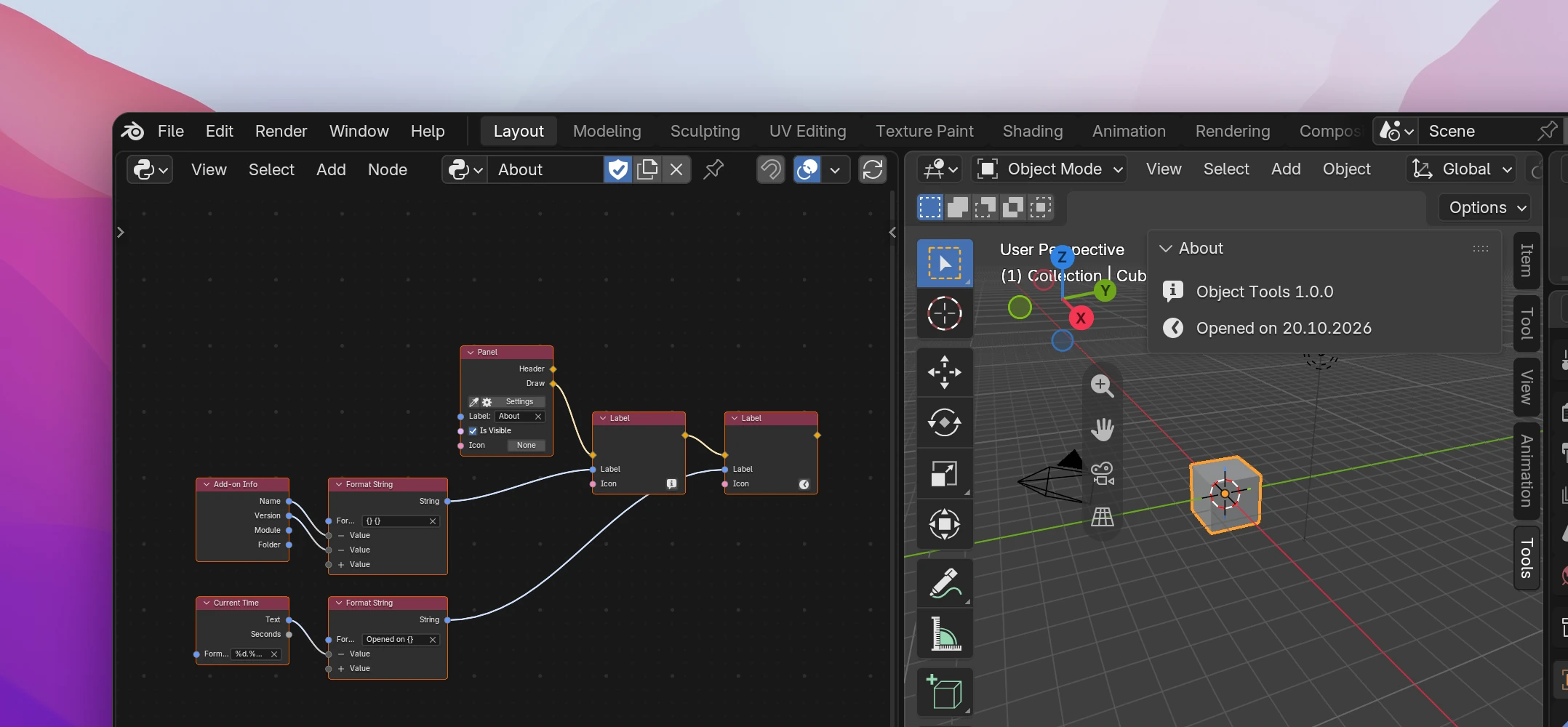
Value nodes write their value right where it's used. The panel in the screenshot:
import time

import bpy


class OBJECT_TOOLS_PT_about(bpy.types.Panel):
    bl_label = 'About'
    bl_space_type = 'VIEW_3D'
    bl_region_type = 'UI'
    bl_category = 'Tools'

    def draw(self, context):
        self.layout.label(text=f"{'Object Tools'} {'1.0.0'}", icon='INFO')
        self.layout.label(text=f"Opened on {time.strftime('%d.%m.%Y')}", icon='TIME')
Vector and Color give tuples like (0.0, 0.0, 1.0), Seconds is time.time().