Enum items
Build the entries of an enum property's dropdown in a function, with names, descriptions and icons.
An enum property is a dropdown: the user picks one of a fixed set of entries, like Blender's Object Type or Shading menus. An Enum Item node is one of those entries, with a name, a tooltip and an icon. You use it in an Items Function, a function that gives the entries when the dropdown opens.
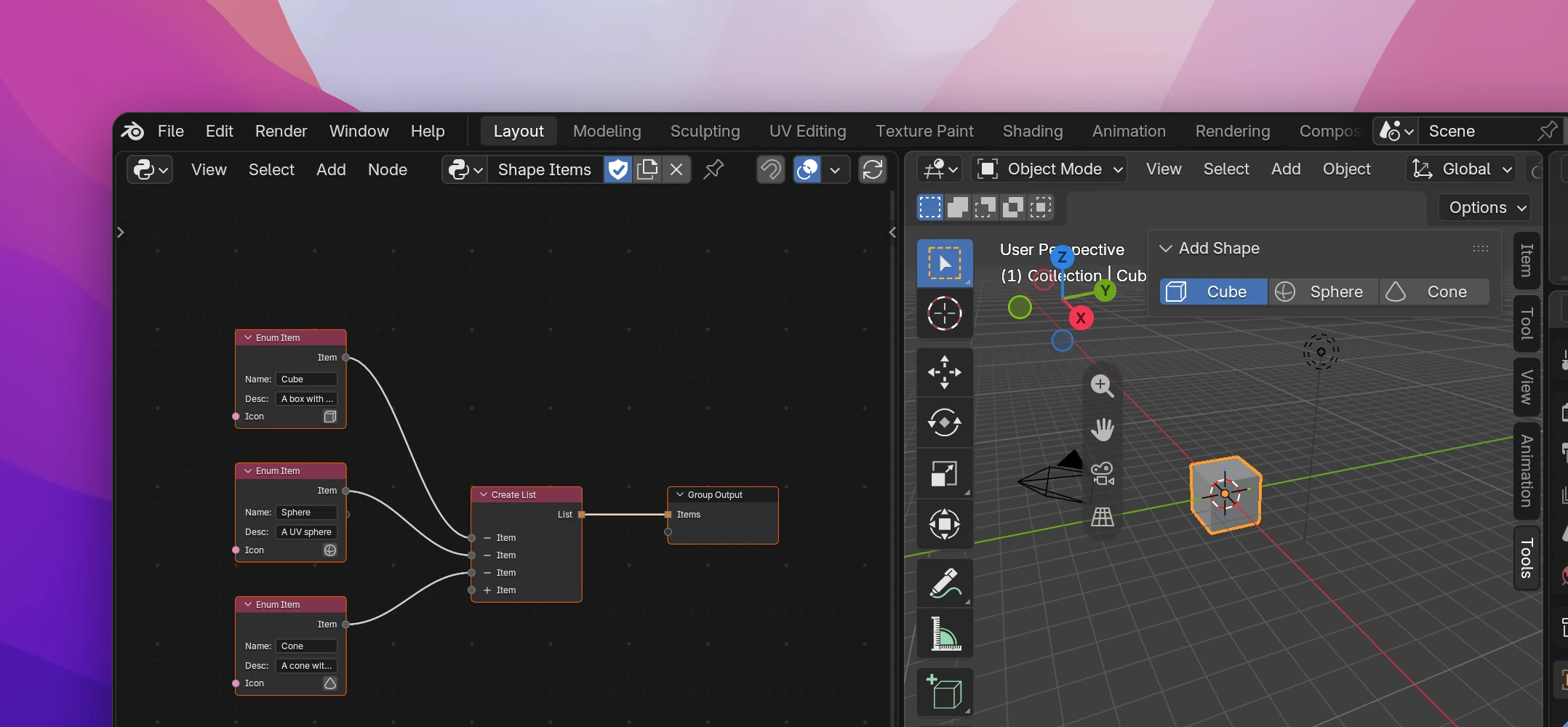
Entries that never change don't need this: add them, with icons, to the property's item list in the property settings. Use an Items Function when the entries depend on the file or on settings, like one entry per scene or per material.
Making the dropdown
Create a function (+ › Function in the sidebar's Files list) and add one output of type List in the sidebar's Group tab, here "Items" (Inputs and outputs).
In the function, add an Enum Item (Add › Data › Enum Item) per entry. Fill in Name, Desc (the tooltip) and pick an Icon.
Connect the Enum Items to a Create List and the list to the Group Output.
In your Enum property's settings, pick the function as Items Function. The list of items below it disappears: the function gives them now.
Draw the property with an Enum Menu. Expand shows the entries as a row of buttons, as in the screenshot.
Enum Item
| Name | The text shown in the dropdown. "Option" by default |
| Desc | The tooltip of the entry. Can stay empty |
| Icon (input) | A built-in icon picked on the node, or a custom icon connected to it. Without one the entry has no icon |
| Item (output) | The entry, for a list |
The value the property stores is the entry's identifier, made from Name: upper case, with every character that isn't a letter, digit or _ replaced by _. "Cube" becomes CUBE, "Low Poly" becomes LOW_POLY. Use the identifier when you compare the property's value with Compare or a Switch: "LOW_POLY", not "Low Poly".
Entries from data
The function can build the list any way it likes, as long as it gives a list. Each list item can be:
- an Enum Item,
- a text: it's used as identifier, name and value, without a tooltip (
"Cube"stays"Cube"), - a tuple of
(identifier, name, description)or(identifier, name, description, icon), e.g. from a Python Expression.
For an entry per scene, go through bpy.data.scenes with For Each (List) and append each scene's name to a list in a variable, then output that list. The function runs every time the dropdown opens or draws, so the entries follow the file.
Limitations
- The function runs very often, every time the property is drawn. Keep it fast: don't create data or change properties in it.
- Two entries with the same identifier confuse Blender: only the first one can be picked. Give every Enum Item a different name.
- When the entries change and the stored entry is no longer one of them, Blender shows the dropdown empty, and reading the property gives an empty text.
The function returns a list of tuples. A 4-item tuple has an icon:
def shape_items():
    return [
        ('CUBE', 'Cube', 'A box with six faces', 'MESH_CUBE'),
        ('SPHERE', 'Sphere', 'A UV sphere', 'MESH_UVSPHERE'),
        ('CONE', 'Cone', 'A cone with a round base', 'MESH_CONE'),
    ]
The property gets a callback that calls the function. Items with an icon also need a number in Blender, so the callback adds one (1 << i for a Multiple enum). It keeps the list in a module variable: Blender crashes or shows garbled text if the strings of dynamic enum items aren't kept alive in Python.
_shape_items = []


def shape_items_2(self, context):
    global _shape_items
    _shape_items = [
        (item, item, '') if isinstance(item, str)
        else (*item, i) if len(item) == 4
        else tuple(item)
        for i, item in enumerate(shape_items() or ())
    ]
    return _shape_items


class SHAPE_TOOLS_PG_scene_properties(bpy.types.PropertyGroup):
    shape: bpy.props.EnumProperty(name='Shape', items=shape_items_2)
If the function uses context (for example through a Blender Data node starting at the context), the callback passes it along.