Inputs and outputs
A function's parameters and return values, set in the Group tab and used through Group Input and Group Output.
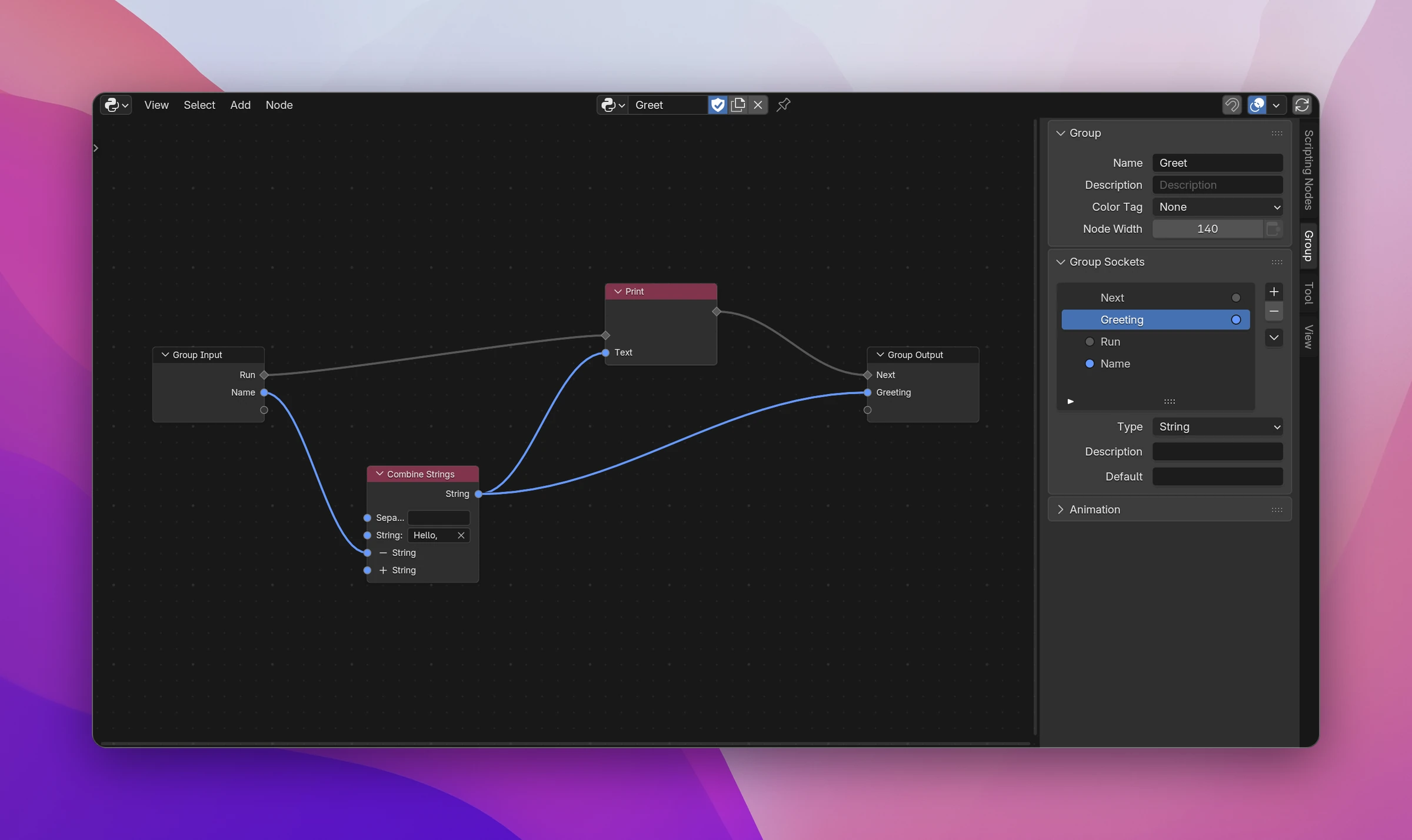
A function's inputs are the values you pass in, its outputs the values it gives back. You edit them in the node editor's sidebar, Group tab, while you're inside the function. Inside, Group Input has a socket per input and Group Output a socket per output. The Function nodes calling it get the same sockets.
Adding inputs and outputs
- In the Group tab, under Group Sockets, + adds an input or output and - removes the selected one. Drag an entry to move it, double-click it to rename it.
- Or drag a link from a node onto the empty socket at the bottom of Group Input or Group Output. The new socket gets the type and name of the socket you dragged from.
Renaming or reordering keeps the links of every Function node calling the function.
Settings
Select an input or output in the list to see its settings below it.
| Setting | For | Does |
|---|---|---|
| Type | All | The socket type: a flow, Data (anything), Blender Data, String, Boolean, Float, Integer, Vector, Color, List or Icon |
| Default | Data types with a value | The value a Function node's input starts with |
| Flow Kind | Flow sockets | Program runs code, Interface draws UI (see below). Logic is the kind of entry points and runs code like Program |
| Dimensions | Vector | Vec2, Vec3 or Vec4 |
| Use Alpha | Color | Adds the alpha channel |
| Type and Collection | Blender Data | What the data is (Object, Scene, ...; empty means any), and whether it's a collection of it. Nodes after it then know which properties it has. A socket made by dragging a link takes these from the linked socket |
Flow inputs and outputs
The flow sockets decide how the function is called (more in Calling functions):
- No flow sockets: a pure value, like a Math node. Connect what Group Output returns to values from Group Input.
- A flow input (Program): the function runs as a step. Its nodes start at Group Input's flow output. Add a flow output to let the caller continue after it.
- A flow input with Flow Kind Interface: the function draws into the panel, menu or popup it's called from. Its sockets turn orange.
A function can have at most one flow input and one flow output, and a flow output needs a flow input. Otherwise the Function nodes calling it show an error, such as "'Greet' has more than one flow input".
Group Input and Group Output
Group Input gives the inputs to the nodes of the function. You can add several Group Input nodes to keep links short; they all give the same values.
Group Output takes the return values. When the flow reaches its flow input, the function returns the values connected to it at that moment. With a flow, that means:
- You can return early: link the Then of an If/Else to Group Output, and the rest doesn't run.
- A branch that ends without reaching Group Output returns
Nonefor every output. - If nothing is linked to Group Output's flow input, the function returns its values at the end of the flow.
Without flow sockets, the function returns what's connected to Group Output. With several Group Output nodes, the active one (the last you selected) is the one returned.
Group Input's values are only available inside the function's own flow. A node elsewhere that reads them shows "only available in the function's flow".
Data inputs become the Python function's parameters, in order, named after the input in lower case: Name is name, Max Count is max_count. Names that are Python keywords get an underscore (class_), and duplicates a number (value_2). self, context, layout and event are taken by the function itself (see What the function can use).