Calling functions
The Function node, how a function's flow sockets decide where it can be used, and the code it becomes.
A Function node calls a function. Pick the function in the field on the node; the node takes the function's name as its title, its inputs as sockets to fill in, and its outputs as values to use. Tab opens the function, Ctrl+Tab comes back.
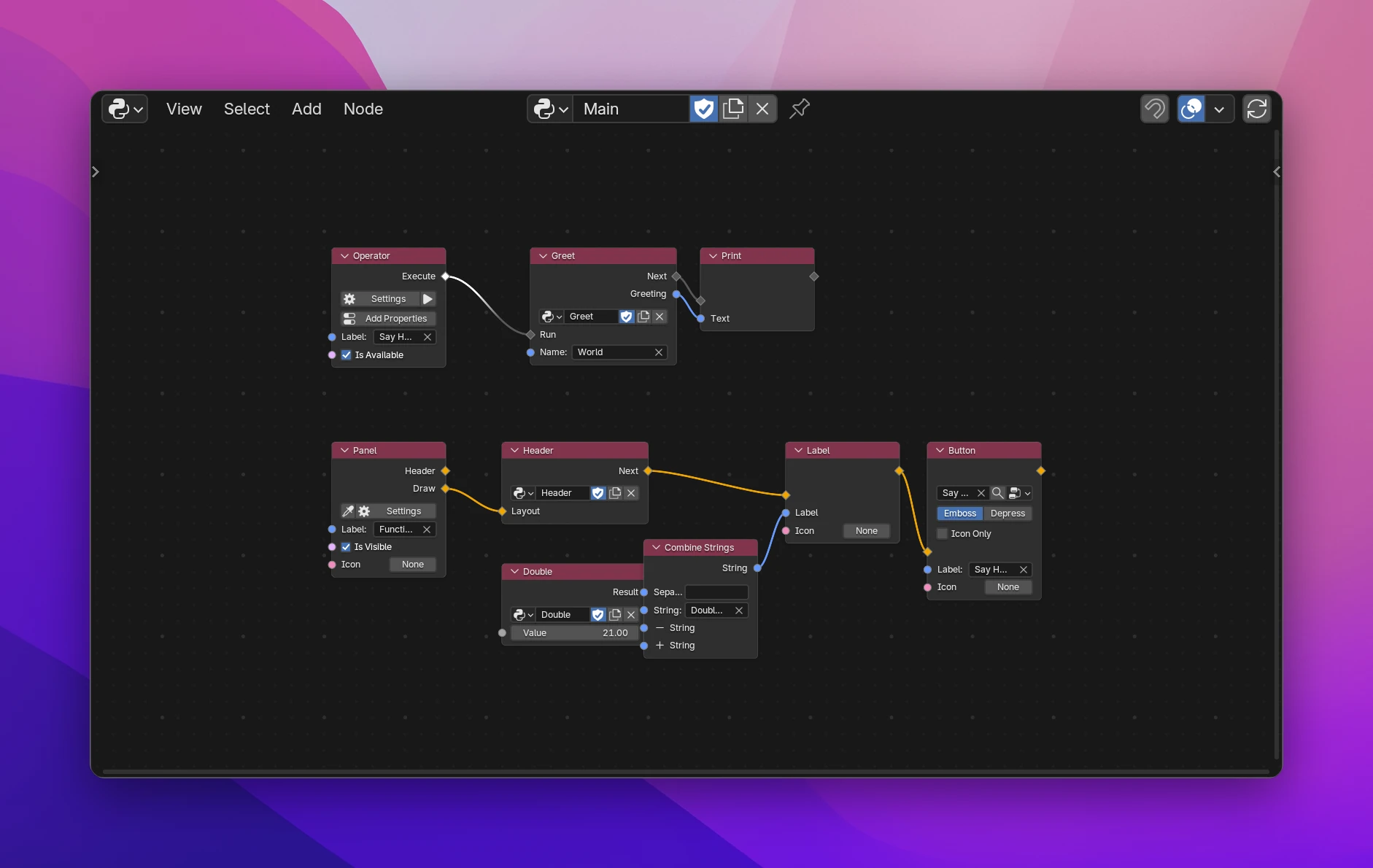
Three ways to call
The function's flow sockets decide what kind of node the Function node is:
| Function has | Function node is | Example in the screenshot |
|---|---|---|
| No flow sockets | A value node, like Math. Its outputs go anywhere a value goes. It runs when a node uses its output | Double returns its Value times 2 |
| A Program flow input (and maybe a flow output) | A step in a flow. It runs when the flow reaches it, then the caller continues at its flow output | Greet prints "Hello, World" and returns the text as Greeting |
| An Interface flow input | A step in a panel, menu or popup. Its nodes draw where the Function node is | Header draws a label at the top of the panel |
The same function can be called from many places and many trees. Every Function node passes its own input values.
The Function node
| Function field | Picks the function. New creates an empty one (New Function). Only functions that don't call this tree are offered, so a function can't call itself |
| Inputs | The function's inputs, with their Default until you type a value or link one |
| Outputs | The function's outputs. With a flow, they're the values from the run of this node, usable by the nodes after it |
When nodes inside the function have errors, the Function node shows "2 errors inside (Tab)". Other errors on the node:
| Message | Cause |
|---|---|
| Pick a function | No function picked, or it was deleted |
| 'Name' can't call itself | The function calls the tree this node is in, directly or through other functions |
| 'Name' has more than one flow input / flow output | Remove one in the function's Group tab |
| 'Name' has a flow output but no flow input | Add a flow input, or remove the flow output |
What the function can use
Inside a function, nodes can use what the caller has: the operator's properties and self, the context, the layout of the panel being drawn, a modal operator's event. The Function node passes them on automatically, so a function can read the calling operator's properties, use Event Info in a modal operator, or draw into the caller's layout. Called from a place that has no self or event (a timer, a handler), those are None.
Limitations
- A value function (no flow sockets) with several outputs runs once for each output that is used. If it's slow or has side effects, give it a flow input and output, so it runs once and the results are stored.
- Break / Continue inside a function doesn't affect a loop around the Function node; it shows "Only works inside a loop".
- Nodes that start code Blender runs (Operator, Panel, events, Trigger) can't be inside a function. Put them in a normal tree and call the function from their flow.
Each function is a Python function in its own file (named after the function, in its folder). Data inputs are the parameters. After a * come the names of the caller's scope that its nodes use, and only those:
def double(value):
    return value * 2.0


def greet(name):
    print("".join(["Hello, ", name]))
    return "".join(["Hello, ", name])


def header(*, layout):
    layout.label(text="Drawn by the Header function")
The calls in the tree from the screenshot:
def execute(self, context):
    result = greet("World")
    print(result)
    return {"FINISHED"}

def draw(self, context):
    header(layout=self.layout)
    self.layout.label(text="".join(["Double(21) = ", str(double(21.0))]))
    self.layout.operator("functions_demo.say_hello", text="Say Hello")
Several outputs return a tuple: a flow call unpacks it into variables (a, b = split(x)), a value call indexes it (split(x)[0], split(x)[1]).