Operators
The actions of your add-on, the shortcuts that run them and the nodes for modal tools.
In Blender, everything you can click does its work through an operator. Add Cube, Shade Smooth, Save, Undo: each is an operator, a named action with settings. A button in a panel, a menu entry, a keyboard shortcut and the operator search (F3) only point at one. So when your add-on needs a button that does something, you make an operator for it and let the button run it.
The operator nodes are under Add › Operators, the nodes for modal operators under Add › Operators › Modal.
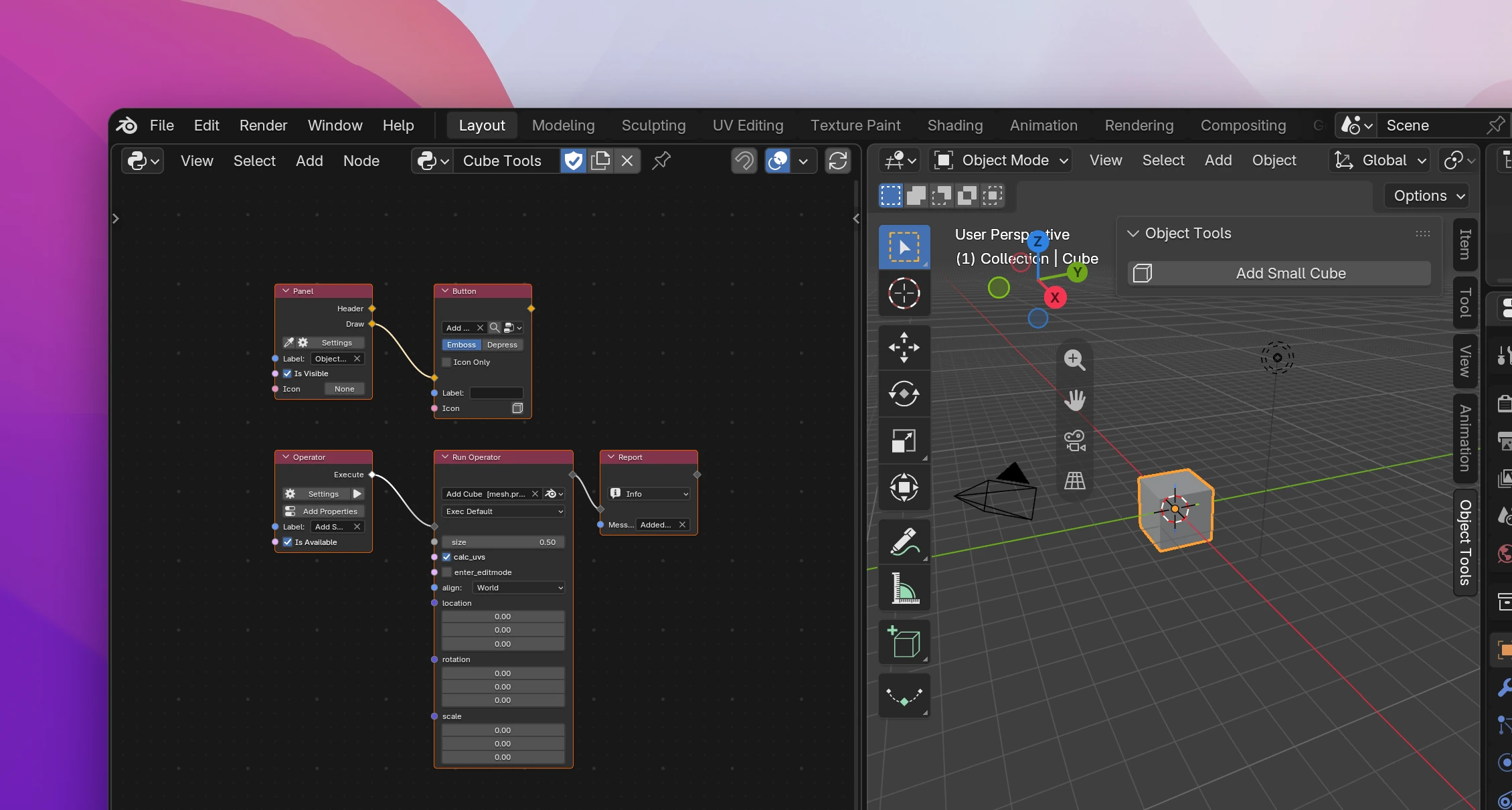
A minimal setup:
Add an Operator node and type its Label, e.g. "Add Small Cube". That's the button's text and the name in the operator search.
Connect what it should do to Execute, e.g. a Run Operator set to Blender's Add Cube with size 0.5. The play button on the Operator node runs it to try it out.
Nodes
| Node | Does |
|---|---|
| Operator | An operator of your add-on: what it does (Execute), its properties, its dialog |
| Run Operator | Runs one of your operators or any of Blender's from a flow |
| Report | Shows an info, warning or error message in the status bar |
| Shortcut | A keyboard shortcut that runs an operator or opens a menu |
| File Handler | Runs an operator when files are dragged onto Blender |
| Return | Ends the operator's flow: finish, cancel, or (modal) pass the event on or wait |
| Is Key | Whether an event is a given key or mouse button, pressed or released |
| Event Info | The event's key, modifier keys, mouse position and movement, tablet pressure |
| Set Header Text | Shows a text at the top of the editor, e.g. what a modal tool does |
| Set Status Text | Shows a text in the status bar, e.g. the keys a modal tool reacts to |
| Set Cursor | Changes the mouse cursor until it's set back |
Two settings windows belong to these nodes: Operator Settings is the popup behind Settings on the Operator node (see Settings), and Record Shortcut is the key button on the Shortcut node that listens for the keys you press (see Shortcuts).
Pages
- Creating operators: the Operator node, its settings, reports, ending early.
- Running operators: Run Operator, yours and Blender's.
- Popups and dialogs: ask for values or a confirmation first.
- Files and drag and drop: the file browser and dropped files.
- Modal operators: tools that follow the mouse until you click.
- Shortcuts: keys that run operators or open menus.
To run nodes when something happens in Blender instead of when someone clicks, see Events.