Files and drag and drop
Let people pick a file or folder, and import files dragged onto Blender.
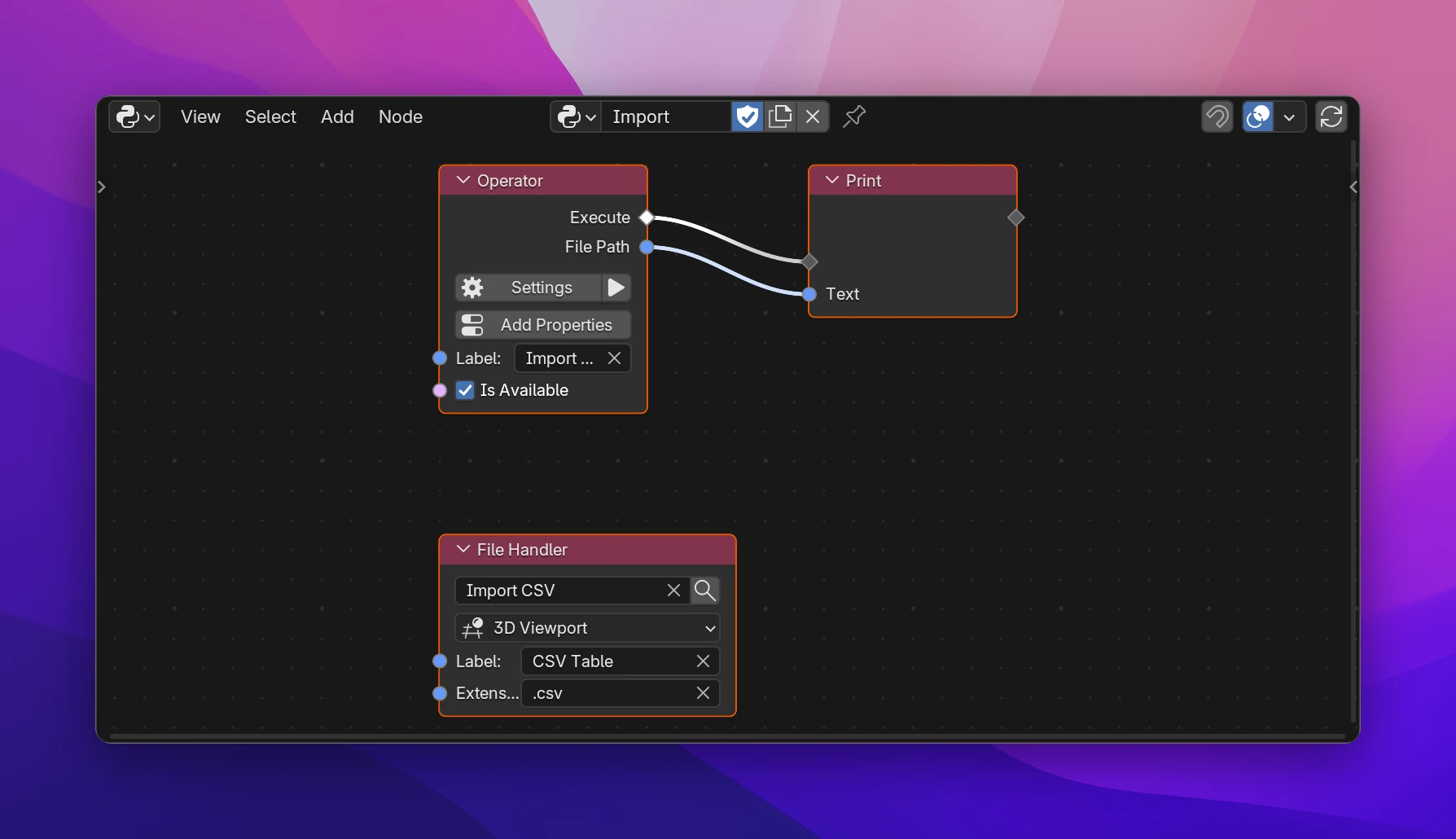
An operator with Invoke Type File Browser opens Blender's file browser first and runs Execute with what was picked. Add a File Handler node, and the same operator also runs when such files are dragged onto Blender, without the browser.
Picking files
Open the Operator node's Settings and set Invoke Behavior to File Browser.
Choose what to pick in the dropdown below it (Pick: Open File by default), and optionally a Filter like *.csv or *.png;*.jpg (empty: all files).
Use the new output of the Operator node in Execute, e.g. with Read Text File to read the file.
| Pick | Output | |
|---|---|---|
| Open File | File Path | One existing file |
| Open Files | File Paths | One or more files, a list of full paths |
| Save File | File Path | A file name to save to. Blender asks before overwriting an existing file |
| Folder | Folder | A folder; Filter isn't used |
The paths are absolute. If the browser is cancelled, Execute doesn't run.
Drag and drop
A File Handler node (Add › Operators) tells Blender which files your add-on can import by drag and drop. When someone drops a matching file, Blender runs the operator with the file already picked, so the file browser doesn't open.
| Operator field | The operator to run. It only lists Operator nodes with Invoke Type File Browser and Pick Open File or Open Files |
| Drop In | The editor where files can be dropped (default 3D Viewport), or Any Editor |
| Label | The name Blender shows for this kind of file when several handlers can take it (default "Import") |
| Extensions | The file endings, separated by ;, e.g. .csv;.txt |
With Open Files, dropping several files runs the operator once with all of them in File Paths.
The screenshot's operator and handler, in an add-on called CSV Importer:
class CSV_IMPORTER_OT_import_csv(bpy.types.Operator):
    bl_idname = "csv_importer.import_csv"
    bl_label = "Import CSV"
    bl_options = {"REGISTER", "UNDO"}
    filepath: bpy.props.StringProperty(
        subtype="FILE_PATH", options={"HIDDEN", "SKIP_SAVE"}
    )
    filter_glob: bpy.props.StringProperty(default="*.csv", options={"HIDDEN"})

    def invoke(self, context, event):
        if self.filepath:
            return self.execute(context)
        context.window_manager.fileselect_add(self)
        return {"RUNNING_MODAL"}

    def execute(self, context):
        print(self.filepath)
        return {"FINISHED"}


class CSV_IMPORTER_FH_csv_table(bpy.types.FileHandler):
    bl_idname = "CSV_IMPORTER_FH_csv_table"
    bl_label = "CSV Table"
    bl_import_operator = "csv_importer.import_csv"
    bl_file_extensions = ".csv"

    @classmethod
    def poll_drop(cls, context):
        return context.area is not None and context.area.type == "VIEW_3D"
A dropped file sets filepath before invoke() runs, so it goes straight to execute(). Open Files uses directory and files (the paths are joined into File Paths), Folder uses directory, Save File adds check_existing.