Modal operators
Operators that keep running and follow the mouse and keyboard until they end.
A modal operator keeps running after it starts and gets every event (each mouse move, click and key press) until it ends. Blender's Grab (G), Knife and Loop Cut work like this: you move the mouse, the result follows, and a click or Esc ends it. Set an Operator node's Invoke Type to Modal under Settings to build one.
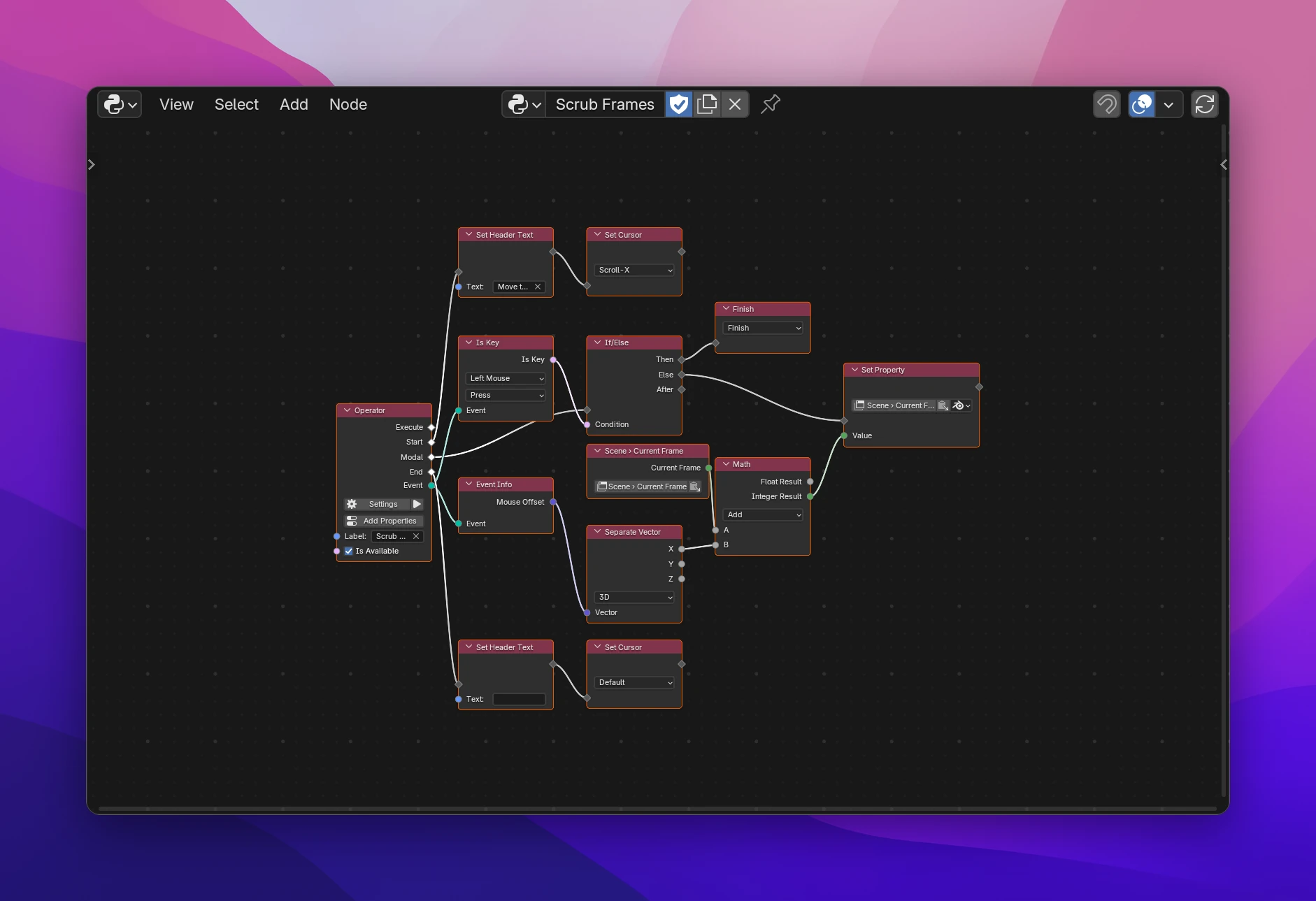
The example on this page is Scrub Frames: move the mouse left or right to change the current frame, click to confirm.
How it runs
With Invoke Type Modal, the Operator node has three flows:
| Output | Runs |
|---|---|
| Start | Once, when the operator starts. Set things up: a header text, the cursor |
| Modal | For every event while it runs. Event is the current event |
| End | Once, when it ends, however it ends: finished, cancelled, or stopped by Blender. Clean up here |
The operator keeps running until a Return node in the Modal flow ends it, or Esc or right click cancels it.
Building Scrub Frames
Add an Operator node, label it "Scrub Frames" and set Invoke Type to Modal in Settings.
On Start: a Set Header Text with "Move the mouse to change the frame, click to confirm", then a Set Cursor set to Scroll-X.
On Modal: an If/Else. Its Condition is an Is Key set to Left Mouse and Press, with the Operator's Event connected. Then goes to a Return set to Finish.
On Else: a Set Property for Blender's scene.frame_current. Its Value is a Math (Add) of the current frame (a Blender Data node, scene.frame_current) and X of Event Info › Mouse Offset, through a Separate Vector. Use the Integer Result: frames are whole numbers.
On End: a Set Header Text with an empty text, which removes it, and a Set Cursor set to Default.
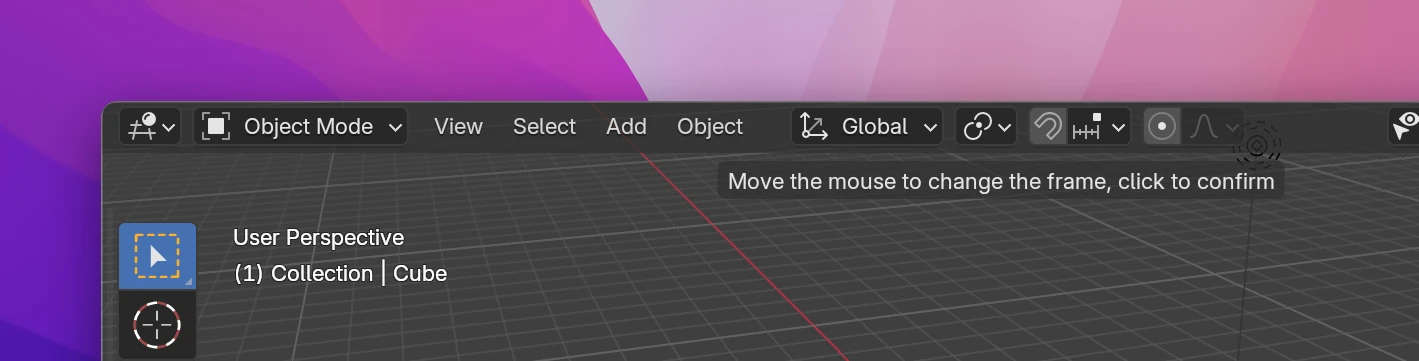
Run it from a button or a shortcut over the 3D Viewport. The header text shows at the top of the editor while it runs:
Ending it
Return (Add › Operators › Modal) decides what happens after the current event:
| Result | |
|---|---|
| Finish | Ends the operator; what it did gets an undo step. End runs |
| Cancel | Ends the operator without an undo step. End runs. What it changed stays changed: to undo it, store the old values in Start (in operator properties) and set them back before you cancel |
| Pass Through | Keeps running and lets Blender handle the event too, e.g. so the mouse wheel still zooms the view |
| Keep Running | Skips the rest of the flow and waits for the next event |
Without a Return, the operator keeps running after each event and Blender doesn't see the event.
Settings
Two settings in the Operator's Settings popup only show for Modal:
- Cancel with Esc / Right Click (on by default): pressing Esc or the right mouse button cancels the operator before the Modal flow runs. Turn it off to handle these keys yourself, e.g. to restore values before you cancel.
- Timer: also runs Modal every this many seconds, even when nothing happens. The event's type is then
TIMER. Use it for animations or to check something regularly. 0 (the default) means only real events.
Nodes for modal operators
All under Add › Operators › Modal:
| Node | |
|---|---|
| Return | Ends the operator, passes the event on or waits for the next one, see Ending it |
| Is Key | Is Key is True if the Event is the picked key or mouse button and, with Press or Release, was pressed or released (Any: either). The list has all of Blender's keys, mouse buttons, the wheel and more. Default Left Mouse |
| Event Info | What the Event is, see below |
| Set Header Text | Shows Text at the top of the current editor. An empty text removes it |
| Set Status Text | Shows Text in the status bar instead of Blender's own, e.g. "Click: confirm, Esc: cancel". An empty text shows Blender's own again |
| Set Cursor | Changes the mouse cursor to the picked one (default Crosshair) until it's changed again. Default sets it back |
Is Key and Event Info need an event: connect the Operator's Event output. In a function called from a modal operator they use the caller's event when the input isn't connected.
Set Header Text, Set Status Text and Set Cursor work in any operator, but they stay until something sets them back. Reset them in End, which runs on every way the operator can end.
Event Info
| Output | |
|---|---|
| Type | The key or button, as Blender names it: "LEFTMOUSE", "A", "WHEELUPMOUSE", "MOUSEMOVE", "TIMER" |
| Value | "PRESS", "RELEASE", "CLICK", "DOUBLE_CLICK", "CLICK_DRAG" or "NOTHING" (mouse moves) |
| Previous Type / Previous Value | The same for the event before |
| Is Repeat | True for a key held down that repeats |
| Shift, Ctrl, Alt, OS Key | Whether these modifier keys are held (OS Key: Cmd or the Windows key) |
| Text | The character a key types, for text input; empty for other keys |
| Mouse in Region | The mouse position in the editor's main region, in pixels from its bottom left |
| Mouse in Window | The mouse position in the Blender window |
| Mouse Offset | How far the mouse moved since the previous event, in pixels (X, Y) |
| Pressure | Tablet pen pressure, 0 to 1 (1 for a mouse) |
| Tilt | Tablet pen tilt (X, Y) |
Limitations
- A modal operator only starts from the interface: a button, a menu, a shortcut, the operator search, or a Run Operator with Invoke Default. With Exec Default (the default of Run Operator) or from Python, it runs its Execute flow instead, and nothing if that isn't connected.
- The operator runs in the editor it was started from. Mouse positions are relative to that editor's region.
- Each event runs the whole Modal flow. Keep it fast: heavy work on every mouse move makes Blender lag.
Scrub Frames, in an add-on called Timeline Tools:
class TIMELINE_TOOLS_OT_scrub_frames(bpy.types.Operator):
    bl_idname = "timeline_tools.scrub_frames"
    bl_label = "Scrub Frames"
    bl_options = {"REGISTER", "UNDO"}

    def invoke(self, context, event):
        if context.area:
            context.area.header_text_set(
                "Move the mouse to change the frame, click to confirm"
            )
        if context.window:
            context.window.cursor_modal_set("SCROLL_X")
        context.window_manager.modal_handler_add(self)
        return {"RUNNING_MODAL"}

    def modal(self, context, event):
        result = self._modal(context, event)
        if result is None:
            return {"RUNNING_MODAL"}
        if not result & {"RUNNING_MODAL", "PASS_THROUGH"}:
            self._end(context)
        return result

    def _modal(self, context, event):
        if event.type in {"ESC", "RIGHTMOUSE"} and event.value == "PRESS":
            return {"CANCELLED"}
        if event.type == "LEFTMOUSE" and event.value == "PRESS":
            return {"FINISHED"}
        else:
            context.scene.frame_current = int(
                context.scene.frame_current
                + (
                    event.mouse_x - event.mouse_prev_x,
                    event.mouse_y - event.mouse_prev_y,
                )[0]
            )

    def _end(self, context):
        if context.area:
            context.area.header_text_set(None)
        if context.window:
            context.window.cursor_modal_restore()

    def cancel(self, context):
        self._end(context)
Start is invoke(), Modal is _modal(), End is _end(). modal() keeps the operator running when the flow returns nothing, and runs _end() when it finishes or cancels; Blender calls cancel() when it stops the operator itself (e.g. when a file is loaded). A Timer adds context.window_manager.event_timer_add(...) to invoke() and removes the timer in _end(). execute() is only written when Execute is connected.