Trigger
Run a flow with a button on the node while you build.
A Trigger node (Add › Events) has a Trigger button. Click it and the flow connected to its output runs, right there in the node editor. It's for trying things out while you build: test a few nodes before you put them in an operator or panel.
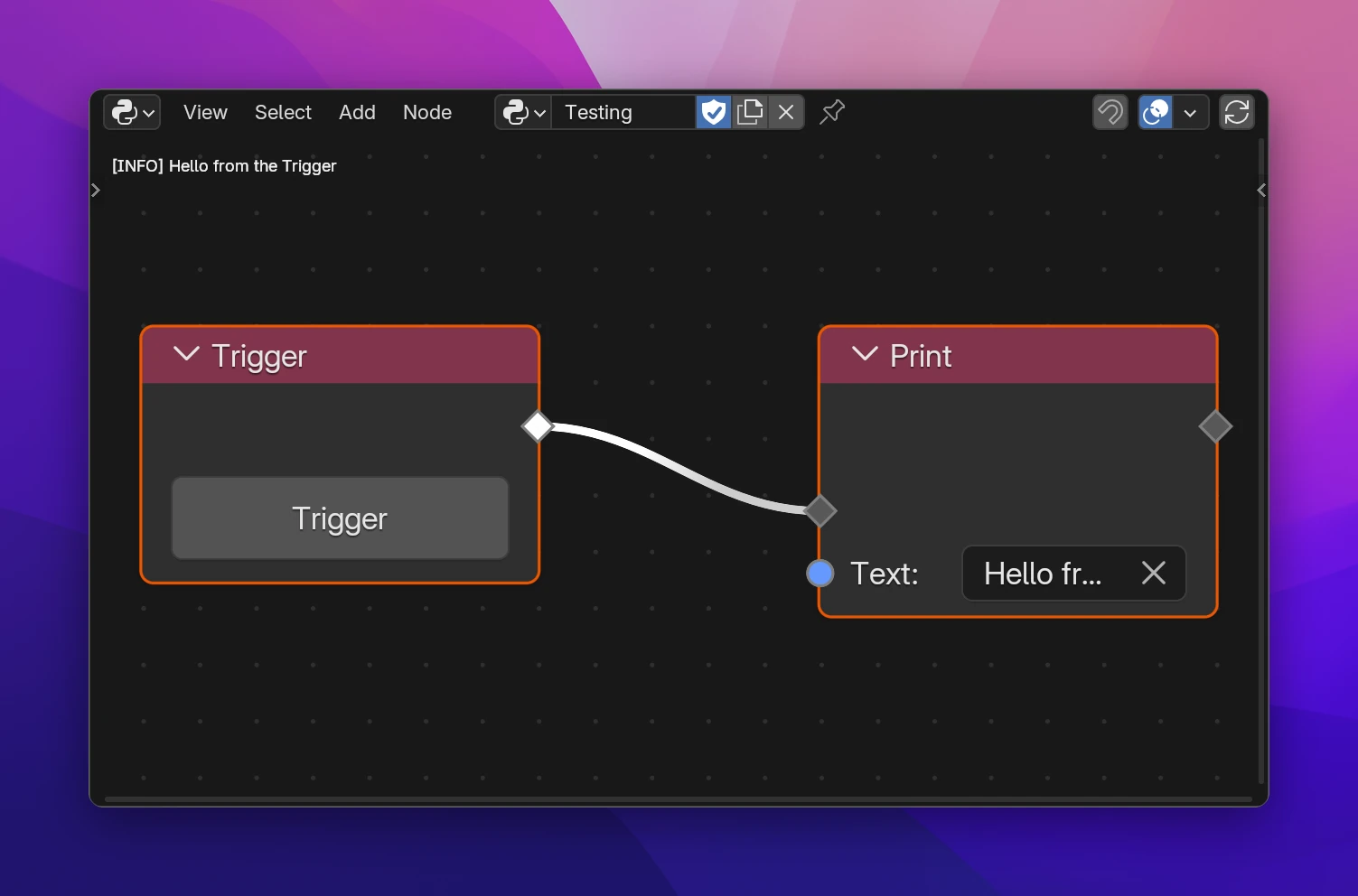
- Messages from Print show at the top of the node editor (and in the console), and errors show on the node that caused them, so you see the result without leaving the editor.
- The flow runs like an operator: it gets an undo step, and Report works.
- If the node shows Trigger (addon not loaded), the add-on failed to build. Check the errors on the nodes.
A Trigger is only part of the add-on while you work on it. The exported add-on leaves Trigger nodes out, and the export check lists them as a warning. To give users a button, use an Operator and a Button.
While you work, each Trigger is an operator named after the node's label (default "Trigger"); its button runs it:
class OBJECT_TOOLS_OT_trigger(bpy.types.Operator):
    bl_idname = "object_tools.trigger"
    bl_label = "Trigger"
    bl_options = {"REGISTER", "UNDO"}

    def execute(self, context):
        utils.log("Hello from the Trigger")
        return {"FINISHED"}
utils.log is print() that also shows the message in the node editor; in the export it's a plain print().