Blender events
Run nodes when Blender opens or saves a file, renders, changes a frame, changes a property or quits.
An event node starts a flow when something happens in Blender: after a file is opened, before it's saved, when the frame changes. Add one from Add › Events and connect what should happen to its output. It runs as long as your add-on is enabled, in every file.
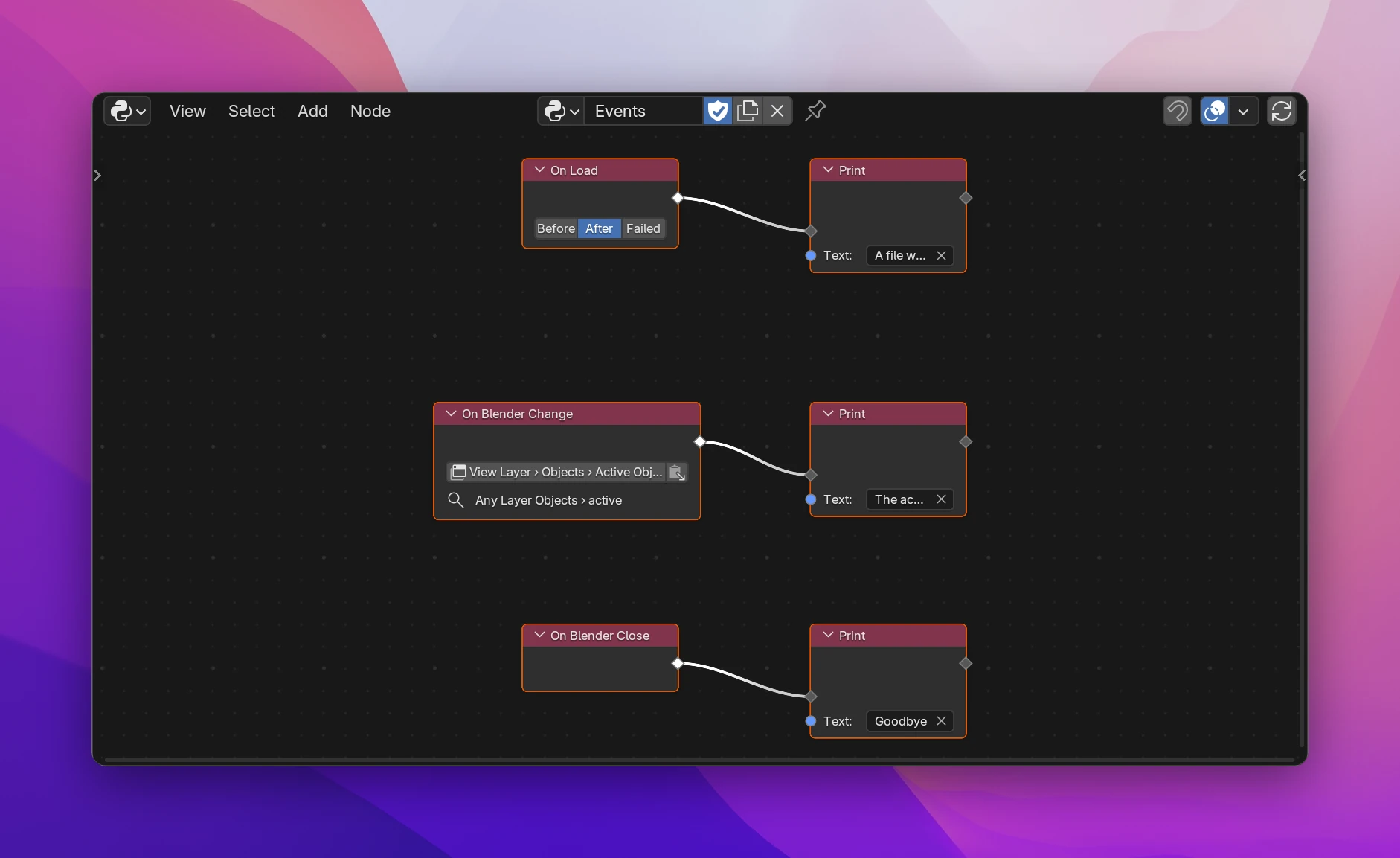
Blender events
Most event nodes have a choice on the node for when exactly they run, e.g. Before or After saving (buttons, or a dropdown when there are more than three).
| Node | Choices | Runs |
|---|---|---|
| On Load | Before, After, Failed | Before or after a .blend file is opened, or when opening it failed. Use After to set things up in the opened file |
| On Save | Before, After, Failed | Before or after the file is saved, or when saving failed |
| On Undo | Before, After | Before or after an undo step |
| On Redo | Before, After | Before or after a redo step |
| On Frame Change | Before, After | Before or after the current frame changes: playback, scrubbing the timeline, setting the frame from Python |
| On Playback | Start, Stop | When animation playback starts or stops |
| On Depsgraph Update | Before, After | Before or after Blender updates the scene's data after a change: moving an object, editing a mesh, changing a setting. It runs very often, so keep it fast |
| On Render Start | Each Frame, Once | Before each frame renders, or once when a render or animation render starts |
| On Render Finish | Each Frame, Complete, Cancel, Frame Saved | After each frame rendered, when the whole render is done or cancelled, or after an animation frame was written to disk |
| On Bake | Start, Complete, Cancel | When baking (Cycles' Bake button) starts, finishes or is cancelled |
| On Composite | Before, After, Cancel | Before or after the compositor runs, or when it's cancelled |
| On Append or Link | Before, After | Before or after data is appended or linked from another .blend file |
These run outside of any operator or panel. Report prints its message instead of showing it, and the context is whatever Blender has at that moment: during a render or file load there may be no active object or editor.
On Blender Close
On Blender Close runs once when Blender quits. Use it to save something to a file, e.g. settings or a log. Blender's data may already be partly gone at this point, so don't rely on the scene or objects.
On Blender Change
On Blender Change runs when one of Blender's properties changes: the active object, an object's name or location, the render engine, the current mode. Search or paste the property's path in the field on the node, like on a Blender Data node. The path starts at the Context or the Blend File, and it has to end at a property, not at data or an item of a list.
- It watches that property on all data of the same type. A path to the active object's
locationruns when any object's location changes. The node shows what it watches below the path, e.g. Any Layer Objects › active forview_layer.objects.active. - Changes in the interface (fields, menus, the Outliner) and from Python run it. Moving objects in the 3D Viewport (G, R, S) and changes by animation don't: use On Depsgraph Update or On Frame Change for those.
- It runs once Blender is done with the current operator, and only once even if the property changed several times.
- Items added to or removed from a list (a new object in the scene) aren't reported. Watch something that changes with it, or use On Depsgraph Update.
- It keeps working after another file is opened.
For your own add-on's properties use On Property Update, which runs right away.
The three events from the screenshot, in the add-on's module:
import atexit

import bpy
from bpy.app.handlers import persistent

from . import utils


@persistent
def on_load_post(*args):
    print("A file was opened")


def on_layerobjects_active_change():
    print("The active object changed")


def on_blender_close():
    print("Goodbye")


def register():
    bpy.app.handlers.load_post.append(on_load_post)
    utils.subscribe("LayerObjects", "active", on_layerobjects_active_change)
    atexit.register(on_blender_close)


def unregister():
    bpy.app.handlers.load_post.remove(on_load_post)
    atexit.unregister(on_blender_close)
The Blender events are functions in bpy.app.handlers (load_pre, load_post, load_post_fail, save_pre, frame_change_post, depsgraph_update_post, render_init, render_write, animation_playback_pre, object_bake_complete, blend_import_post, ...), marked @persistent so they stay registered when another file is opened. On Blender Close uses Python's atexit. On Blender Change subscribes with bpy.msgbus through utils.subscribe, which subscribes again after a file is loaded and clears the subscriptions when the add-on is disabled.