Timers
Run nodes after a delay or at an interval.
Run with Delay and Run in Intervals (Add › Events) start a timer from any flow: an operator, an event, a function. The flow after them continues right away through their last output; the timer's own flow runs later.
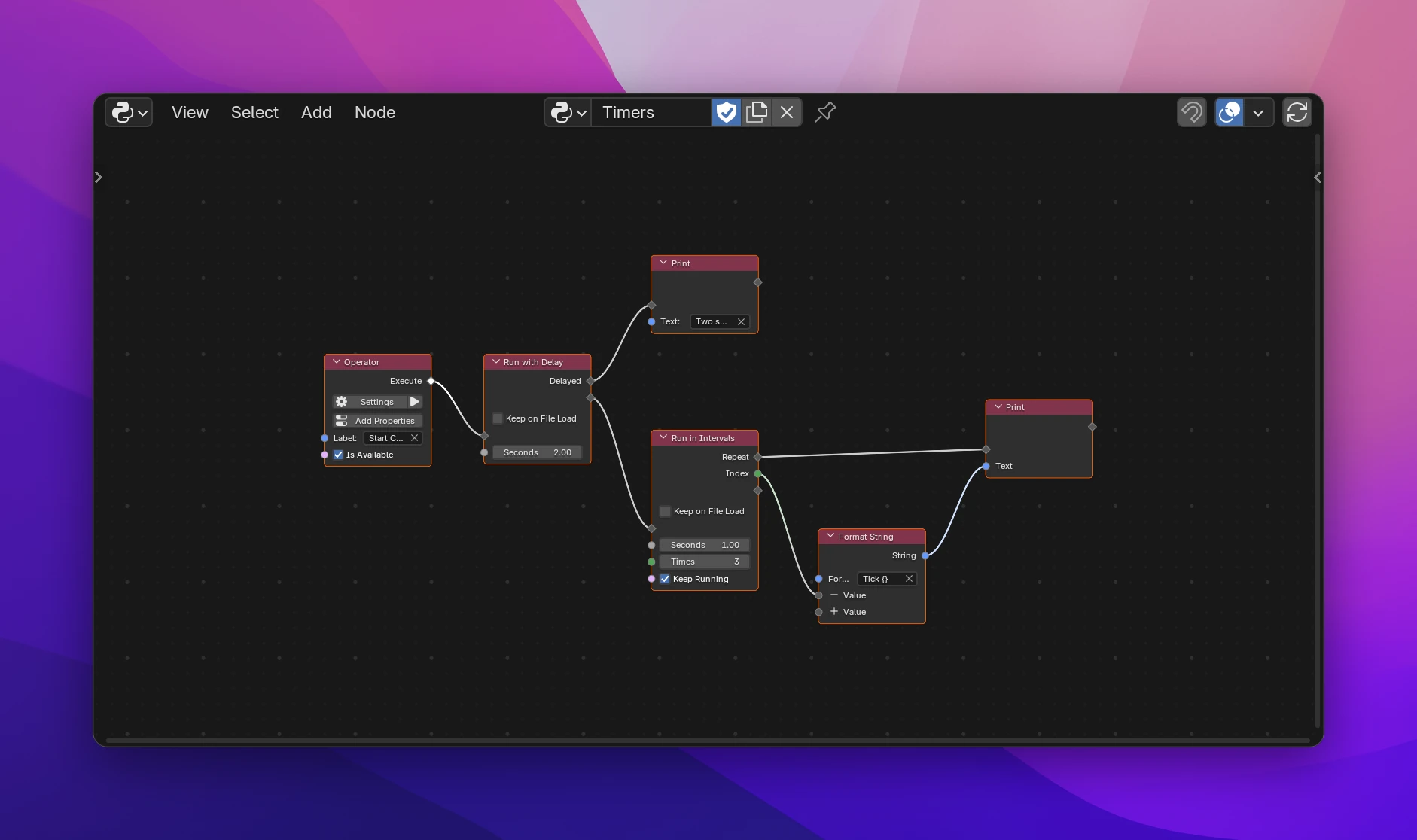
Run with Delay
Runs Delayed once, after Seconds (default 1). Use it to do something a moment later, e.g. after On Load when Blender's interface has to be ready first, or to clear a message after a few seconds.
Run in Intervals
Runs Repeat every Seconds (default 1), the first time right away. Index counts the runs from 0. It stops
- after Times runs (0, the default: no limit),
- when Keep Running is off after a run: connect a condition that turns False when it's time to stop,
- or when the add-on is disabled.
Keep on File Load
Timers stop when another file is opened, unless Keep on File Load on the node is on. All timers of an add-on stop when it's disabled, so a rebuild while you work never leaves an old timer running.
Things to know
- The timer's flow runs on its own, outside the operator or panel that started it. Report prints instead (there is no operator to report from), and the context is Blender's at that time: the active object or the editor may have changed.
- Values from nodes before the timer are taken when it starts. Read a property or variable inside the timer's flow to get the current value.
- Blender runs timers between other work, so the timing is approximate. The shortest interval is 0.01 seconds.
- Blender doesn't run timers while it renders from the command line or runs in background mode.
The timer's flow becomes a nested function, passed to a helper of the add-on:
def execute(self, context):
    def delayed():
        print("Two seconds later")

    utils.run_later(delayed, 2.0)

    def repeat(index):
        print(f"Tick {index}")
        return True

    utils.run_in_intervals(repeat, 1.0, 3)
    return {"FINISHED"}
run_later and run_in_intervals register the function with bpy.app.timers and remember it, so the add-on's unregister() can stop it. repeat() returns the Keep Running value; returning False stops the timer. Keep on File Load adds persistent=True.