Loops
Run nodes several times with Repeat, and stop or skip runs with Break / Continue.
Repeat runs the nodes on its Loop output a number of Times, then continues at After. Use it when you know how often something should happen: add five cubes, try three times, count down from ten.
Repeat
| Socket | |
|---|---|
| Times (input) | How often Loop runs. 3 by default; 0 or less runs it never |
| Loop | Runs once per repetition |
| Index | The number of the current run, counting from 0: 0, 1, 2 for Times 3 |
| After | Runs once, when the loop is done |
Index only exists inside the loop. A node after After that uses it shows an error.
To run nodes once for every item of a list or a Blender collection (all objects, the selected objects, a mesh's vertices), use For Each (List) instead. In a panel, Draw For Each draws a row per item.
To keep a value from one run to the next, such as a total, store it in a Local Variable before the loop and change it inside.
Stopping early
Break / Continue (Add › Flow) changes what a loop does next. Pick the action in the dropdown on the node; its title shows the choice.
- Stop Loop leaves the loop right away and continues at After.
- Next Item skips the rest of this run and goes on with the next one.
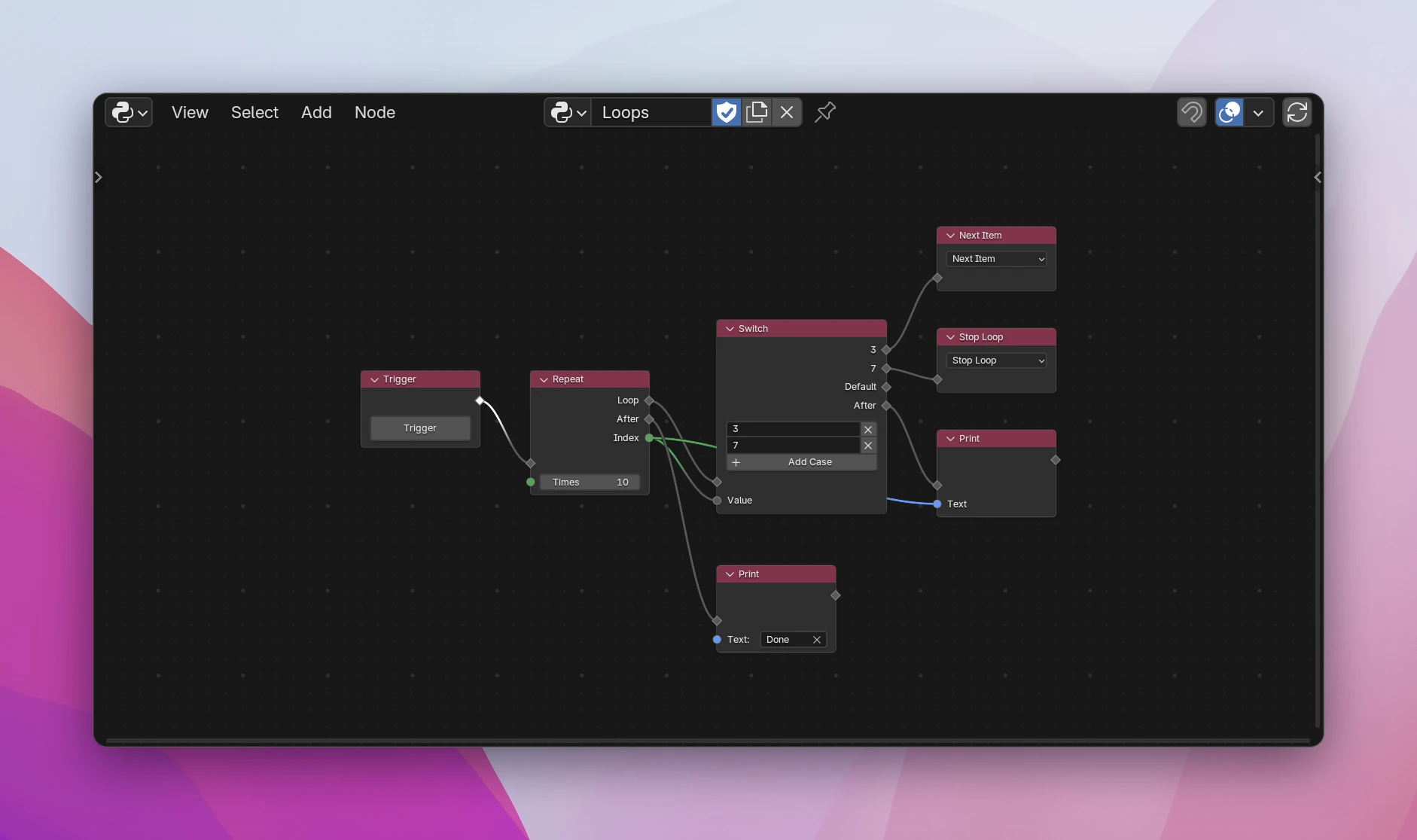
It has no output: nothing after it runs in this run. Put it after an If/Else or a Switch, so it only stops or skips for some runs, as in the screenshot.
It works in Repeat and For Each (List) loops. Outside of a loop, or inside a function called from a loop, it shows the error "Only works inside a loop".
The tree in the screenshot becomes a Python for loop. Index is only given a name when something uses it (_ otherwise):
for index in range(10):
    value = str(index)
    if value == "3":
        continue
    elif value == "7":
        break
    print(str(index))
print("Done")
Stop Loop is Python's break, Next Item is continue.