Local variables
A value that exists for the rest of one flow, like a total counted up in a loop.
A Local Variable creates a variable at its place in a flow. The nodes after it can read and change it until that flow ends. The next time the flow runs (the next click on the button, the next event) it starts again at its Initial Value.
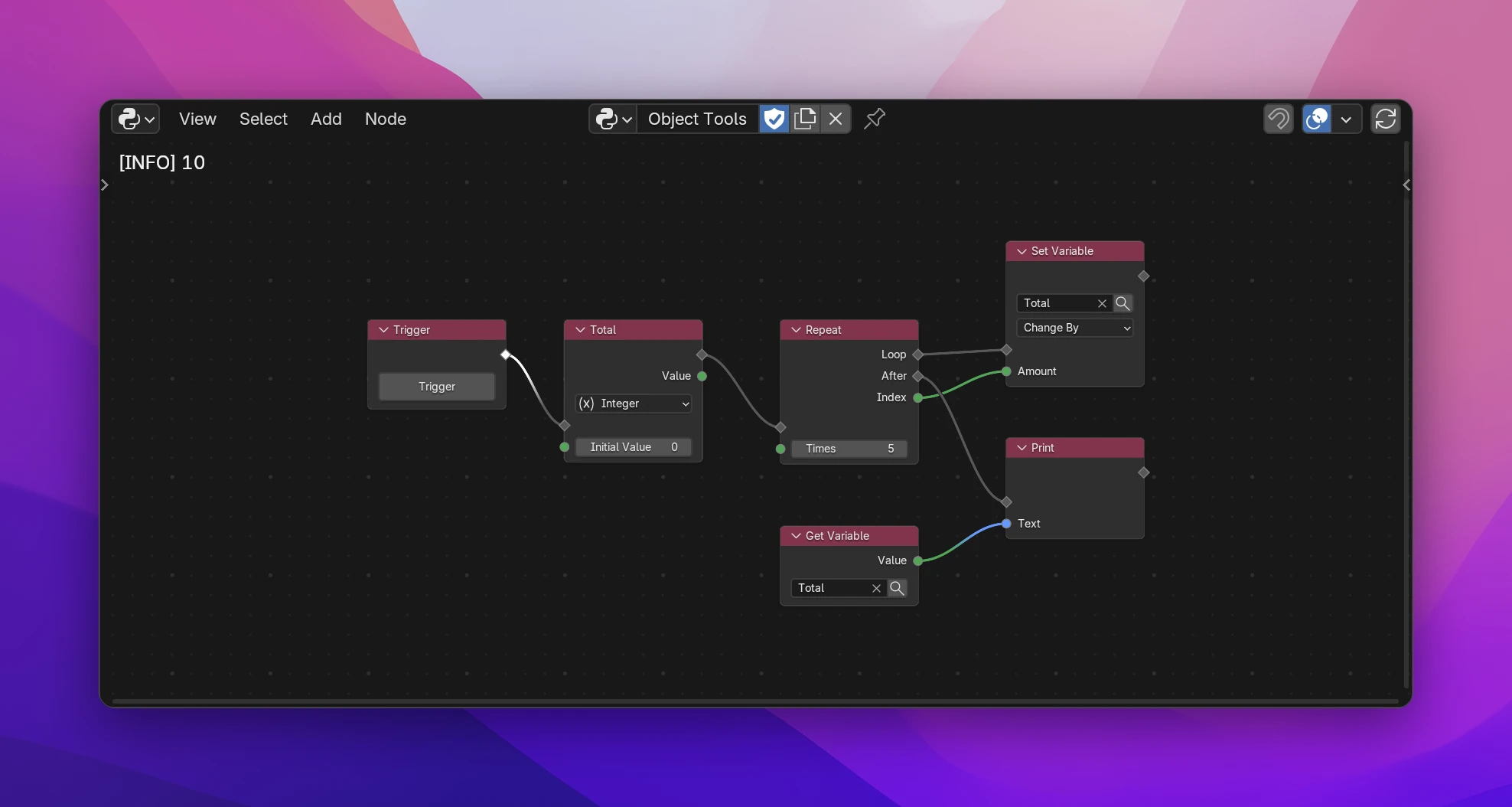
Counting in a loop
Add Add › Variables › Local Variable before the loop, link the flow through it, and set its label to Total (F2, or Label in the sidebar's Node tab).
Pick Integer in the dropdown on the node and leave Initial Value at 0.
Inside the loop, add Set Variable, pick Total in its search field, set it to Change By and connect the loop's Index to Amount.
After the loop, read it with Get Variable (pick Total) or the Local Variable's own Value output, and print it.
The screenshot adds 0 + 1 + 2 + 3 + 4 and prints 10.
The node
| Data type (dropdown) | What the variable holds: Data (anything), Blender Data, String, Boolean, Float, Integer, Vector, Color, List or Icon. Sets the type of the sockets |
| Initial Value (input) | The value it starts with each time the flow passes the node |
| Value (output) | The variable's current value, for the nodes after it in the same flow. After a Set Variable it gives the new value |
| Label | The variable's name, also in the generated code (Total becomes total) |
Where it can be used
A local variable exists from its node to the end of the flow it's in, including the branches and loops after it.
- Get Variable and Set Variable only offer local variables of their own tree. Use a Global Variable to share a value between trees.
- Use it only in nodes after the Local Variable in the same flow. A Get Variable in another operator of the same tree, or before the Local Variable, reads a name that doesn't exist there: Python raises a
NameErrorwhen it runs. - Its Value output follows the same rule; used outside the flow, the node using it shows "isn't available here".
A Local Variable is an assignment in the function the flow runs in, here the Trigger's operator:
def execute(self, context):
    total = 0
    for index in range(5):
        total = total + index
    print(str(total))
    return {"FINISHED"}