Blender Data node
Read any of Blender's data by its path, with outputs of the right type.
The Blender Data node follows a path to some data and outputs what it finds: the active object, a scene's frame rate, all materials of the file, the width of the connected object's Bevel modifier. It has no flow sockets; it's evaluated where its output is used.
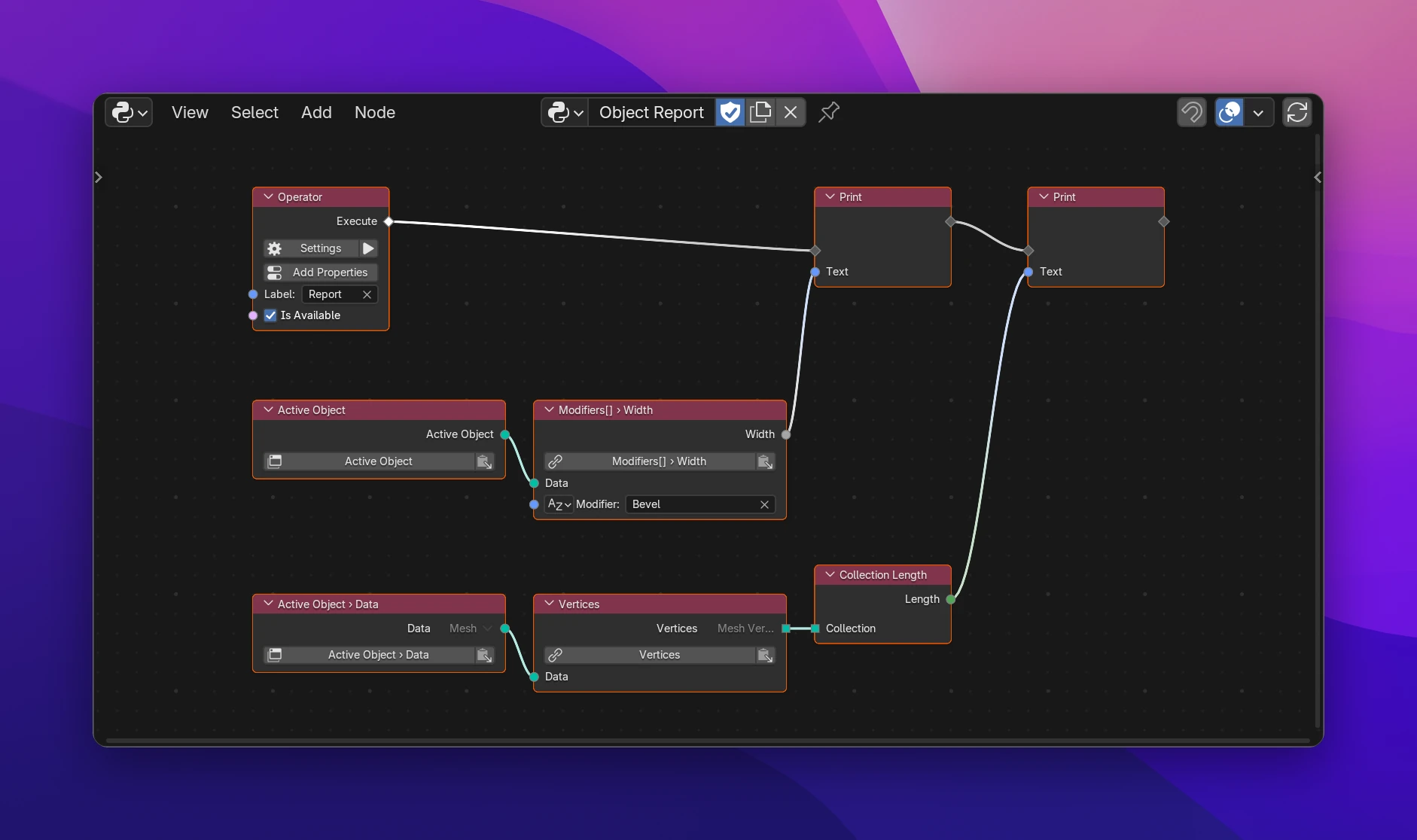
Using it
Add Add › Blender Data › Blender Data, or one of the set-up entries below it (Active Object, Selected Objects, Scene, View Layer, Window Manager, Preferences, Blend File, All Objects).
Click the path button on the node (Pick Data) and pick the path in the browser, then Use Path. Or copy a path from a field in Blender and click the paste button next to it.
Connect the output. It's named after where the path ends (Width, Active Object) and has its type.
To continue from data you have, connect it to a second Blender Data node that starts at Data Input: from an Active Object node, a second node with the path modifiers[] gets the modifiers. Each node shows only the last two steps in its header (Modifiers[] › Width), so chains stay readable.
Sockets
| Socket | |
|---|---|
| Data (input) | The data the path starts at. Only shown when the path starts at Data Input. Unconnected, the arrow next to it picks the type to browse from |
one input per [] | Picks the item of a list: Integer for Index, String for Name, nothing for Active (the icon in front switches) |
| output | The value at the end of the path, named after it: a Float, a Boolean, an Object, a list of Modifiers, ... Named Value while a Data Input path is empty |
When the output's type has subtypes (an object's data can be a Mesh, a Curve, a Camera, ...), the arrow next to it picks the type you expect. Nodes connected to it then offer that type's properties.
Starts
| Start | Code | |
|---|---|---|
| Context | context. | What's current where the code runs. In an operator or panel it's their context, elsewhere bpy.context |
| Blend File | bpy.data. | All data of the file. With an empty path the output is bpy.data itself |
| Data Input | the connected expression | Continues from another node |
Errors
- Search or paste a data path: the path is empty.
- Connect the data the path starts at: the path starts at the Data Input and nothing is connected.
- Object has no 'widht' (under the path button): a step doesn't exist on the data before it. Pick the path again.
- Material Slots has no active item: a
[]is set to Active on a list that has no active item.
When the add-on runs, a path fails if the data isn't there: no active object, no modifier named "Bevel". The error shows on the node. Check first where that can happen, e.g. with Is Object Type (False for None) or a comparison.
The output is the path as an expression, written where it's used:
# Active Object › Modifiers[] (Name: "Bevel") › Width
context.active_object.modifiers['Bevel'].width

# Blend File › Objects[] (Index: 0) › Name
bpy.data.objects[0].name

# Active Object › Vertex Groups[] (Active) › Name
context.active_object.vertex_groups.active.name
Every use of the output writes the path again; nothing is cached. Values from inputs (a key connected to a loop's Index) are put in place of the key.