Menus
Dropdown menus, pie menus, popovers and operator menus.
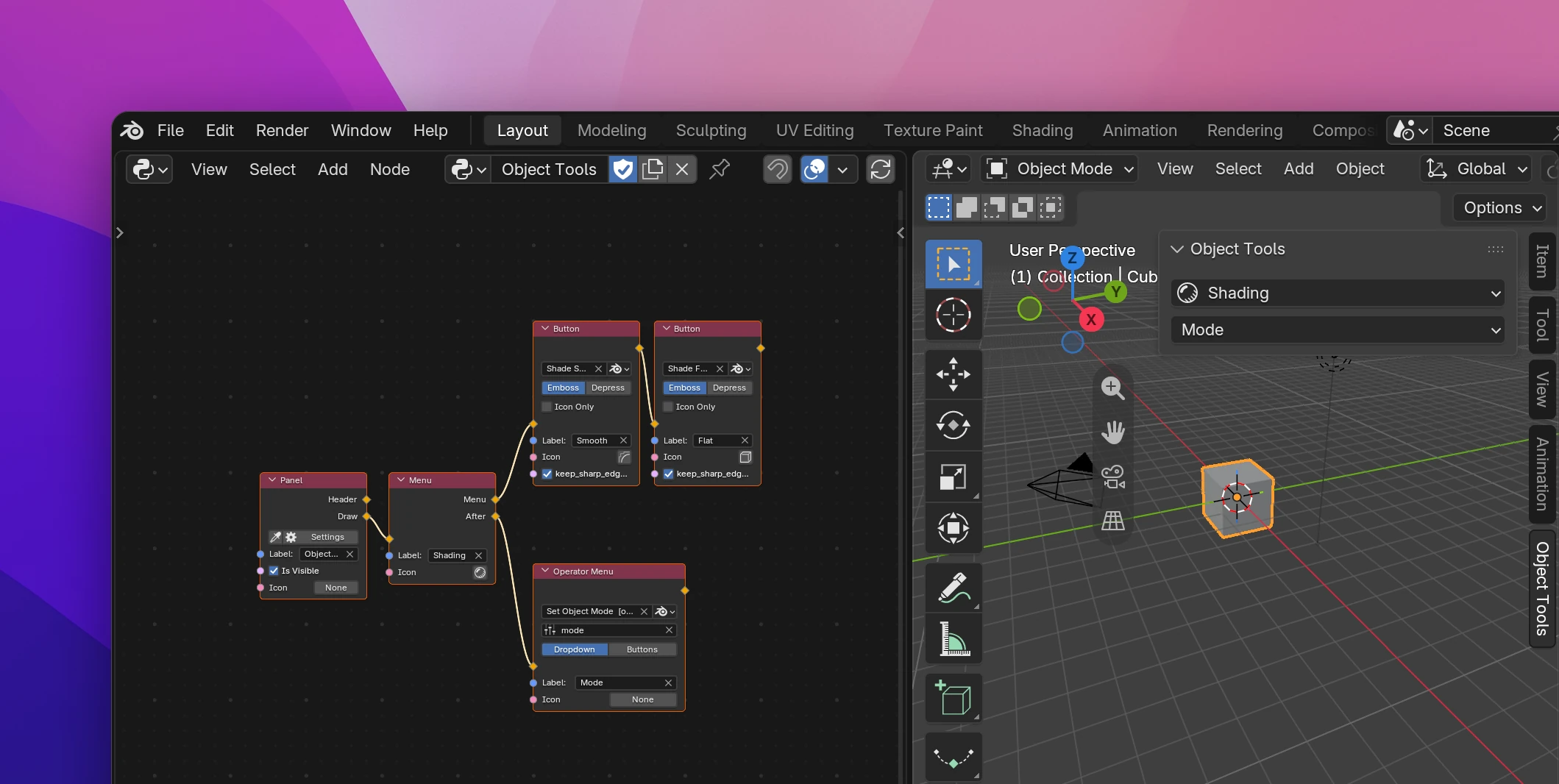
A Menu node draws a dropdown button, and the nodes connected to its Menu output are what the menu shows when it opens. Pie menus open around the mouse with a shortcut, popovers open a panel as a popup.
Your own menus
Add a Menu (Add › Interface › Menu) where the button should be: in a panel, another menu, a header. Then connect the menu's entries to its Menu output, usually Buttons. In a menu, entries are drawn below each other as menu items.
| Socket | |
|---|---|
| Label | The menu's title, and the text on the button (Menu by default) |
| Icon | The button's icon |
| Menu | The menu's contents: buttons, labels, fields, separators, other Menu nodes for submenus |
| After | Continues the layout after the button |
The menu exists even when no flow draws its button, so a Menu node with nothing connected to its input can still be opened by a Shortcut or Open Menu.
Pie menus
A Pie Menu (Add › Interface › Pie Menu) is a menu around the mouse, like the one Blender opens with Z in the 3D Viewport. It doesn't draw a button; open it with a Shortcut set to Open Menu, or with Open Menu.
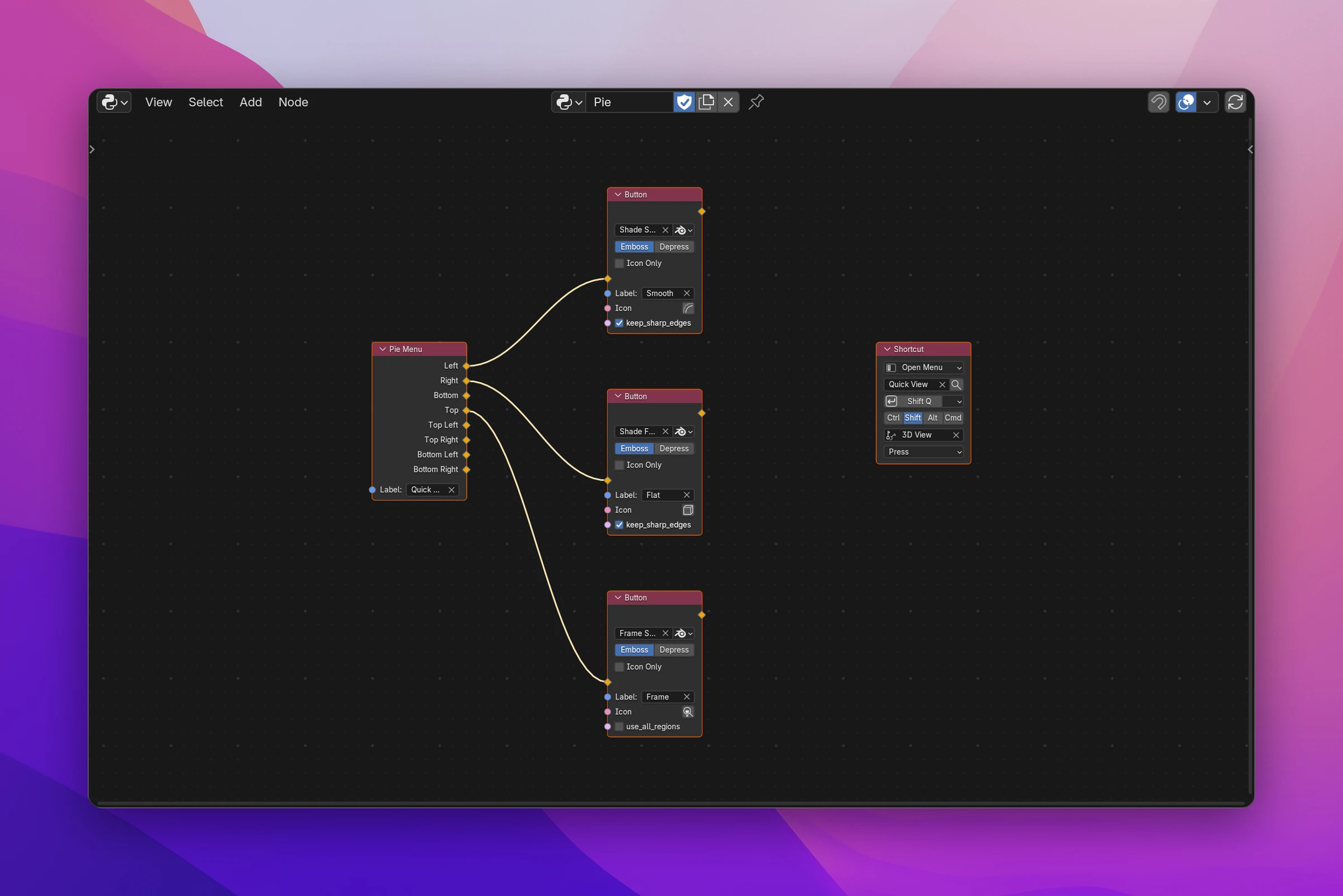
It has one output per direction: Left, Right, Bottom, Top, Top Left, Top Right, Bottom Left, Bottom Right. Connect a button to a direction, or several nodes: each direction draws as a column, so they stack. Directions with nothing connected stay empty. Label is the title shown in the middle.
Opening menus and panels
- A Shortcut set to Open Menu opens a menu, pie menu or panel at the mouse.
- Open Menu (Add › Interface › Open Menu) does the same from a program flow, e.g. at the end of an operator. Pick the Menu, Pie Menu or Panel node in its field.
Popovers
Popover draws a button that opens a panel as a popup, like the shading options in the 3D Viewport's header. Pick a Panel node of your add-on in its field. Label and Icon are the button's text and icon; without a Label it shows the panel's title.
The panel still shows where its Panel node places it. To use a panel only as a popover, set its region to Header in the Panel's Settings › Location.
Operator Menu
Operator Menu draws one entry per item of an operator's Enum property. Blender's Object › Mode menu works like this: it's the object.mode_set operator with one entry per item of its mode property.
- Pick the operator: one of yours, or one of Blender's with the Blender button next to the field.
- Pick the Enum property in the field below (it lists the operator's Enum properties).
- Choose the style: Dropdown is a dropdown button with one entry per item, Buttons a row of buttons, one per item.
With Dropdown, Label and Icon set the dropdown button's text and icon.
Menu Contents
Menu Contents draws the entries of a menu right where it is, instead of a button that opens it. Pick one of your Menu nodes, or switch the button next to the field to Blender and search for one of Blender's menus by name. Use it to repeat a menu's entries in a panel, or to build a menu out of other menus.
To add entries to one of Blender's menus, use Add to Menu instead.
Limitations
- A pie menu has at most eight directions. For more entries, connect a Column with several buttons to one direction, or a Menu for a submenu.
- Open Menu opens at the mouse, so run it from something the user started: an operator run from a button or a shortcut.
A Menu becomes a bpy.types.Menu class, and the button layout.menu():
class OBJECT_TOOLS_MT_shading(bpy.types.Menu):
    bl_label = 'Shading'

    def draw(self, context):
        self.layout.operator('object.shade_smooth', text='Smooth', icon='MOD_SMOOTH')
        self.layout.operator('object.shade_flat', text='Flat', icon='MESH_CUBE')


# in the panel's draw():
self.layout.menu('OBJECT_TOOLS_MT_shading', text='Shading', icon='SHADING_RENDERED')| Node | Python |
|---|---|
| Pie Menu | A bpy.types.Menu class drawing into self.layout.menu_pie(), a column() per used direction and separator() for empty ones before them |
| Open Menu | bpy.ops.wm.call_menu(name=...), wm.call_menu_pie or wm.call_panel |
| Popover | layout.popover('OBJECT_TOOLS_PT_...', text=..., icon=...) |
| Operator Menu | layout.operator_menu_enum('object.mode_set', 'mode', text='Mode') (Dropdown) or layout.operator_enum('object.mode_set', 'mode') (Buttons) |
| Menu Contents | layout.menu_contents('VIEW3D_MT_object') |