Text and links
Show labels, wrapped text, markdown and links in your interface.
A Label draws one line of text. For longer text, a Multiline Label wraps it to the width of the panel, and Markdown adds headers, lists and bold text. A Link opens a web page.
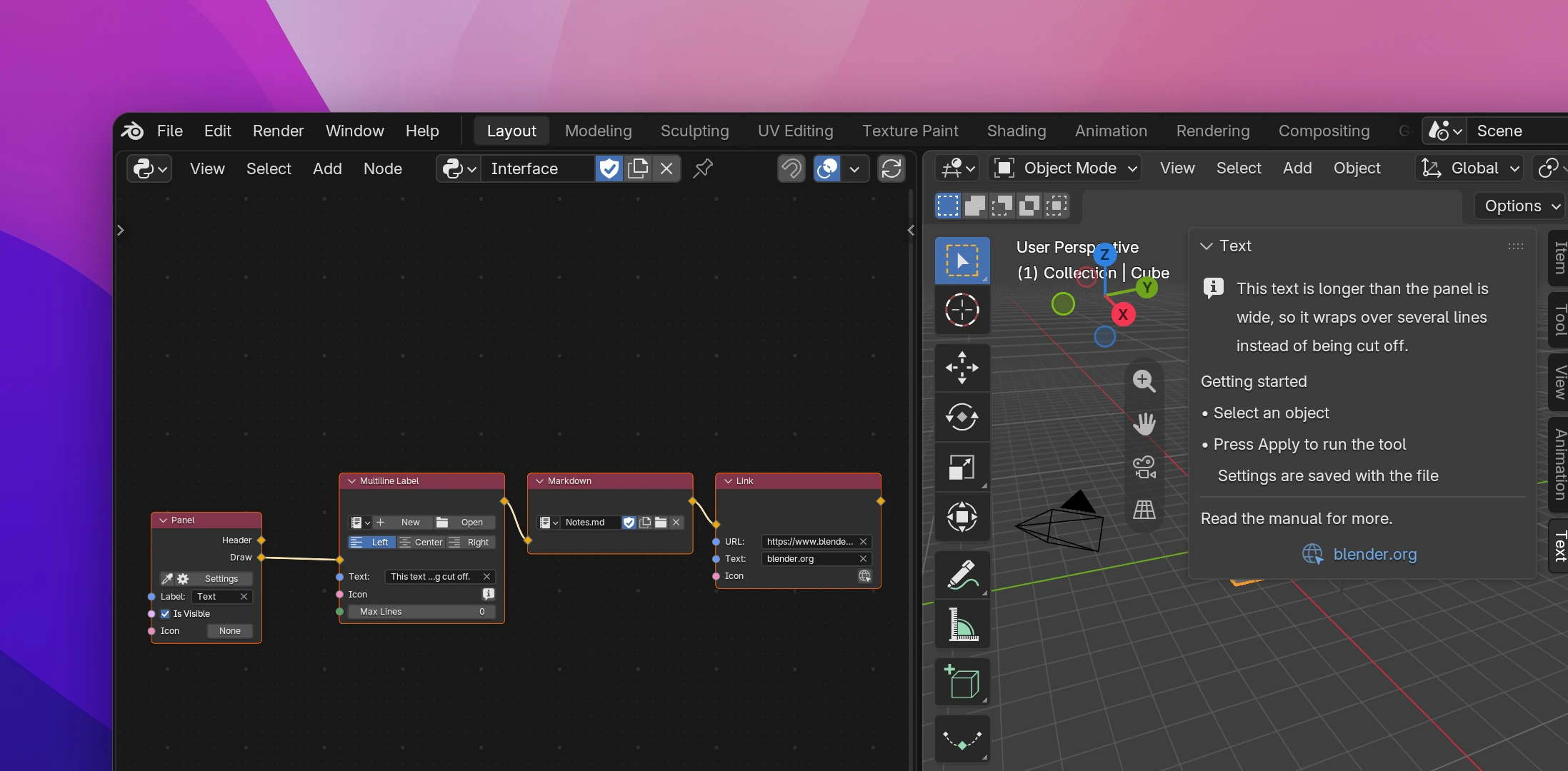
Text nodes
| Node | Inputs and settings |
|---|---|
| Label | Label is the text, Icon an icon in front of it. One line; text longer than the panel is cut off |
| Multiline Label | Text, Icon in front of the first line, Max Lines cuts the text off after that many lines (0 shows all). The buttons on the node align it Left, Center or Right |
| Markdown | Text in markdown: headers (#), lists (-), **bold**, *italic*, `code`, links ([text](url)), quotes (>) and rules (---) |
| Link | URL is the page it opens (https://www.blender.org by default), Text what it shows (empty shows the URL), Icon an icon in front |
A label's text can come from other nodes: connect a Combine Strings to show a count, or a Blender Data node to show the active object's name.
Text over several lines
A text socket holds one line. For Multiline Label and Markdown, pick a text data-block on the node instead (New or Open, the same as in the Text Editor) and write the text in the Text Editor. The Text input goes away while a text is picked, and the add-on rebuilds while you type.
The text is copied into the add-on's code when it's built, so the add-on works without the text data-block.
Older Blender versions
Blender added these to its interface recently: links in 5.2, multiline labels and markdown after that. On a Blender without them, your add-on draws a simpler version:
- Link draws a button that opens the URL.
- Multiline Label draws one label per line, wrapped by an estimate of the panel's width.
- Markdown draws plain labels: list items get a bullet, and headers, bold, italic, code and link markers are removed. Links can't be clicked.
Label is layout.label():
self.layout.label(text="Select an object", icon="INFO")The other three call helpers in the add-on's utils.py that use Blender's own functions where they exist and draw the simpler version otherwise:
label_multiline(self.layout, "This text is longer...", max_lines=3, icon="INFO")
label_markdown(self.layout, "## Getting started\n- Select an object")
link(self.layout, "https://www.blender.org", text="blender.org", icon="URL")
label_multiline calls layout.label_multiline(), label_markdown calls layout.label_markdown() and link calls layout.link(). Before Blender 5.2, link draws a wm.url_open button.