Preferences
Settings of your add-on that users set once in Preferences › Add-ons.
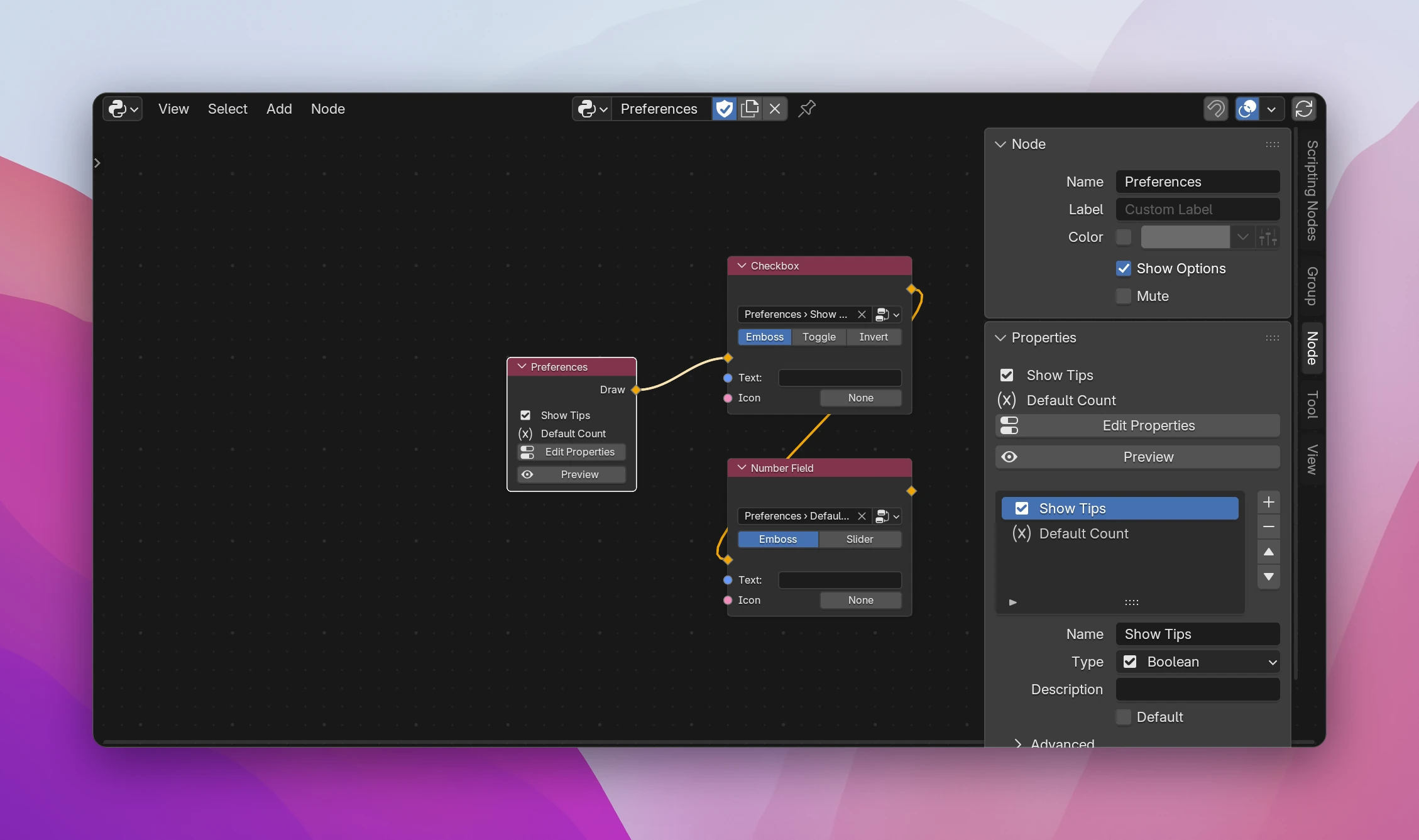
A Preferences node (Add › Interface › Preferences) gives your add-on its own settings in Preferences › Add-ons, below the add-on's name. Use them for things a user sets once and keeps across files: a default size, an API key, whether to show tips. Unlike add-on properties, which are stored in the .blend file, preferences are saved with Blender's user preferences.
Using it
Add a Preferences node. Click Add Properties on it (or open the sidebar's Node tab with the node selected) and add the settings, e.g. a Boolean Show Tips. The property list and its settings work like the add-on's own properties.
Connect fields to Draw to lay out the preferences page: a Checkbox picking Show Tips, a Number Field for a count. Labels, layouts and buttons work like in a panel.
Click Preview on the node to see the page in a popup.
Reading preferences
The preference properties can be picked anywhere a property can: Get Property and Set Property, fields in panels and dialogs. Leave their Data input empty; they read from the add-on's preferences, context.preferences.addons[__package__].preferences in the generated code.
KeyError. It works in the exported, installed add-on, so test those parts there.Preview
While you build the add-on in Scripting Nodes, it doesn't appear in Blender's add-on list, so Preferences › Add-ons can't show its page. Preview draws the page in a popup instead. The fields in the preview work, but their values are the preview's own and aren't saved. The real page shows up once the add-on is exported and installed.
If the add-on has an error, Preview reports that it isn't running; fix the error shown on the node first.
Limitations
- One Preferences node per add-on. Blender allows one preferences class per add-on, and a second one fails to register.
- The values only persist when the user saves their preferences (Blender does that on its own when Auto-Save Preferences is on).
class OBJECT_TOOLS_AP_preferences(bpy.types.AddonPreferences):
    bl_idname = __package__
    show_tips: bpy.props.BoolProperty(name='Show Tips')
    default_count: bpy.props.IntProperty(name='Default Count', default=5)

    def draw(self, context):
        self.layout.prop(self, 'show_tips')
        self.layout.prop(self, 'default_count')
Inside draw(), the fields use self, the preferences themselves. Everywhere else, they're read from context.preferences.addons[__package__].preferences.