Viewport Draw
Draw your own graphics into the 3D Viewport and other editors.
A Viewport Draw node runs its Draw flow every time an editor redraws. Connect Draw nodes to that flow and they appear in the editor, in every editor of that type, for as long as the add-on is enabled.
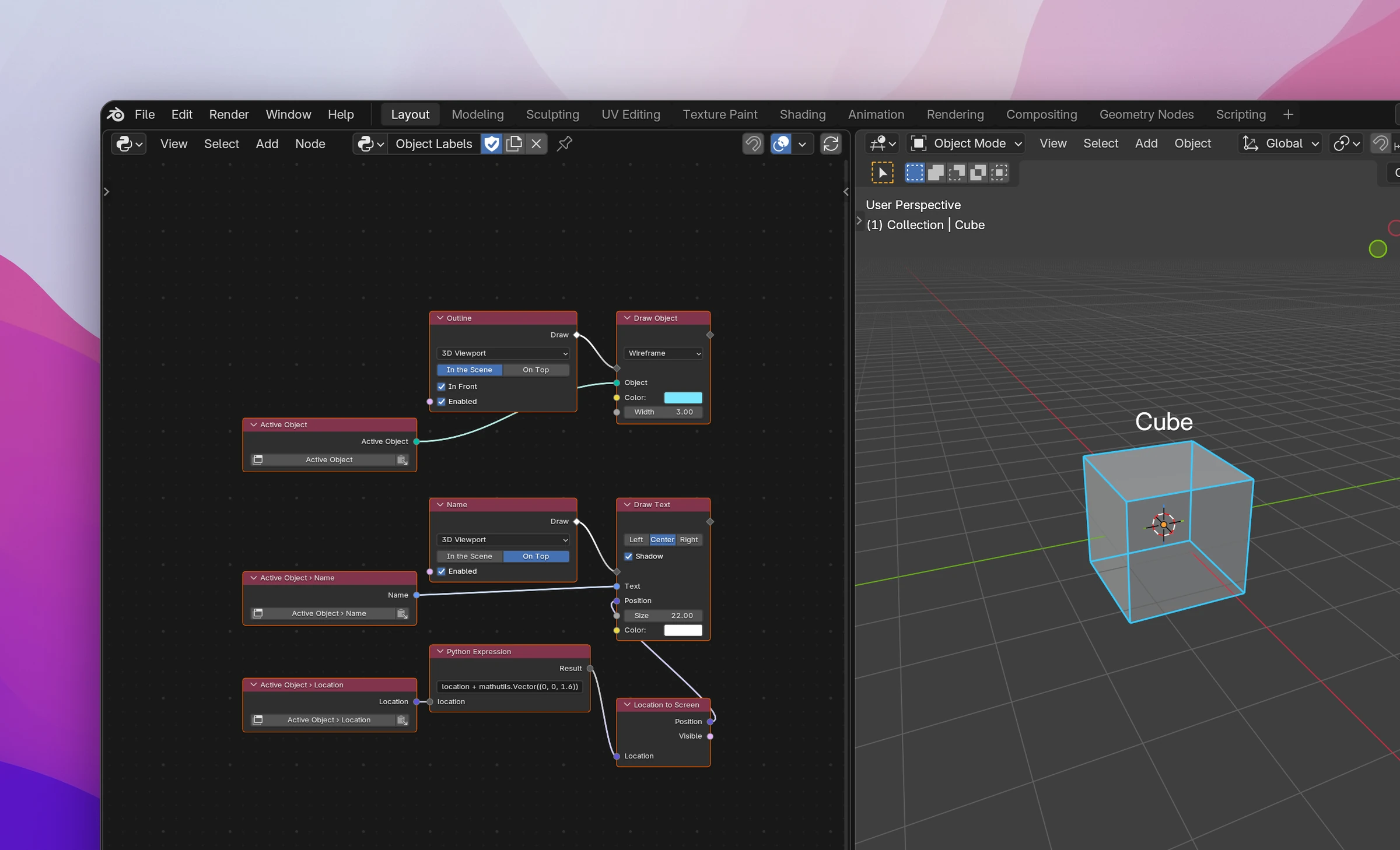
Drawing in the 3D Viewport
The example above has two Viewport Draw nodes, because it draws in two ways:
Outline draws In the Scene: points are 3D locations, like the object's vertices. Add a Viewport Draw (Add › Drawing), keep 3D Viewport and In the Scene, and turn on In Front so the lines show through the object.
Connect a Draw Object to its Draw output. Its Object is a Blender Data node with the path active_object. Pick a Color and set Width to 3.
Name draws On Top: positions are pixels of the editor, from its bottom left corner. Add a second Viewport Draw, set it to On Top, and connect a Draw Text with Center alignment and Shadow.
The text goes where the object is on the screen. active_object.location goes through a Python Expression (location + mathutils.Vector((0, 0, 1.6)), a point above the object) into Location to Screen, whose Position is the text's Position. The text's Text is active_object.name.
Select another object and the outline and name follow it: the viewport redraws when the selection changes, and the flow runs again with the new active object.
Settings
| Setting | |
|---|---|
| Editor | 3D Viewport, Image Editor, Node Editor, Video Sequencer or Movie Clip Editor. The flow draws in every open editor of this type |
| In the Scene | Draws in the editor's own space: 3D locations in Blender units in the 3D Viewport, hidden behind objects that are in front of them |
| On Top | Draws in pixels of the editor, from its bottom left corner, on top of everything |
| In Front | Only for In the Scene in the 3D Viewport: draws in front of objects instead of being hidden by them |
| Enabled (input) | When it's off, nothing is drawn. Connect a Boolean property to let users turn the drawing on and off |
Which Draw nodes fit which mode:
| In the Scene | On Top | |
|---|---|---|
| Draw Lines, Draw Points, Draw Polygon | 3D locations | 2D pixel positions |
| Draw Circle | Center and radius in Blender units, facing Normal | Center and radius in pixels |
| Draw Object | Yes | No, its vertices are 3D locations |
| Draw Text, Draw Rectangle, Draw Image | No, they're made for pixels | Yes |
Keeping it up to date
The flow runs whenever the editor redraws. Blender redraws the 3D Viewport when you move the view, select, or change objects, so a drawing based on the scene follows along without help.
Blender doesn't redraw for things it doesn't watch: a value changed by a timer, a variable, an add-on property shown only in a panel of another editor. After changing those, run a Redraw node with Editors set to 3D Viewport (or the editor you draw in). See Interface.
Limitations
- The flow runs on every redraw, many times a second while the user orbits the view. Keep it light: no file reading, no loops over every object of a big scene.
- Draw nodes only draw inside the flow of a Viewport Draw. In an operator or a panel they do nothing useful.
- An error in the flow happens on every redraw. A path like
active_object.namefails when nothing is active; put an If/Else in front of the Draw nodes, with a condition like the Python Expressionobj is not None. - Drawing is visual only. Users can't click what you draw; for that, combine it with a modal operator that reads the mouse.
Each Viewport Draw becomes a function named after its label, added as a draw handler of the editor's space type when the add-on registers (SpaceView3D.draw_handler_add), and removed when it's disabled. In the Scene is the POST_VIEW draw type, On Top is POST_PIXEL.
def draw_outline():
    gpu.state.blend_set("ALPHA")
    utils.draw_object(
        bpy.context.active_object,
        color=(0.20000000298023224, 0.800000011920929, 1.0, 1.0),
        width=3.0,
    )
    gpu.state.blend_set("NONE")


def draw_name():
    gpu.state.blend_set("ALPHA")
    utils.draw_text(
        bpy.context.active_object.name,
        view3d_utils.location_3d_to_region_2d(
            bpy.context.region,
            bpy.context.region_data,
            (
                lambda _sn_v: _sn_v
                if hasattr(_sn_v, "__getitem__") and len(_sn_v) >= 3
                else (0.0, 0.0, 0.0)
            )(bpy.context.active_object.location + mathutils.Vector((0, 0, 1.6))),
        )
        or (0.0, 0.0),
        size=22.0,
        align="CENTER",
        shadow=True,
    )
    gpu.state.blend_set("NONE")


def register():
    utils.add_draw_handler(bpy.types.SpaceView3D, draw_outline, "POST_VIEW")
    utils.add_draw_handler(bpy.types.SpaceView3D, draw_name, "POST_PIXEL")
The lambda turns the Python Expression's result (a Data value) into a vector for Location, (0.0, 0.0, 0.0) if it isn't one. Location to Screen gives None for a location behind the view, so its Position falls back to (0.0, 0.0).
Without In Front, drawing In the Scene in the 3D Viewport turns on the depth test (gpu.state.depth_test_set("LESS_EQUAL")) and turns it off again at the end. An Enabled input that isn't left on adds if not <enabled>: return at the start.
The Draw nodes call small functions written into the add-on's utils.py, built on Blender's gpu module (gpu_extras.batch.batch_for_shader with the built-in POLYLINE_UNIFORM_COLOR, POINT_UNIFORM_COLOR, UNIFORM_COLOR and IMAGE_COLOR shaders) and blf for text. Only the functions your nodes use are written.