Blend files
Append or link materials, objects and node groups from other .blend files.
Add-ons often come with a library: materials, node groups, a rig, brushes. Keep them in a .blend file, ship it with the add-on as an asset, and load what the user needs with Load from Blend File. Blend File Contents lists what's in a file without loading it.
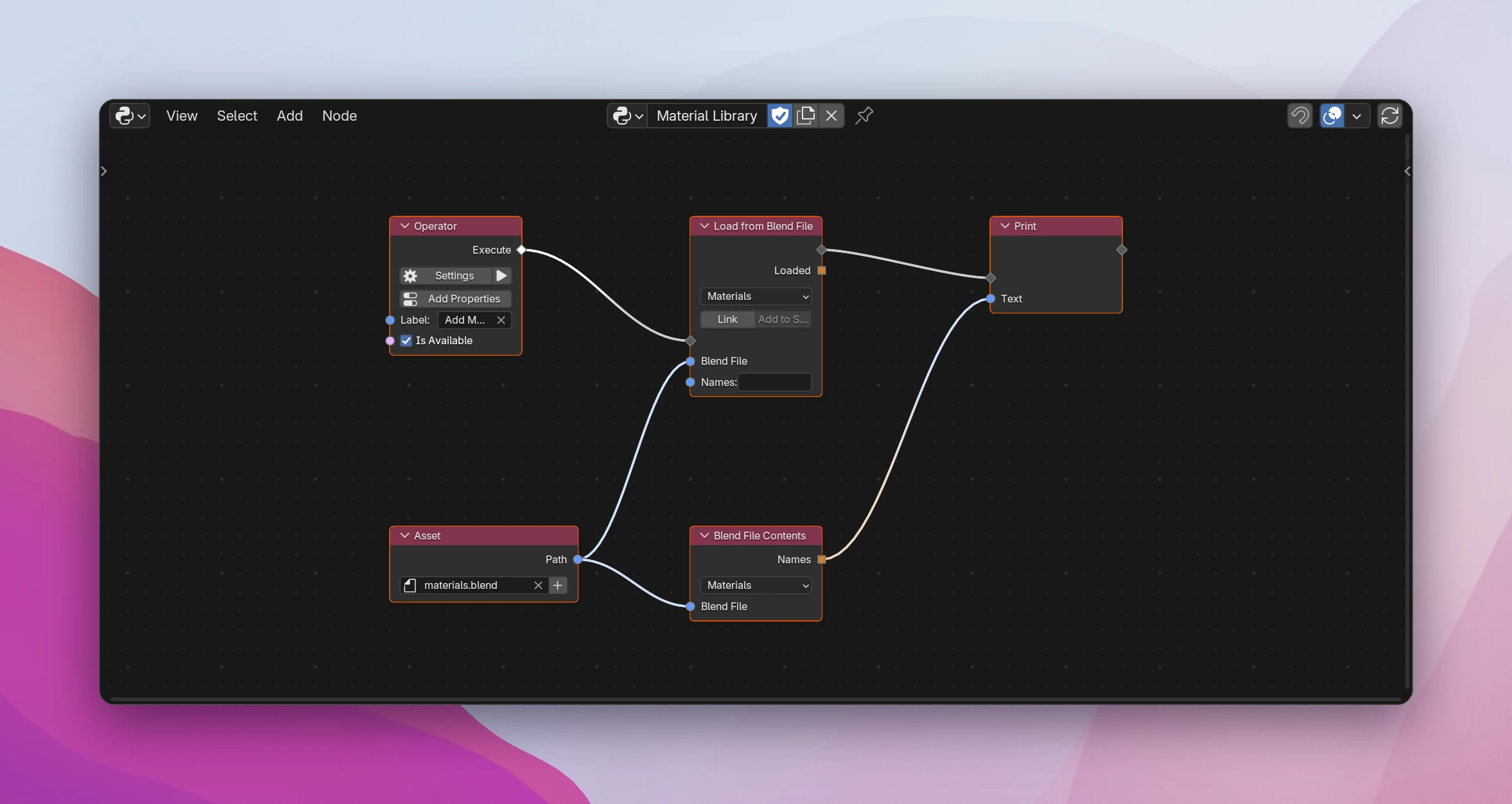
Shipping a material library
Save your materials in a .blend file. Give each one a fake user (the shield in the material list), or Blender drops unused materials when it saves.
Add the file in the sidebar under Addon Data › Assets. An Asset node picking it gives its Path in the installed add-on.
In an Operator, connect Execute to a Load from Blend File, set its type to Materials and connect the Asset's Path to Blend File. With Names empty, it appends every material of the file.
Above, Print shows what Blend File Contents lists: ['Brass', 'Oak', 'Rubber'].
Load from Blend File
Appends (or links) data from a .blend file, in a flow.
| Type | What to load: Objects, Collections, Materials, Node Groups, Meshes, Worlds, Images, Texts, Actions, Brushes, Cameras, Lights, Curves, Fonts, Grease Pencils, Palettes, Scenes, Textures or Armatures |
| Link | Link instead of append: the data stays in the other file and can't be edited, and changes to that file show up when the user's file is opened again |
| Add to Scene | Only for Objects and Collections: puts what was loaded into the scene's main collection. Without it, loaded objects exist in the file but aren't in any scene |
| Blend File (input) | The path of the .blend file |
| Names (input) | The name of one data-block. Empty: everything of the type. A name the file doesn't have loads nothing. For a few named data-blocks, use one node per name |
| Loaded | A list of the data-blocks that were loaded, e.g. to assign the first material to the active object |
Appending something twice makes a second copy, named with .001. To load a material only once, check first whether it's there, for example with a Python Expression name in bpy.data.materials.
Blend File Contents
The names of everything of the chosen Type in Blend File, sorted, without loading anything. A file that doesn't exist gives an empty list. Use it to offer a choice: show the names in a panel, or let users pick one in an enum and load only that one with Names.
Limitations
- Loading from a file that doesn't exist, or isn't a .blend, stops the flow with an error on the node.
- Loaded only lists the data-blocks of the chosen type. Materials of appended objects come along, but aren't in the list.
- The Type list covers the common data. For other types, call
bpy.data.libraries.loadin a Python Statement or a script.
class MY_ADDON_OT_add_materials(bpy.types.Operator):
    bl_idname = "my_addon.add_materials"
    bl_label = "Add Materials"
    bl_options = {"REGISTER", "UNDO"}

    def execute(self, context):
        loaded = utils.load_blend(
            os.path.join(os.path.dirname(__file__), "assets", "materials.blend"),
            "materials",
            "",
        )
        print(
            str(
                utils.blend_contents(
                    os.path.join(os.path.dirname(__file__), "assets", "materials.blend"),
                    "materials",
                )
            )
        )
        return {"FINISHED"}
utils.load_blend(path, data_type, names, link=False, add_to_scene=False) and utils.blend_contents(path, data_type) are written into the add-on's utils.py. Both use bpy.data.libraries.load; Load from Blend File assigns the wanted names to data_to.<type> inside it.