Text files and folders
Read and write text files, list folders and work with paths.
The file nodes take a path as text. A path starting with // is relative to the folder of the open .blend file, like Blender's own paths: //selection.txt is a file next to the .blend.
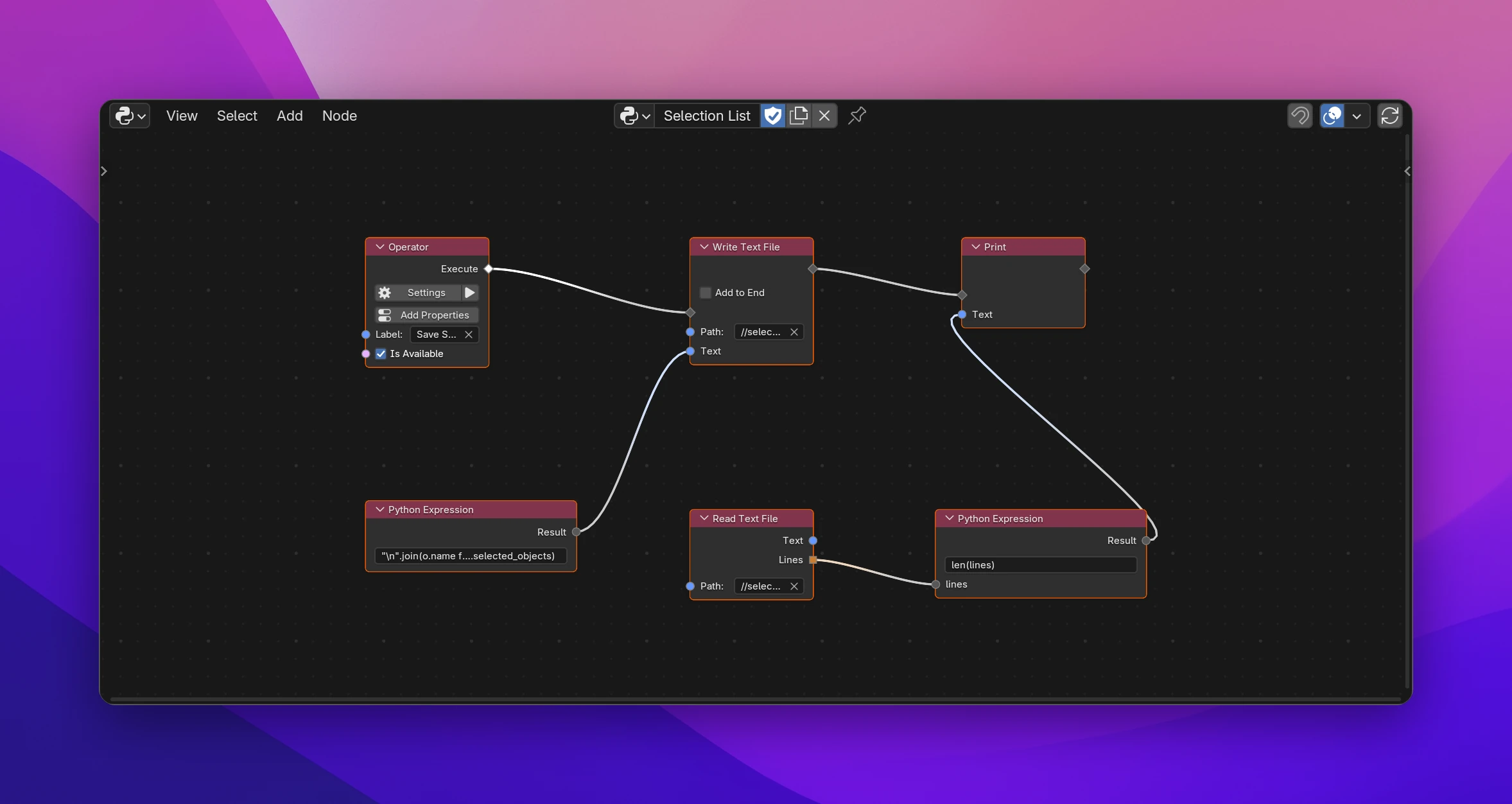
Saving and reading a file
The example above is an operator, Save Selection:
An Operator's Execute flow runs Write Text File with Path //selection.txt.
Its Text comes from a Python Expression: "\n".join(o.name for o in context.selected_objects), the names of the selected objects, one per line.
After writing, Print shows how many lines the file has: Read Text File's Lines go into a Python Expression len(lines).
Save the .blend first: in an unsaved file, // paths have no folder to start from.
Read Text File
| Path (input) | The file to read |
| Text | All of its text. A file that doesn't exist reads as empty text "" |
| Lines | The text split into a list of lines, without the line breaks |
The file is read as UTF-8 every time one of the outputs is used. Using both Text and Lines reads it twice; store the text in a variable if the file is big.
Write Text File
Writes Text into the file at Path, in a flow.
| Add to End | Off: replace what the file had. On: keep it and add Text at the end |
| Path | The file. Folders on the way that don't exist are created |
| Text | What to write. Numbers and other values are turned into text. No line break is added, so with Add to End, end the text with \n to write one line per run |
Create Folder
Creates the folder at Path, and any folders above it that are missing, in a flow. A folder that exists already is left as it is.
List Folder
The contents of Folder as a list, sorted by name.
| List | Files, Folders, or Files and Folders |
| Full Paths | On (default): full paths, ready for Read Text File or Load from Blend File. Off: only the names |
| Folder (input) | The folder to list. One that doesn't exist gives an empty list |
| Extension (input) | Only files whose names end in it, like .png (upper or lower case doesn't matter). Empty: all files. Not used for Folders; folders are never filtered |
| Paths | The list |
Combine it with a loop to do something with every file, or with Blend File Contents to look into every .blend of a folder.
Join Path
Joins a folder and names into one path with the separator of the system (/ on macOS and Linux, \ on Windows). The first Path is the folder; connecting the last Path input adds another one, for more parts.
Write the parts without separators: Path //exports and Path scene.txt give //exports/scene.txt. A part that starts with / starts a new path from the root and drops the parts before it, as Python's os.path.join does.
Path Info
The parts of Path, after turning a // path into a full one.
| Output | For //renders/shot_010.png next to /projects/film.blend |
|---|---|
| Full Path | /projects/renders/shot_010.png |
| Folder | /projects/renders |
| File Name | shot_010.png |
| Name | shot_010 |
| Extension | .png |
| Exists | Whether there's a file or folder at the path |
| Is File | Whether it's a file |
| Is Folder | Whether it's a folder |
Asset
An Asset's Path is where a file or folder your add-on ships with is, once the add-on is installed. Add the file in the sidebar under Addon Data › Assets, then pick it in the node's field; + next to the field opens a file browser, adds the file (or, with Whole Folder, the folder) as an asset and picks it. The Assets page explains how assets are copied into the add-on.
Use the Path wherever a file node takes one: Load from Blend File for a .blend of materials, Read Text File for presets, Join Path to get a file inside an asset folder. The node shows an error when no asset is picked, when its asset was removed, or when the asset's source file is missing.
Don't write into this path. The add-on's folder is replaced when users update it, and the Extensions platform rejects add-ons that write there. Write user files next to the .blend or into bpy.utils.extension_path_user(__package__, create=True) (a Python Expression).
Permissions
Add-ons on the Extensions platform tell users what they do outside of Blender. Every file node except Join Path and Asset adds the files permission to your add-on. The add-on settings show it as Used by nodes; write a reason there, like Saves reports next to the blend file.
Limitations
- Text files only: no binary files. Files are read and written as UTF-8.
- No deleting, copying or moving files. Use a Python Statement (
os.remove(path),shutil.copy(source, target)); the files permission then has to be turned on by hand. - Errors stop the flow: writing to a folder without write access, or a path that is a folder, shows the error on the node.
The example's operator:
class MY_ADDON_OT_save_selection(bpy.types.Operator):
    bl_idname = "my_addon.save_selection"
    bl_label = "Save Selection"
    bl_options = {"REGISTER", "UNDO"}

    def execute(self, context):
        utils.write_text(
            "//selection.txt", "\n".join((o.name for o in context.selected_objects))
        )
        print(utils.as_text(len(utils.read_text("//selection.txt").splitlines())))
        return {"FINISHED"}
Read Text File, Write Text File and List Folder call small functions written into the add-on's utils.py (read_text, write_text, list_folder), which turn // paths into full ones with bpy.path.abspath. The other nodes write the Python in place:
| Node | Code |
|---|---|
| Create Folder | os.makedirs(bpy.path.abspath(path), exist_ok=True) |
| Join Path | os.path.join(path, part, ...) |
| Path Info | os.path.dirname(...), os.path.basename(...), os.path.splitext(...), os.path.exists(...), os.path.isfile(...), os.path.isdir(...) of bpy.path.abspath(path) |
| Asset | os.path.join(os.path.dirname(__file__), "assets", "materials.blend"), with the add-on's folder for trees in subfolders |