Numbers
Calculate, round, clamp and map numbers, convert angles and pick random values.
Math adds, subtracts, multiplies or divides two numbers. The other nodes on this page round and limit numbers, map them from one range to another, convert angles and make random values. Connect any number to them: a property, a frame number, a Python result.
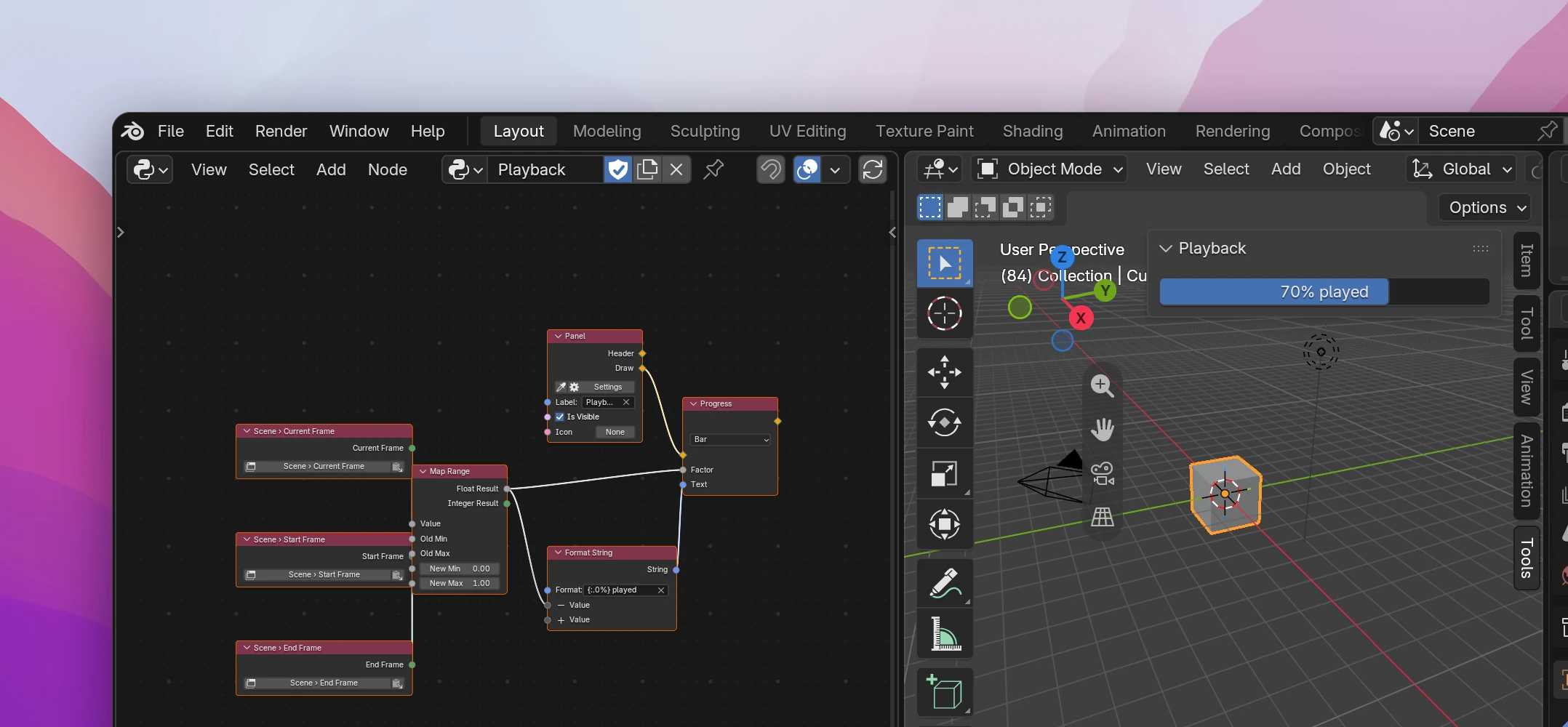
The screenshot maps the current frame (84 of 1 to 120) to a factor from 0 to 1 for a Progress bar. Format String with {:.0%} shows the same factor as 70% played.
Math
Math calculates with A and B. Pick the operation in the dropdown on the node:
| Operation | Result | Example |
|---|---|---|
| Add | A + B | 7 + 2 = 9 |
| Subtract | A − B | 7 − 2 = 5 |
| Multiply | A × B | 7 × 2 = 14 |
| Divide | A ÷ B | 7 ÷ 2 = 3.5 |
| Power | A to the power of B | 7² = 49 |
| Modulo | The rest of A ÷ B | 7 mod 2 = 1. Use it for "every second item": index mod 2 is 0 for even numbers |
It has two outputs:
- Float Result: the result as calculated.
- Integer Result: the result as a whole number, with the decimals cut off: 3.5 gives 3, -3.5 gives -3. To round to the nearest number instead, use Round Float.
Integer inputs stay integers: 7 + 2 is 9, not 9.0, unless you Divide.
Rounding and limiting
Round Float rounds Float to Decimals decimal places (0 by default: a whole number, still a Float). Pick how in the dropdown:
- Nearest (default): to the closest value. Exact halves go to the even number, Python's way: 2.5 gives 2, 3.5 gives 4.
- Up: always up. 2.01 gives 3.
- Down: always down. 2.99 gives 2.
Negative Decimals round to tens, hundreds: 1234 with -2 gives 1200.
Clamp keeps Value between Min and Max: below Min gives Min, above Max gives Max, everything else stays. All three are 0 when you add the node, so set Max first. It has a Float Result and an Integer Result like Math.
Map Range
Map Range takes Value from the range Old Min to Old Max and gives the same position in the range New Min to New Max. With the defaults (0 to 1 → 0 to 10), 0.5 gives 5.
Use it to turn one scale into another: a frame number into a factor from 0 to 1, a factor into a size, a mouse position into an angle. Swap New Min and New Max to invert: 0 to 1 → 1 to 0.
The result isn't limited to the new range: a value beyond Old Max gives a result beyond New Max. Put a Clamp after it to keep it inside. It has a Float Result and an Integer Result like Math.
Angles
Blender stores angles in radians, and shows them in degrees. A rotation of 90° is 1.5708 in Python (π / 2). Convert Angle converts an Angle:
- Degrees to Radians: 180 gives 3.14159. Use it before setting a rotation.
- Radians to Degrees: 3.14159 gives 180. Use it to show a rotation as degrees in a label.
Random Value
Random Value gives a random value of the type picked in the dropdown:
| Type | Inputs | Output |
|---|---|---|
| Float | Min (0), Max (1) | Value: a decimal number between them |
| Integer | Min (0), Max (100) | Value: a whole number between them, both included |
| Boolean | Probability (0.5) | Value: True with this probability. 0.1 is True in about one of ten times |
| Vector | Min (0), Max (1) | Vector: three numbers, each random between Min and Max |
| Color | Color: a random RGB color |
The value is new every time it's used. A Random Value connected to two inputs gives two different values. To use the same random value twice, store it in a variable first.
Limitations
- Divide or Modulo by 0 raises an error when the add-on runs, as does Map Range with Old Min equal to Old Max. Check the divisor with Compare first when it can be 0.
- Power of a negative number with a fraction (−8 to the 1/3) gives a complex number, which nothing else in Blender accepts.
- Float results can be off by tiny amounts: 0.1 + 0.2 gives 0.30000000000000004. Round them before showing them, or use Format String with
{:.2f}. - Random values come from Python's
randommodule, without a seed: every run is different. For repeatable results, set a seed with a Python Statementrandom.seed(1)before.
The progress bar in the screenshot. The Map Range expression is written twice, once for each use:
def draw(self, context):
    self.layout.progress(
        factor=(context.scene.frame_current - context.scene.frame_start)
        * (1.0 - 0.0)
        / (context.scene.frame_end - context.scene.frame_start)
        + 0.0,
        text=f"{(context.scene.frame_current - context.scene.frame_start) * (1.0 - 0.0) / (context.scene.frame_end - context.scene.frame_start) + 0.0:.0%} played",
)| Node | Python |
|---|---|
| Math | a + b, a - b, a * b, a / b, a ** b, a % b; Integer Result int(a / b) |
| Round Float | round(value, decimals); Up / Down: math.ceil(value * (10 ** decimals)) / (10 ** decimals), math.floor(...) |
| Clamp | max(low, min(high, value)) |
| Map Range | (value - old_min) * (new_max - new_min) / (old_max - old_min) + new_min |
| Convert Angle | math.radians(angle), math.degrees(angle) |
| Random Value | random.uniform(min, max), random.randint(min, max), random.random() < probability, a tuple of three random.uniform() or random.random() |